Guide · Prospecting
How to find local businesses with no website
A firm with no website has no agency, no budget to defend and no gatekeeper. Here are four ways to find them, and what each one costs you.
Four methods comparedA free manual SOPReal rates by country and trade
Why no website is the strongest signal in local sales
Most cold outreach fails for a dull reason. You pitch people who already bought.
A local firm with a website has someone behind it. An agency, a cousin, a booking platform, a template someone paid for once. That person owns the job you want.
A firm with no website has told you three things at once. It has no agency. It has no budget line to defend. And the owner decides, because there is nobody else to ask.
- No incumbent to displace. You are the first call, not the fourth.
- No brand team and no sign-off chain. One person says yes or no.
- The pain is visible. They can see the gap on their own phone.
- The pitch writes itself. You show them what a customer sees today.
- They care about price. They also move fast once a rival outranks them.
That last point is the one people miss. A small firm cannot be talked into a website. It can be shown one, and then it moves in days.
The flip side is real, so say it out loud. A firm with no website may have no budget either. Some chose the gap on purpose, because word of mouth fills the diary. Qualify before you pitch, and start with the review count.
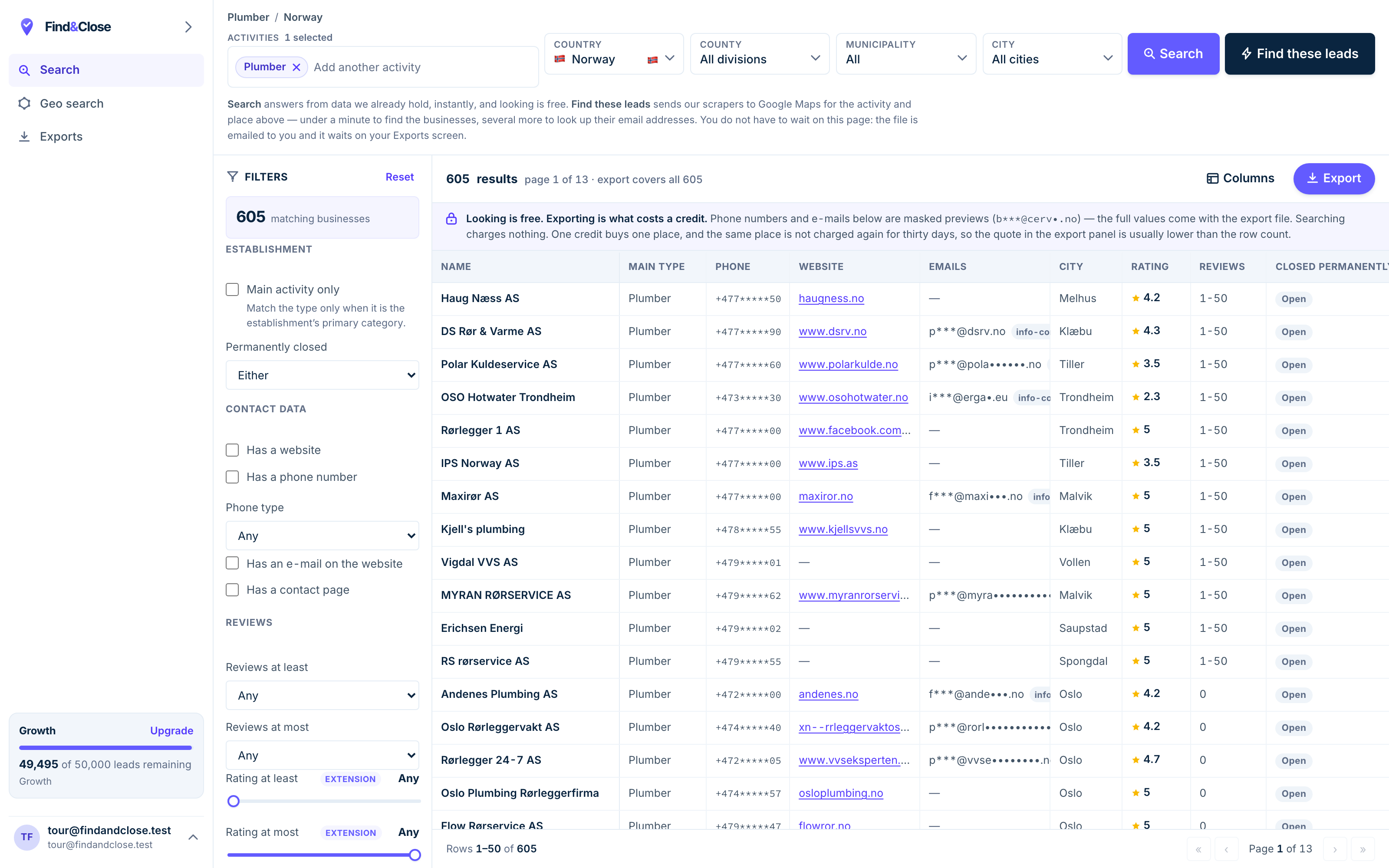
- Pick the trade Type it and take the match. One trade or twenty, on every plan.
- Pick the place Country, county, municipality, city. No plan gates the geography.
- The count moves first The number updates before you spend anything. Looking is free.
- Filter to the ones worth calling Has email, has phone, has a website, has a contact page. Combine them freely.
- Contacts are masked until export You can see a row exists and judge it. The address itself is the product.
- Export what you are looking at The file is exactly this filter set, with nothing dropped in between.
What the gap looks like across the Nordics
These are counts from our own database on 26 July 2026. Most guides on this topic carry no numbers at all.
We hold 44,684 local business records across Norway, Sweden, Denmark and Finland. The country counts below are narrower: they cover only the trades we publish list pages for, which is 23,846 of those rows.
- Norway: 9,632 records. 30% have no website at all.
- Sweden: 6,404 records. 19% have no website.
- Denmark: 3,927 records. 28% have no website.
- Finland: 3,883 records. 24% have no website.
Norway runs highest, and that shocks people. Rich market, fast broadband, and three firms in ten still have no site.
The trade matters more than the country. So pick the trade first.
The extremes are where the money sits
47% of Norwegian dentists have no website. That is a trade with real revenue and real rivals, and half of it is invisible on search.
Only 3% of Danish painters have an email on their listing. You will not email that trade into a meeting. You phone it.
57% of Swedish opticians do have an email. Same database, the same crawl, nineteen times the coverage.
Norwegian law firms average 3.99 stars, the lowest rating of any trade we hold. Only 53% have claimed the listing.
Read that last pair together. Weak ratings plus unclaimed listings means nobody is selling to that trade.
Four ways to find them
All four work. They charge you different things: your time, your money, or the risk of a blocked account.
1. Search Google Maps by hand
Open Maps, type a trade and a town, and read the panel for each result. A listing with no Website button has no site.
Cost: nothing but your hours. Speed: slow, and it stays slow.
This is the right method for your first ten prospects and the wrong one for your first thousand. Do it once anyway. An hour in Maps teaches you more about a trade than any dashboard.
2. A Chrome extension
Extensions read the Maps page in your browser and dump the visible rows to CSV. They are cheap, and for a week they feel like magic.
Then you hit the ceiling. Maps shows a slice of results per search, so the extension sees that slice and no more. Scrolling harder does not help.
There is a second cost. A browser tool runs on your own logged-in account, and that carries account risk. We do not ship an extension, so this is not a pitch.
3. An indexed database
Somebody else crawls Maps, cleans the rows, and lets you filter. You tick No website, pick a country, and export.
Cost: a subscription. Gain: you skip both the crawl and the ceiling. You also get fields the map panel never shows you, like whether the owner ever claimed the listing.
The honest trade-off is freshness. A row is true on the day we crawl it, not the second you read it. Which is why every count we publish carries a date beside it.
4. The Google Places API
Google sells access to its own place data. You write code, you pay per call, and you stay inside the rules.
The catch is field coverage. Google exposes what Google chooses. Email is not on that list, and neither is a no-website flag you can filter on.
So you get a clean feed with a hole in it. Most teams end up pairing it with a crawler, which puts them back where they started.
- By hand: free, slow, no risk, fine for ten prospects.
- Extension: cheap and fast, capped by what one search shows, some account risk.
- Database: paid, instant, filterable, and only as fresh as the last crawl.
- Places API: clean and inside the rules, needs code, and holds no email field.
The manual method, step by step
Run this before you pay anybody. It takes an afternoon and it teaches you the segment.
- Pick one trade and one town. Not a whole country. One trade in one town, so every row you write down is comparable.
- Search Maps in a private window. Your normal profile bends results toward places you have been. A clean window gives you a flatter list.
- Switch to the list view and scroll to the end. Maps loads more rows as you scroll. Stop when the list stops growing.
- Open each result and look for the Website button. No button means no site. A Facebook link in that slot counts as no site for your purpose.
- Write six columns in a sheet. Name, phone, address, rating, review count, and the date you checked it.
- Flag the ones with a social page and no site. They already believe in being findable online. They are the warmest half of the segment.
- Sort by review count, high to low. Reviews mean customers. Customers mean cash. A listing with no reviews is often a dead listing.
- Call the top twenty before you email anybody. Ten calls will teach you more than a hundred emails, and they teach it the same day.
You now have two things. A short list you can work, and a feel for how thick the segment is in your town.
That second thing is what tells you whether to buy a bigger file or pick a different trade.
Qualify before you pitch
A missing website is a signal, not a verdict. Some of these firms are doing fine without one.
Check four things before you spend a call.
- Review count. Under five reviews often means a stale listing or a hobby.
- Claimed or not. If nobody logs in, nobody will read a form fill either.
- A social page. A live Facebook page proves they will pay for reach.
- Opening hours. Real hours mean a real person keeps the listing tidy.
Two of those four ship as columns in our export. The other two take ten seconds each on the listing itself.
Hold on to one number from our file. Only 53% of Norwegian law firms have claimed their listing. Nearly half a well-paid trade never logs in to the one page every new client checks first.
A firm in that state is not ignoring you. It has not thought about the channel at all. That is a much easier conversation than displacing an agency.
What to do once you have the list
A list is not a pipeline. The next three choices matter more than where the rows came from.
Match the channel to the data you hold. If email coverage is thin, the plan is phone, and no amount of tooling changes that. Our guide to local email coverage has the country numbers.
Write one offer, not five. A small firm cannot judge a menu, and a menu asks it to do work it will not do.
Give it a month before you judge the segment. Local sales cycles are short, but they are not instant.
When you do write, keep it short and put the opt-out in plain words. There is a full sequence in the cold email guide, and the legal position sits here.
Questions about the no-website segment
Does a Facebook page count as a website?
For your purpose, no. A Facebook page ranks poorly for local search terms, and the owner does not control it.
Treat those firms as the warm half of the segment. They have already decided that being findable matters. They just picked a channel they do not own.
How do you know a business has no website?
The Maps listing carries a website field, and the owner fills it in. When that field is empty, we store the row with a no-website flag.
We do not guess and we do not infer it from a failed page load. An empty field is an empty field, and that is what the flag means.
Which trade has the most firms with no website?
Of the trades we hold, Norwegian dentists top the list at 47%. Norwegian accountants and Norwegian painters also run high.
The pattern is worth knowing. Trades that get work by referral drift off the web, even when the work pays well.
Is scraping Google Maps for this legal?
The fields here are public business data, published by the business on its own listing. In the EU and the EEA, B2B contact for a related product usually rests on legitimate interest under Article 6(1)(f) of the GDPR.
You must still name yourself, say where you got the data, and offer an opt-out in the first message. Our GDPR guide covers the balancing test in full. It is not legal advice.
Can I filter for no website inside FindAndClose?
Yes, and it is one switch. Pick a category, pick a country, tick No website, and the count in the corner updates before you export anything.
Every plan searches every country with every filter. There is no upgrade wall on geography, which is the thing most tools charge you twice for.
How many of these prospects do I need?
Work backwards from your own close rate rather than from a benchmark. Count the conversations you need for one sale, then multiply.
The useful habit is to size the segment first. If your town holds forty firms with no site, that is a month of work, not a business. Widen the trade or widen the map.
Read next
The rest of the play, and the files these methods produce.
- Build a local business email list Where the addresses really live
- Cold email local businesses Subject lines, length, a full sequence
- Find web design clients Territory, pricing, a week of work
- GDPR and B2B cold email Legitimate interest, opt-out, suppression
- Scrape Google Maps without code What Maps exposes, and what it hides
- Every list we publish Trades and countries
- Plumbers in Norway Phone and email flags per row
- Accountants in Norway A trade that drifts off the web
- Electricians in Norway Strong email coverage for a trade
- Electricians in Sweden The Swedish side of the same trade
See the no-website filter on real rows
Fourteen days, 100 leads, no card. Long enough to pull one trade in one country and call the top twenty.
- 14-day free trial
- 100 leads included
- No credit card