FindAndClose and Clay
Clay is not the competition. Clay is where your list goes next
Clay is an enrichment and routing canvas. It needs rows to work on. We hand you the local rows, deduplicated, with 64 columns.
CSV in one clickClean input, fewer wasted creditsUse both
What Clay actually is
Clay calls itself infrastructure to get any data, run agent workflows and launch go-to-market plays. That is a fair description.
A Clay table looks like a spreadsheet and behaves like a pipeline. Each column can call a vendor, an agent or your own API.
Their site says one contract buys data from more than 200 data and AI vendors. Waterfall enrichment tries them in order until one answers.
Claygent is their research agent. Point it at a company and ask it a question in plain words.
What Clay does that we do not
- Waterfall enrichment across many vendors on one bill
- AI research agents that read a website and answer a question
- CRM sync both ways, webhooks and HTTP calls to your own systems
- Email sequencing and ad audience pushes
- Free tier with 500 actions, 100 data credits and 200 rows a table
We do none of that. We are not trying to. A single-source index and an orchestration canvas are different products.
Clay can pull local firms too
We should be straight about this. Clay ships a Google Maps source and a lesson on finding local firms with it.
You give it a place and a business type, and it fills a table. Then its own enrichment columns go to work.
That path is real and it works. It is also search by search, and each row spends credits you could spend on enrichment.
Where each tool sits in the same workflow
This is not a scorecard. It is a map of who owns which step, checked against their own pricing and docs.
| FindAndClose | Clay | |
|---|---|---|
| Job in the workflow | Source the local list | Enrich, score and route it |
| Data vendors on one billtheir own figure | No | 200 and up |
| AI research agent | No | Claygent |
| CRM sync, webhooks and HTTP columns | No | Yes |
| Email sequencing built inwe send nothing, by design | No | Yes |
| Free tier | 14 days, 100 leads | 500 actions, 100 credits, 200 rows |
| Whole-country local list in one export | Yes | Search by search |
| Row count on screen before you spend | Yes | No |
| Deduplicated on Google ID across searches | Yes | Dedup the table yourself |
| Filter for firms with no website | Yes | Filter after the pull |
| Fixed 64-column schema | Yes | You build the columns |
| Cost of a raw local row | One lead credit | Credits per row and per column |
Clay's pricing and features last checked on 26 July 2026. We re-check every month. Rows shaded grey are ones where they beat us.
Clay prices on monthly actions and data credits, with a row cap per table that rises with the plan. Their own pricing page carries the current tiers.
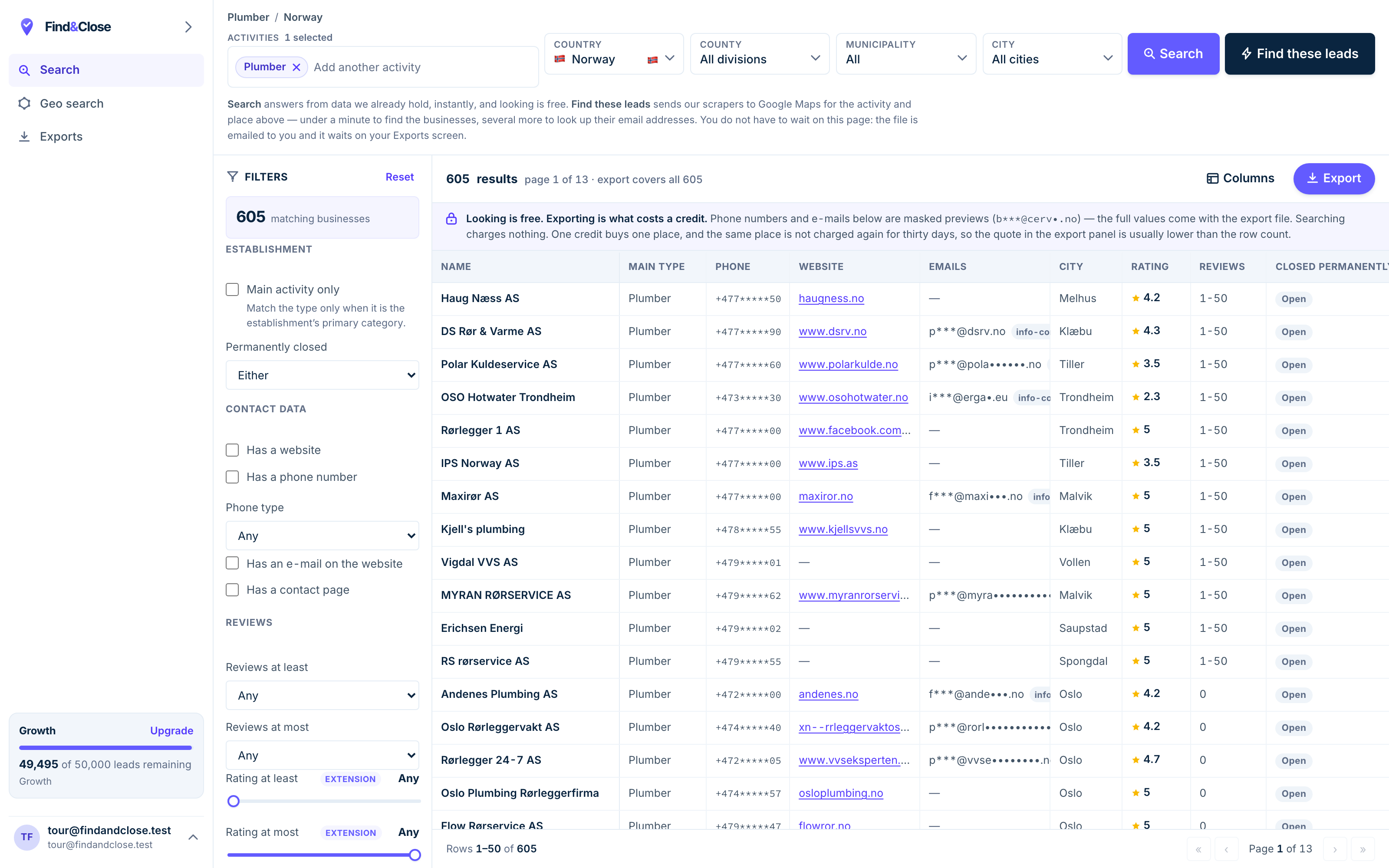
- Pick the trade Type it and take the match. One trade or twenty, on every plan.
- Pick the place Country, county, municipality, city. No plan gates the geography.
- The count moves first The number updates before you spend anything. Looking is free.
- Filter to the ones worth calling Has email, has phone, has a website, has a contact page. Combine them freely.
- Contacts are masked until export You can see a row exists and judge it. The address itself is the product.
- Export what you are looking at The file is exactly this filter set, with nothing dropped in between.
Why you want both
Clay charges for work done on a row. So the cheapest thing you can do is give it a clean row to start with.
Every wasted row in a Clay table costs credits before it costs you a reply. A closed firm, a duplicate, a bad domain: all of them burn actions.
So the two tools stack in an obvious order.
- Pick the market here Trade plus country. Read the count on screen. Add the filters that matter: no website, has phone, mobile numbers.
- Export the CSV One file, 64 headers, tab separated with a byte order mark. No duplicates and no permanently closed firms.
- Import it into a Clay table The domain and company name columns are the two Clay wants. Both come out of our export.
- Let Clay do the part it is good at Find the owner, waterfall the personal email, run Claygent on the site, score the row.
- Route it Push to your CRM or your sequencer from Clay. We do not send email, and we do not plan to pretend otherwise.
The cost argument, without numbers we cannot stand behind
We will not model your Clay bill for you. Your credit burn depends on which columns you run.
The direction is clear though. Fewer junk rows in means fewer paid actions on rows that were never going to reply.
Our filters cut the file before it reaches Clay. Drop the permanently closed. Drop the firms with no phone. Keep only the ones with no website if that is your pitch.
When Clay alone is enough
You want fifty local firms in one city for a test. Clay can pull that from Maps on its own.
You already pay for Clay and the volume is small. Adding a tool for a hundred rows makes no sense.
You need a lot more than local data. If your target list is enterprise software buyers, we are the wrong source and Clay is the right home.
When the source matters more
You want every plumber in Norway, not the first page of them.
You want the same file next quarter, with new firms marked by their first-seen date.
You want one switch for the firms with no website, because that is the whole pitch of your agency.
You want the raw rows to cost the same each month, so your Clay credits go on enrichment and not on sourcing.
Clay users spend more on go-to-market than anyone else in this market. That is because the workflow works. We would rather be a clean input to it than argue with it.
Questions about using both tools
Is FindAndClose a Clay competitor?
No. Clay enriches, scores and routes rows. We produce the rows for one kind of market.
The overlap is a single Clay source that pulls local firms from Maps. Outside that, the two products barely touch.
How do I get our export into Clay?
Export as CSV or XLSX, then import the file as a new Clay table. Our file is tab separated with a UTF-8 byte order mark.
Map the website column to domain and the name column to company. Those two carry most Clay enrichment.
Which of our 64 columns does Clay care about?
Website root URL and company name first. Then the address fields for geography, and the socials for people research.
The Maps rating and review count are worth keeping as scoring inputs. A firm with 300 reviews and no website is a different pitch from one with four.
Can I skip Clay and just use your file?
For local outreach, often yes. The file already holds a generic email, role inboxes, a phone and the socials.
Clay earns its keep when you need a named person, a personal address, or a research step per row.
Do you send the emails?
No. We do not send email, we do not host a dialer, and we do not run sequences.
We publish sample sequences as advice you run in your own tool. Clay, or your sequencer, owns the send.
What does FindAndClose cost next to Clay?
Our plans open at $49 a month for 10,000 lead credits, and every plan carries all 64 columns and every filter.
Clay prices on actions and data credits, with a free tier and paid tiers above it. The two bills cover different work. See our pricing.
Read next
Where the rows come from before they reach a Clay table.
- FindAndClose vs D7 Lead Finder Bulk searches vs a fixed file
- FindAndClose vs Lobstr.io Crawler runs vs a queryable index
- Chrome Maps scrapers compared When the extension is enough
- Google Maps scraper: the four routes The plain guide
- Every list we publish The full index
- Plumbers in Norway 605 records
- Electricians in Norway 602 records
- Accountants in Norway 851 records
Give your Clay table a clean list to work on
Pick a trade and a country, cut it with the filters, export the CSV. Fourteen days, 100 leads, no card.
- 14-day free trial
- 100 leads included
- No credit card