Plain guide
Google Maps scraper: the four ways to get the data, compared
There are four honest routes to Maps data, and they suit four different jobs. This page explains all four before it mentions ours.
No sales pitch until the endWritten 26 July 2026Sources named throughout
What a Google Maps scraper is
A Maps scraper turns business listings into rows in a file. Name, address, phone, website, rating, hours.
Google Maps holds a listing for most trading firms on earth. Each listing is a small public profile the firm can edit.
A scraper reads many of those listings and writes them out as a table. The whole job, in one line.
People want this for four reasons. Sales lists. Market sizing. Local SEO audits. Store or site location planning.
What the tools do not give you
A Maps listing has no employee count, no revenue and no named owner. So no Maps scraper can hand you those.
An email is not a Maps field either. Tools that return one found it on the firm website, not on the listing.
Anyone promising you a decision-maker name from Maps is selling you a second product. Ask which one.
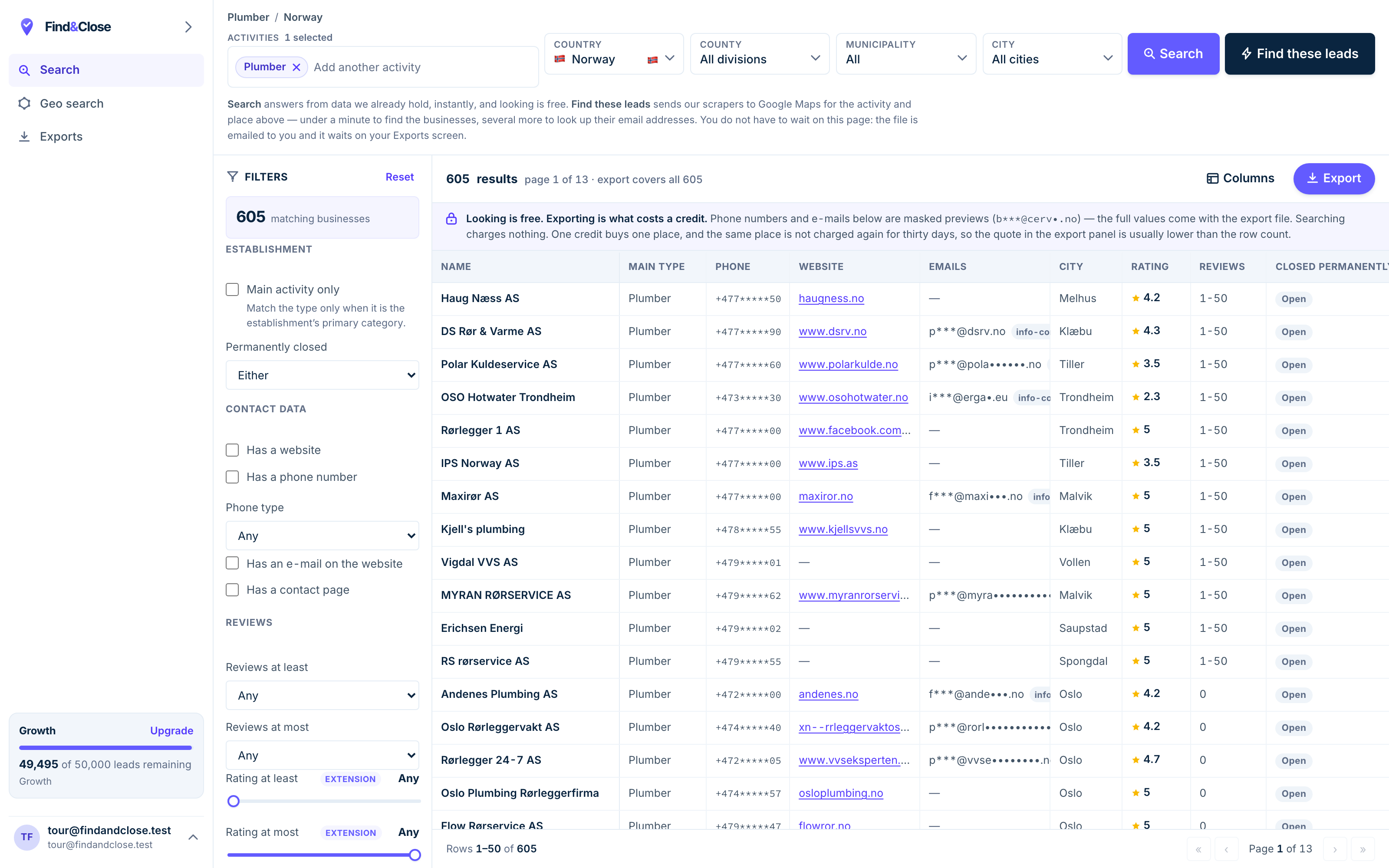
- Pick the trade Type it and take the match. One trade or twenty, on every plan.
- Pick the place Country, county, municipality, city. No plan gates the geography.
- The count moves first The number updates before you spend anything. Looking is free.
- Filter to the ones worth calling Has email, has phone, has a website, has a contact page. Combine them freely.
- Contacts are masked until export You can see a row exists and judge it. The address itself is the product.
- Export what you are looking at The file is exactly this filter set, with nothing dropped in between.
Route one: a browser extension
You run a Maps search. A side panel reads the results on your screen and writes a CSV.
This is the cheapest and fastest route. Free tiers are normal. Install, search, press a button.
What it is good at
- A few hundred rows in one city, today, for almost nothing
- Working from a search you already ran and trust
- Testing whether a niche is worth any further work
What it cannot do
A single Maps search stops feeding results after a couple of hundred rows. The extension can only read what Maps drew.
The work runs on your machine and your IP. Your browser has to stay open for the whole job.
A page reader breaks when Google changes the page. Every tool in this class has had that week.
Two overlapping searches give you two files with the same firms in both. Merging them is your problem.
Route two: a cloud crawler
You configure a job on a hosted platform. It runs on their machines, on a schedule, and delivers a file.
Platforms in this class run scrapers for many sites, not only Maps. You set filters or paste URLs, then pick a run schedule.
What it is good at
- Repeat runs on a schedule you control, down to the hour
- Parallel runs, so a big job finishes without your laptop
- Delivery straight to Google Sheets, S3, SFTP or a webhook
- One platform across Maps and half a dozen other sites
What it costs you
You pay per result, so you find out the size of a job by running it.
You own the config. A category, a country and a post code list are yours to build and maintain.
Results sit on their servers for a set window. Retention windows in this class run from about a week to about a month, so download what you keep.
Fields differ per scraper, so your file shape can change under you when a vendor ships an update.
Route three: the official Places API
Google sells its own place data. This is the only route with no argument about terms.
You call the API, you pass a field mask, and Google bills you per request. Their docs group fields into Essentials, Pro and Enterprise tiers.
Mixing tiers matters. Ask for fields in both the Essentials and the Pro tiers, and Google bills the whole call at the Pro rate.
What it is good at
- Data straight from the source, with no page reading in the middle
- A clean contract and support you can call
- Perfect fit for a product that looks up one place at a time
The two things that stop most list builders
First, the terms. Google says you must not pre-fetch, cache or store Places content. A few narrow exceptions apply. Place IDs are one: you may keep those without a time limit.
That rules out the thing a list buyer wants, which is a file they keep. Read the Maps Platform terms yourself before you plan around this.
Second, there is no email. The Places API does not carry a contact address, and an email is what most outreach lists are for.
So who should use it
Build a product that shows a user a place, and the API is the right call.
Build a sales list you plan to keep and re-use, and the API is the wrong shape for the job.
Route four: a maintained index
Someone else crawls once, cleans the result, and sells you a filtered view of it.
The difference is when the work happens. A crawler works when you press go. An index has already done the work.
So you can filter and count before you spend anything. You see 605 plumbers in Norway, and 262 of them with no website, before you export a row.
What you get from the shape
- A count on screen, so you can size a market with no run
- Dedup across every search, because the store holds one row per firm
- Filters before the export, not a clean-up after it
- A first-seen date on each row, so you can tell new firms from old
- A schema that stays still, so your CRM import keeps working
What you give up
Freshness on demand. An index is as current as its last crawl of that area.
Coverage. An index only holds what its owner has crawled. Ask which countries are real before you buy.
Control. You cannot point it at a street and a minute the way a crawler can.
The four routes, side by side
The extension column stands for the whole browser class. Read it as a shape, not a brand.
| FindAndClose | Chrome extension | |
|---|---|---|
| Cost to start | From $49 a month | Free to a few euros |
| Time to first row | Sign up, filter, export | Install and press a button |
| Where the work runs | Our machines | Your machine and your IP |
| Rows from one searchMaps stops feeding a single query | The whole country | A couple of hundred |
| Count before you spend | Yes | No |
| Dedup across searches | Yes | No |
| Survives a Maps layout change | Yes | No |
| Fixed export schema | 64 columns, one order | Varies by tool |
| Email columnread off the firm website, not the listing | Yes | Varies by tool |
| Keeps working with the browser shut | Yes | No |
Chrome extension's pricing and features last checked on 26 July 2026. We re-check every month. Rows shaded grey are ones where they beat us.
A cloud crawler sits between these two columns: hosted like us, but you configure it like an extension. The Places API sits outside the table, because its terms do not allow the stored list both other routes produce.
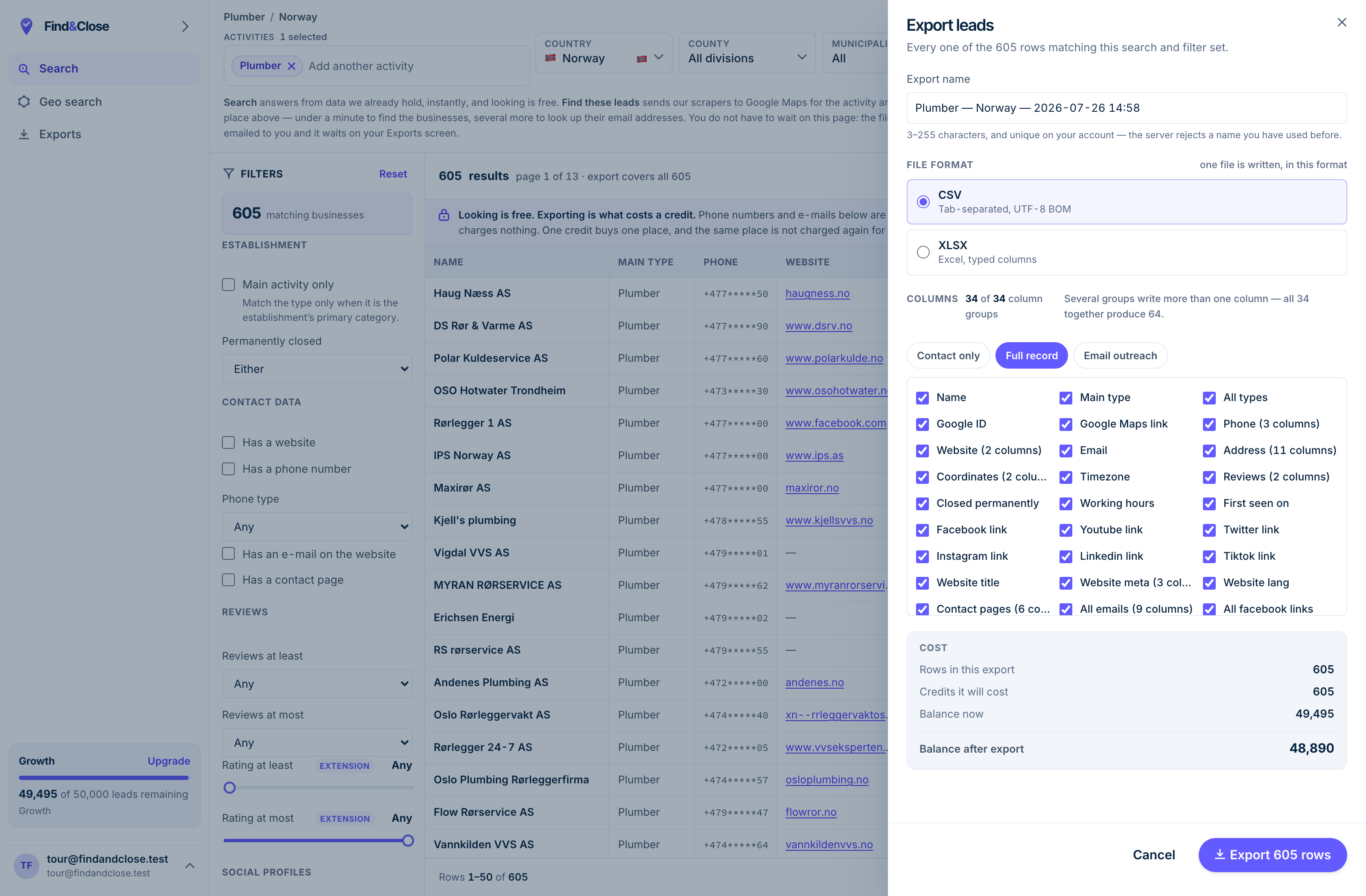
- It exports the whole result Every row the filter matched, not the page you happen to be looking at.
- CSV or XLSX Tab-separated UTF-8, or typed Excel columns. One file per job.
- 34 groups, 64 columns The same 64 on every plan. Nothing is held back for a higher tier.
- Three presets Contact only, full record, or the outreach set. Or tick your own.
- The cost, before you commit One credit per place, once per 30 days. Re-downloading is free.
What a usable export holds
Row counts sell tools. Column quality decides whether the list works.
Here is the test. Open the file and see whether you could start calling from it today, with no other tool.
- Name, full address split into street, post code, city and region
- Phone in national and international form, plus the line type
- Website, and the root domain on its own, for matching later
- Email, plus the page it came from, so you can check the working
- Role inboxes: contact, sales, finance and administration
- Rating, review count and whether the firm has claimed the listing
- Facebook, Instagram, LinkedIn, YouTube, X and TikTok links
- Opening hours, price level and the full Maps category tree
- A closed-for-good flag, and a first-seen date on the row
The four fields people forget to ask for
Line type. A mobile number and a switchboard need different scripts.
The source page for the email. Without it you cannot audit a bad address.
The closed-for-good flag. A file full of dead firms wastes a week of calls.
The first-seen date. It is the only way to tell a new firm from one you already worked.
Two questions to ask any vendor
Does the column set change between exports? If it does, your CRM import map breaks every month.
Does the file stay mine after I cancel? Some tools take the export away with the plan. Read the terms.
Where the law sits
This is the part most pages skip. It is not hard, and getting it wrong is expensive.
The data is public business data
A firm puts up its own Maps listing for the public to read. A company name, a trading address and a switchboard number are business facts.
A personal name in a role inbox is a different thing. Treat that as personal data and hold it to the same rules as any other contact record.
GDPR and B2B contact
In the EU and the EEA, cold B2B email runs on legitimate interest, not consent. That is a real legal basis and it comes with duties.
You must name yourself and your company. You must say where you got the address. You must offer an opt-out in the first message and honour it.
You must also keep the message relevant to the business you are writing to. A pitch that could go to anyone is a weak legitimate interest case.
National rules layer on top. Some countries treat sole traders as individuals. Check your own market and take advice if the programme is large.
Terms of service
Every service has terms, and Google Maps is no exception. We will not tell you to break them.
If you use the official Places API, follow its rules on caching and storage. Google says you may keep place IDs without a time limit.
The rest of the Places content works the other way. Google says you must not pre-fetch, cache or store it, outside a few narrow exceptions.
If you use a hosted tool, the vendor is the party operating against those terms, and that is part of what you pay them for. Read their terms too.
A suppression list is not optional
Someone will ask you to stop. Record it, honour it, and make sure it survives your next export.
A per-account suppression list is the mechanism. A domain in it should never appear in a later file, whoever on your team runs the search.
How to pick, in four lines
Match the route to the job, not to the price.
- A few hundred rows in one city, once Use a browser extension. It costs almost nothing and it will do the job today.
- A feed you keep fresh across several sites Use a cloud crawler. Schedules, parallel runs and webhooks are what that class is for.
- A product that looks up one place at a time Use the official Places API. It is the only route with no terms argument, and it has no email.
- A market you plan to work for months Use a maintained index. Count first, filter first, and keep the schema still.
That last line is us. FindAndClose holds Norway, Sweden, Denmark and Finland today, with 64 columns on every plan.
We do not claim global coverage, because we do not have it. Google Maps is our only live source. Apple Maps and Bing Maps are on the roadmap and are not shipping.
If a different route fits your job better, take it. A list you cannot work is worse than no list.
Common questions about scraping Google Maps
Is scraping Google Maps legal?
The fields on a Maps listing are public business data. A firm puts them there about itself, for the public to read.
For B2B contact in the EU, that sits under legitimate interest rather than consent. The duties then sit on what you do next.
Name yourself. Say where the address came from. Offer an opt-out and honour it. Read the terms of any service you automate against.
Can I get email addresses from the Places API?
No. Google does not return a contact email in Places data.
Every tool that hands you an email found it somewhere else, almost always on the firm own website. Ask any vendor where their email column comes from.
How many results can one Google Maps search return?
A single query stops feeding results after a couple of hundred rows. That ceiling belongs to Maps, not to the tool reading it.
This is why whole-country lists come from grid searches, post code sweeps or a stored index, and never from one search box.
How fresh is Maps data anyway?
A listing changes when the owner edits it or when Google acts on a report. Some listings sit untouched for years.
So freshness is about the crawl, not the source. Ask any vendor when they last saw the row you are buying, and prefer a file that carries a date on each record.
What is a fair price for local business data?
Prices in this market run from free browser tools to per-row cloud pricing to a flat monthly index fee.
Compare cost per usable row, not headline price. A row with no phone, a dead domain or a closed business is not a row you bought.
What does FindAndClose hold today?
Norway, Sweden, Denmark and Finland, from Google Maps, with 64 export columns on every plan.
Every plan searches every country we hold, with every filter and no upgrade wall on geography. Browse the published lists or the plans.
Read next
The named tools in each class, checked against their own sites.
- FindAndClose vs D7 Lead Finder Bulk searches vs a fixed file
- FindAndClose vs Lobstr.io Crawler runs vs a queryable index
- Chrome Maps scrapers compared When the extension is enough
- FindAndClose and Clay Source here, enrich there
- Every list we publish The full index
- Plumbers in Norway 605 records
- Electricians in Norway 602 records
- Accountants in Norway 851 records
Try the fourth route on a real market
Pick a trade and a country, read the count, apply the filters, then export. Fourteen days, 100 leads, no card.
- 14-day free trial
- 100 leads included
- No credit card