Guide · Contact data
How to find a business email address
For a local firm there is no staff directory and no pattern to guess from. Here is where the address really sits, and seven ways to reach it.
Seven methods, rankedWhy guessing backfiresWhat works at scale
Start with how the address gets published
You cannot find an email until you know who put it where.
Nobody assigns a local business an email address. The owner picks one, and the owner decides where it appears — if it appears anywhere at all.
That gives you a short map of possible places.
- The firm’s own website: a contact page, a footer, a legal page.
- A social page the owner filled in, most often Facebook.
- A public filing, in the countries whose registries carry contact details.
- The owner’s own mouth, when you call and ask.
Google Maps is not on that map. A listing there carries phone, address and website. The format has no email slot, so searching the map itself will never surface one.
The hard truth up front: some firms never wrote an address down anywhere. No tool can find what was never published. For those firms the phone is the channel, and pretending otherwise wastes your week.
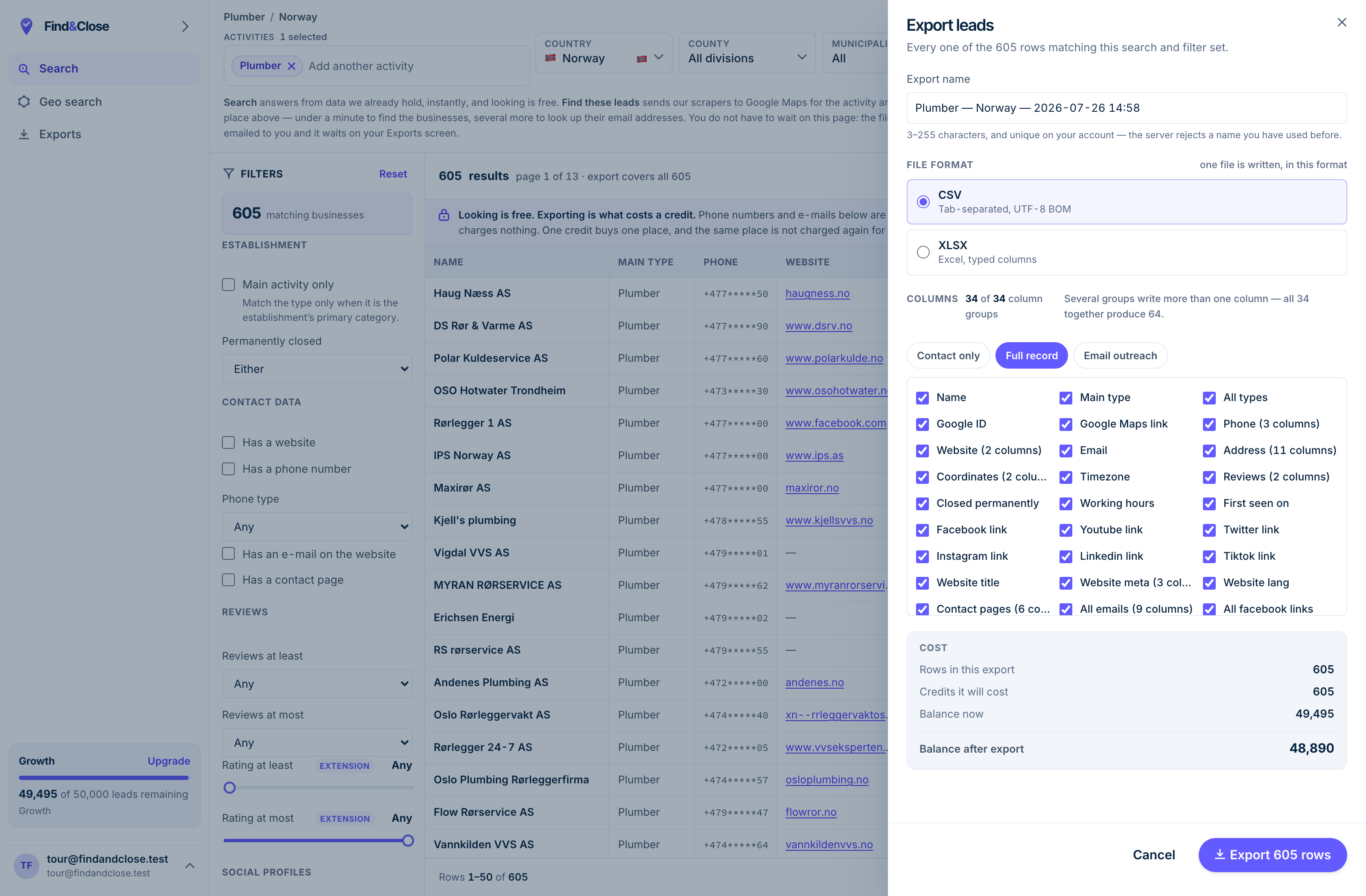
- It exports the whole result Every row the filter matched, not the page you happen to be looking at.
- CSV or XLSX Tab-separated UTF-8, or typed Excel columns. One file per job.
- 34 groups, 64 columns The same 64 on every plan. Nothing is held back for a higher tier.
- Three presets Contact only, full record, or the outreach set. Or tick your own.
- The cost, before you commit One credit per place, once per 30 days. Re-downloading is free.
Seven ways to find it, ranked
Ordered by how often each one pays off for a local firm.
1. The contact page
Follow the website link on the Maps listing, then find the contact page. Most published addresses live here or nowhere.
If the page shows a form instead of an address, view the page source and search for mailto. Some forms hide a plain address behind the button.
2. The rest of the site
Check the footer, then the privacy page and the terms page. Privacy pages often name a contact address, because data law asks the firm to provide one.
A quote page or booking page sometimes carries a direct address too. The owner wants those messages to arrive.
3. The Facebook page
Open the page’s about section. Owners who filled in their profile with care often list an email there, along with hours and a phone.
For firms with a Facebook page and no website, this is often the only written address in existence.
4. The national registry
Every Nordic country runs a public company register.
- Norway: Brønnøysundregistrene.
- Sweden: Bolagsverket.
- Denmark: the CVR register.
- Finland: the PRH.
They confirm the legal name, the company number and the registered address. Some records carry a contact address; many do not. Treat the registry as a check on identity, not as an email source.
5. A domain lookup
A WHOIS or RDAP query on the firm’s domain once returned the owner’s name and email. Since the GDPR arrived, registrars redact those fields on most records.
Expect a privacy notice or a relay form instead. Try it in a spare minute, and expect little.
6. Ask by phone
Call the number on the listing and ask who handles the thing you sell, and the best address for a short note. Small firms answer their own phones, and the person answering is often the owner.
This is the highest-yield method on the page, and the sequence below turns it into a repeatable play.
7. An email finder tool
Finder tools were built for corporate targets: a known domain, named staff, a guessable pattern like first.last. A one-van firm on a webmail address breaks all three assumptions.
They still work for the larger local firms with real domains. Just verify everything they return before you trust it.
- Website pages: the primary source, when a site exists.
- Facebook: the fallback for site-less firms that still want to be found.
- Registries and domain lookups: identity checks, rare email sources.
- The phone: slowest per firm, highest hit rate, and it warms the lead.
- Finder tools: fine for firms shaped like corporations, weak below that.
Why guessed addresses cost more than they save
A pattern guess feels like progress. The mail server disagrees.
When a guessed address does not exist, the message bounces. Mailbox providers count your bounces, and a high rate marks your domain as a list-buyer’s domain.
That mark outlives the campaign. Every future send from the same domain starts in a worse position, whoever it goes to.
Catch-all domains make it worse: the server accepts every address, real or not, so the guess looks confirmed right up until nobody reads it.
Our position is the boring one. We publish addresses we found on a real page, we store which page, and we flag the rows where we found nothing. An empty field you can trust beats a guess that looks right.
For verification, warm-up and the catch-all problem in full, read the list building guide.
The ask-for-it play
When no address is published, the fastest legitimate route is to ask for one. Two contacts, a few minutes each, from your own phone and inbox.
-
Call the number on the listing. Say who you are in one line.
Then ask: who looks after [the thing you sell], and what is the best address for a short note about it?
Write the name down next to the address. A note to a named person gets opened.
Small firms have no gatekeeper, so the question lands with the decision maker more often than not. You leave with a real address and spoken permission to use it.
-
Subject as promised on the phone
Hi [name]. Thanks for taking my call earlier. Here is the short version in writing, as promised.
[Two lines on what you do and why it fits their firm.]
If this landed in the wrong inbox, tell me and I will stop writing.
The call created the permission and the same-day note keeps it warm. This is a continued conversation now, not a cold email.
-
Subject the note from Tuesday
Lifting my note back to the top of your inbox.
One question: is this worth ten minutes this month, yes or no?
A no is a fine answer, and I will not write again.
One follow-up is polite. Five would turn a conversation back into a campaign, and this thread earned better than that.
When there is no address at all
Plan for the miss, because the miss is the common case.
The chain is short. The email lives on the website, so a firm with no website has no address for anyone to find.
Our own database, counted on 26 July 2026, puts odds on the hunt. Across the trades we track, Norway leads with 38% of rows carrying an email. Sweden holds 19%, Denmark 17% and Finland 16%.
Read those as base rates. In three of our four countries, the search fails more than four times in five.
- Route the no-email rows to phone. They are the half your rivals never reach.
- Use the contact form only for a firm you care about. You get no copy and no thread, so it cannot carry a campaign.
- Do not pad the file with guesses to make the numbers look better. The bounces will price that decision for you.
Trade matters more than country here. Our study on which trades publish an email has the breakdown.
Finding hundreds at once
Everything above is per firm. Past about fifty prospects, the hunt itself becomes the cost.
The scale version of this page is a crawl. Pull the listings for a trade and a region. Follow each website link and read the contact pages. Store what a human would have found, with the source page and the date.
That is the product we sell, so read this section as a vendor talking.
- An email where one was published, and the exact page we found it on.
- A flag on every row that has no email, so the phone half of the file is explicit.
- The no-website flag, the phone number, the rating and the claimed status beside it.
- A per-account suppression list: add a domain once and it stays out of every later export.
The source page matters more than it looks. It means you can open our working and check any address yourself, which no guessed list can offer.
Every plan searches every country with every filter, and your exports stay yours after you cancel. The scraper comparison shows the full 64-column export.
Questions about finding business emails
Is it legal to use an email address I found online?
In the EU and the EEA, the usual basis is legitimate interest, under Article 6(1)(f) of the GDPR. It covers a relevant offer sent to a published business address.
The duties still apply: say who you are, name the source, and give a plain opt-out in the first message. Our GDPR guide walks through it. None of this is legal advice.
Can I get an email address from a Google Maps listing?
Not from the listing itself — the format holds phone, address and website, and nothing else that helps you write.
The listing’s value is the website link. Follow it, and the contact page either pays off or tells you to pick up the phone.
Do email finder tools work for small local firms?
They work in proportion to how corporate the firm is. A real domain and named staff give the tool something to match on.
A sole trader on a webmail address gives it nothing, and some tools respond by guessing. Verify every returned address before it touches your sender domain.
What is a catch-all domain, and why does it matter?
A catch-all mail server accepts messages to any address at its domain, real or invented. Verification tools cannot tell a live inbox from a void there.
Treat catch-all rows as unconfirmed: send small, watch the response, and never let them dominate a batch. The list building guide covers the handling.
How do I find the owner’s name to go with the address?
The company register names the people behind the firm, free to search in all four Nordic countries. The website’s about page is the friendlier version.
On the listing itself, read the replies to reviews. Owners often sign them.
Does FindAndClose guess addresses when none is published?
No. Every email in our export was read off a real page, and the export names that page beside the address.
Where we found nothing, the field is empty and flagged. We think a visible gap is worth more than an invented address, to you and to your domain.
Read next
What to do with the address once you have it.
- Cold email local businesses The message and the full sequence
- Build a local business email list Coverage, verification, catch-alls
- Google Maps lead generation The six-step playbook
- Get clients for a marketing agency Signals, retainers, a sequence
- Which trades publish an email Coverage by trade, from our file
- GDPR and B2B cold email The rules before you press send
- A Google Maps scraper, compared What a finished export holds
- Every list we publish Trades and countries
See the address and the page it came from
Fourteen days, 100 leads, no card. Every email in the export names its source page, so you can check our working.
- 14-day free trial
- 100 leads included
- No credit card