Guide · Pipeline
Google Maps lead generation
Every local business you could sell to is already on the map, scored in public. This is the playbook for turning those rows into booked work.
Six steps, start to closeSignal-to-offer matchingA sequence to copy
Why the map beats every other local lead source
Most lead lists tell you a business exists. The map tells you how it is doing.
A Maps listing is a live scorecard, kept current by the platform and by customers. It shows the rating, the review count, the website link, the hours and the photos. It even shows whether the owner ever claimed the page.
Each field is a buying signal for somebody.
- No website: the firm is invisible outside the map. A build job.
- A weak rating: customers are choosing the rival. Reputation work.
- An unclaimed listing: nobody is watching the shop window. Profile work.
- Stale hours or old photos: the listing is decaying. Maintenance work.
- A strong listing: not a prospect for fixes, but proof they spend on presence.
No purchased lead list carries this. A bought lead knows nothing about the business; a Maps row is the business, described by its own market.
One boundary before the playbook. Lead generation here means finding and contacting businesses yourself. We build the lists. We do not send email, run ads or place calls — those stay in your tools, under your name.
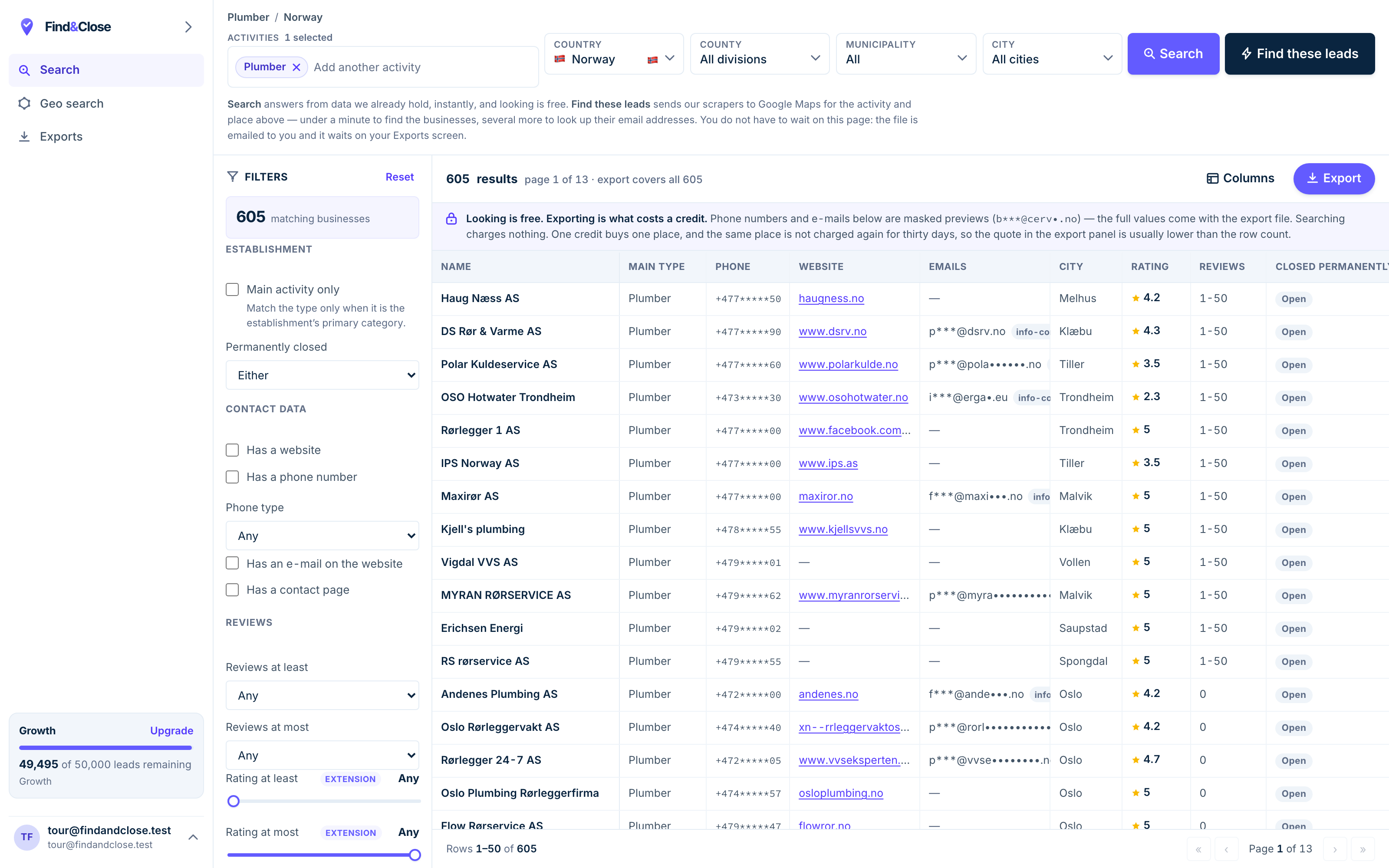
- Pick the trade Type it and take the match. One trade or twenty, on every plan.
- Pick the place Country, county, municipality, city. No plan gates the geography.
- The count moves first The number updates before you spend anything. Looking is free.
- Filter to the ones worth calling Has email, has phone, has a website, has a contact page. Combine them freely.
- Contacts are masked until export You can see a row exists and judge it. The address itself is the product.
- Export what you are looking at The file is exactly this filter set, with nothing dropped in between.
Step one: pick a segment you can finish
A segment is a trade, a place, and one signal. All three, every time.
The trade decides the offer and the language. The place decides the examples you can show. The signal decides the first line of the first message.
Dentists in Oslo with no website. Law firms in Bergen under four stars. Salons in Malmö with unclaimed listings. Each of those is a campaign; “businesses in Norway” is not.
Size it before you commit. Our database held 44,684 records across the four Nordic countries on 26 July 2026. Of those, 23,846 sit in the 81 trade categories we track. One trade in one region with one filter often comes back as a list of dozens to a few hundred.
That is the right size. A list you can work to the end beats a list that makes you feel armed.
If the signal you want is the missing website, the no-website guide sizes that gap country by country.
Step two: get the rows out
Maps has no export button. Choose your route by how often you will need the file.
There are four ways out: copy by hand, run a browser extension, rent a hosted scraper, or query an indexed database. The no-code guide weighs all four.
Whichever route you pick, hold the file to the same bar.
- Every row dated, so you know what you are working with.
- The signal fields present: rating, review count, claimed status, website flag.
- Email marked as found or missing, never guessed.
- A source you could check by opening ten listings by hand.
Our export runs 64 columns per row on every plan, with first-seen and last-seen dates and the source page for every email. The scraper comparison walks the columns.
Step three: qualify and rank the rows
A raw pull is not a pipeline. Ten minutes of sorting doubles the value of the week.
- Kill the dead rows first. Marked closed, zero reviews and no photos, or a phone that matches nothing. Gone before you start.
- Split by the signal you sell against. Your offer fixes one gap. Rows without that gap belong in a different campaign, not in this one.
- Rank the rest by evidence of money. Review count is the best free proxy. Reviews mean customers, and customers mean a budget to fix things with.
- Mark the channel per row. Email where an address was found, phone where none was. Two lanes, two scripts, one list.
The top of the ranked list is your calling block. The middle is your email batch. The bottom is next month, or nobody’s.
Watch the claimed flag while you rank. An unclaimed listing means no owner reads that page. So pitch that row by phone, and show them the page they have never seen.
Step four: match the offer to the signal
The row tells you what to sell. Selling anything else turns a warm signal cold.
- No website → a small site, priced and dated. The web design guide is that pitch in full.
- Weak rating or thin reviews → reputation and listing work. The marketing agency guide covers the retainer version.
- Unclaimed listing → claim, tidy and maintain the profile. Small ticket, fast yes, natural upsell.
- No email on file → whatever you sell, the channel is the phone. Plan the block, not the blast.
This matching is the whole trick of Maps lead generation. The message does not open with you. It opens with the one true thing the row already told you about them.
It also keeps you honest with volume. Fifty rows that share a signal take one well-aimed message each. Five hundred mixed rows take a generic one, and generic is what filters and readers both delete.
Step five: a sequence built on the listing
Written for any service that fixes a visible gap on the row. Every message points at one true thing. Send it from your own tool — we do not send email.
-
Subject your page on Google
Hi [name]. I found [business] on Google Maps this week and noticed [one true detail from the row: the missing website, the rating, the last review].
That gap costs you customers you never hear about. I fix it for [trade] like yours, and the work takes [your timescale].
Worth a look? If not, reply stop and I will take you off my list.
The row wrote the first line for you. One observed fact beats any clever opener, and the plain opt-out closes the loop the law asks for.
-
Ring the number on the listing, early or late, when the trade can answer.
Name the gap, not your service list. Then ask what a new customer finds when they search the trade in [town].
If there is interest, offer a start date on the spot. A date closes; a meeting postpones.
A call collapses a week of email into three minutes. The owner can check the gap on their own phone while you talk, which no other channel allows.
-
Subject before and after
Here is a [trade] listing before and after the fix: [link to one page showing both].
The price sits on the same page, so you do not have to ask for it.
Reply stop and this thread ends here.
Proof and a public price answer the two questions an owner will not ask out loud: does it work, and what does it cost.
-
Subject taking you off my list
No reply needed — I am taking [business] off my list today.
If the gap starts to hurt this year, the page with prices stays up.
The final message asks for nothing, and that is why it draws replies. Whatever it promises, honour it: said you would stop, so stop.
Step six: track it like a pipeline, then refresh
The difference between lead generation and a busy week is a sheet with dates in it.
Give every row a status and a date. Untouched, contacted, spoke, quoted, won, lost, suppressed. Nothing fancier is needed.
- Count four things weekly: rows worked, conversations, quotes out, work won.
- Move opt-outs to suppression the hour they arrive, and never clear that list.
- Write the reason on every lost row. Ten reasons in, the pattern is your next fix.
- When the list runs dry, pull the next segment — the next region, or the next signal in the same one.
Then refresh on a schedule. Firms close, sites appear, ratings move. A re-pull each quarter keeps the signals true, and dated rows show you what went stale.
The legal frame for the whole play — legitimate interest, the first-message duties, the opt-out — lives in the GDPR guide. Read it before the first batch, not after the first complaint.
Questions about Google Maps lead generation
What is Google Maps lead generation?
It means using Maps business data to find local firms, then contacting them with a relevant offer. The data covers names, contact details, ratings and website status.
The edge over bought lead lists is the signals. The listing tells you what each firm is missing before you write a word to them.
Is this allowed in Europe?
For B2B offers on public business data, the usual basis is legitimate interest. That is Article 6(1)(f) of the GDPR. Duties come with it: identify yourself, name the source, offer an opt-out.
The platform’s terms are a separate question from the data protection one, and national marketing rules differ by country. The GDPR guide separates the threads. Not legal advice.
Do I have to scrape Maps myself?
No. Four routes reach the same rows: by hand, an extension, a hosted scraper, or an indexed database. Each one charges a different mix of time, money and freshness.
The right choice turns on frequency. One list, once: do it by hand. A segment a month: buy the index and spend the saved days on the outreach.
Which listing fields predict a good lead?
Review count predicts budget, because reviews mean customers. The claimed flag predicts attention, and the website flag predicts the gap you can name.
The strongest rows combine money and a gap: solid review counts with a missing site, or a claimed listing with a weak rating. Those are firms with revenue and a visible problem.
Can I resell the leads instead of selling a service?
You can, but think first. Pass rows to a third party and you become a data vendor. The GDPR duties of one follow: source records, a lawful basis, and answers when someone objects.
Most people reading this are better off selling the fix than the file. The margin is higher and the duties stay manageable.
How much of this does FindAndClose do?
Steps one to three: we hold the index, you filter it and export ranked rows with the signal fields as columns. Sixty-four of them, dated, on every plan.
Steps four to six are yours: the offer, the sending tool, the calls and the tracking. We do not send anything on your behalf.
Read next
Each step of the playbook, in full.
- Scrape Google Maps without code Four routes to the rows
- Find businesses with no website The strongest signal in local
- Find business email addresses Seven methods, ranked and honest
- Get clients for a marketing agency Signals, retainers, a sequence
- Cold email local businesses The message and the full sequence
- GDPR and B2B cold email The rules before you press send
- A Google Maps scraper, compared What a finished export holds
- The Nordic website gap The data study behind these guides
- Every list we publish Trades and countries
Turn one segment into a pipeline
Fourteen days, 100 leads, no card. One trade, one region, one signal — enough rows to book the first calls.
- 14-day free trial
- 100 leads included
- No credit card