Compared · Instantly
Instantly sends the email. We build the list it sends to.
We do not send email, so this is not a swap. We pull local business lists out of Google Maps. You send them from the tool you already pay for.
We never send email64 columns per rowNordics first
What Instantly does that we do not
Start with the concession, because it is a large one. Their half of this job is a real product, and we do not build it.
They run mailboxes at scale. That is hard, dull work, and they are good at it.
Their platform warms a new inbox. It spreads one campaign across many mailboxes. It watches bounce rates and eases off when a domain looks shaky. It catches replies and puts them in one place.
We do none of that. No sequencer. No warmup pool. No inbox rotation. No shared reply box. No dialer.
Read that line again before you sign up here. We do not send email. If you need a sender, keep the one you have. This page is about the file you feed it.
So why does this page exist?
Because every sending tool ends the pitch with the same three words. Bring your own list.
That line hides the whole problem. For local business, the list is the hard part.
A plumber in Bergen has no job title. He has no LinkedIn page. He sits in no headcount band. He has a map pin, a phone number and four reviews.
Contact databases index people at companies. They are strong on a VP of Sales at a software firm. They are thin on a roofer with a van.
So their users pay twice. Once for the sequencer. Once for data that does not hold the trade they sell to.
We sell the second half only. Google Maps, crawled by us, 64 columns per row, yours to keep.
Instantly and FindAndClose, on the data half only
This table leaves out the sending features on purpose. They win every one of those, and the shaded rows below say so in plain words.
| FindAndClose | Instantly | |
|---|---|---|
| Where the list comes from | Google Maps, crawled by us | Their own contact database |
| A record is centred on | The business | The person and their job title |
| Local trades in the Nordicsplumbers, salons, garages, driving schools | Every open listing we can see | No trade or map-category filter |
| Filter for businesses with no website | Yes | No |
| Google rating and review count | Yes | No |
| Opening hours, price level, map category | Yes | No |
| Direct dial numbers for named staff | No | Yes |
| Intent and technology filtersstrong for software buyers | No | Yes |
| Columns in the export | 64, on every plan | Contact and company fields |
| Geography behind an upgrade wall | No, every plan searches everywhere | Credits set the ceiling |
| Past exports after you cancel | Yours, we delete nothing | Ask them before you cancel |
| Entry price for the data half | $49 a month, 10,000 credits | $47 a month, credits only |
| Sends the email | No | Yes |
| Mailbox warmup | No | Unlimited, on every plan |
| Unlimited email accounts | No | Yes |
| Inbox rotation across mailboxes | No | Yes |
| Reply detection and a unified inbox | No | Yes |
| Bounce and deliverability tooling | No | Yes |
| Private server and IP blocks | No | On their top tiers |
Instantly's pricing and features last checked on 26 July 2026. We re-check every month. Rows shaded grey are ones where they beat us.
Prices come off their own pricing page on the date above. Their outreach plans and their credit plans sell apart, so the row we compare is the credit plan, not the bundle.
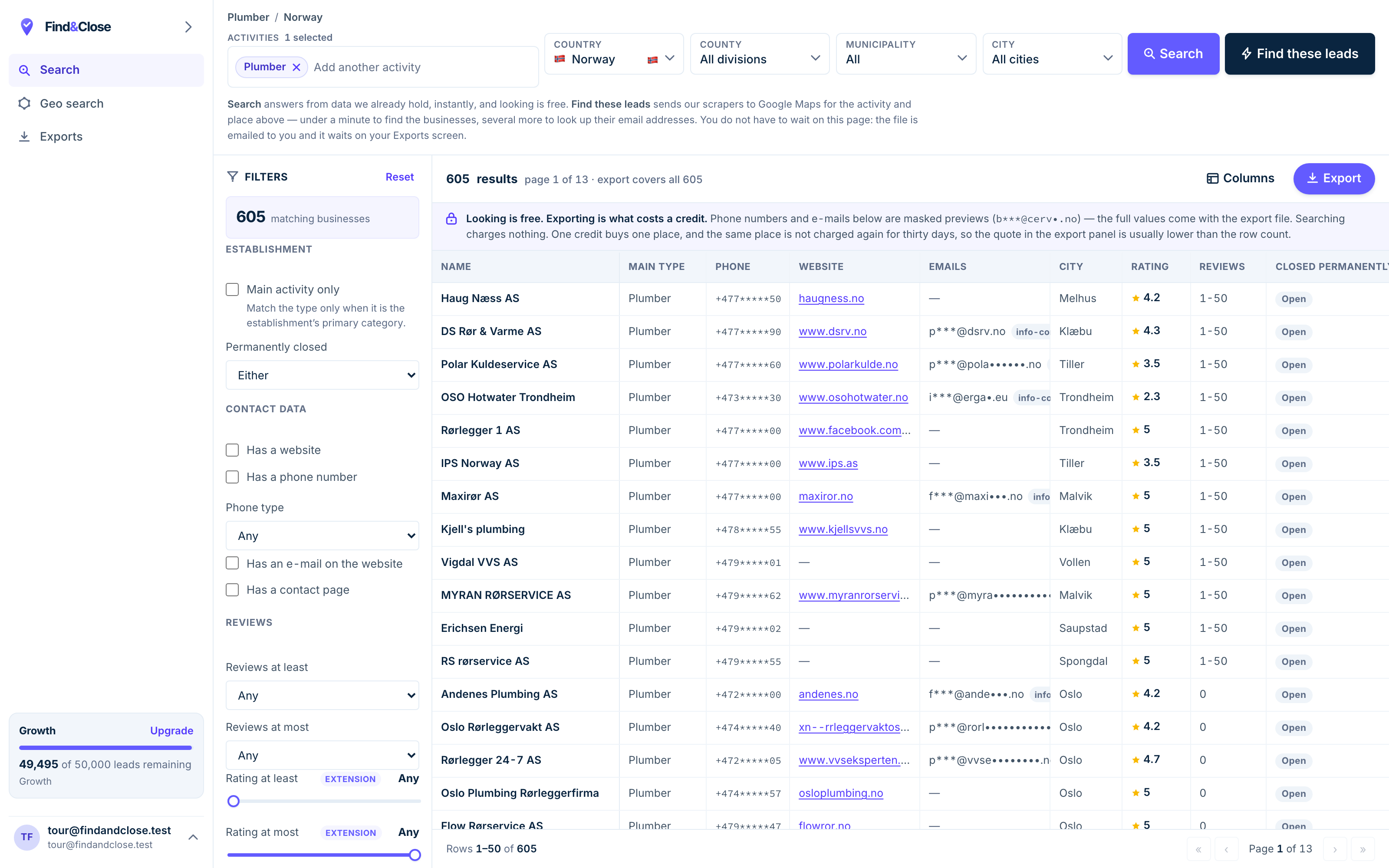
- Pick the trade Type it and take the match. One trade or twenty, on every plan.
- Pick the place Country, county, municipality, city. No plan gates the geography.
- The count moves first The number updates before you spend anything. Looking is free.
- Filter to the ones worth calling Has email, has phone, has a website, has a contact page. Combine them freely.
- Contacts are masked until export You can see a row exists and judge it. The address itself is the product.
- Export what you are looking at The file is exactly this filter set, with nothing dropped in between.
How to run both tools in one week
Four steps, two tools, about twenty minutes for the first list. Nothing here needs an engineer.
-
Open the app and pick a country. Norway, Sweden, Denmark or Finland.
Pick a category next. Plumber, electrician, salon, dentist, garage. There are over 4,000 to choose from.
The count updates as you click. You see the size of the list before you spend a credit.
Trade and country come first, because those two choices decide every filter after them.
-
Now cut the list down. Tick No website to keep the businesses running on a map pin alone.
Add a region if the list is still wide. One county in week one beats a whole country.
Drop the rows with no email if your first touch is email. Keep them if you plan to call.
A tight list of 300 beats a loose list of 3,000. You write a better first line when you know who is on it.
-
Export to CSV or XLSX. Sixty-four columns land in the file, on every plan.
Open it and keep the columns your sender needs. Name, email, town, trade, rating, review count.
That last pair earns its place. Review count is the best local personalisation field you will ever hold.
Keep the file. It stays yours after you cancel, and we never delete a past export.
-
Import the CSV as a new lead list. Map the columns you kept to custom fields.
Write the sequence over there. Use the town and the review count in the first line.
Send from their mailboxes, with their warmup and their rotation. That half is theirs, and it is good.
We hand over at the CSV. Everything after the import belongs to their product, not ours.
What a local list changes about your replies
We will not print a reply rate. We have not measured yours, and a made-up number would be worth nothing to you. The mechanism is worth walking through.
Three things change when the rows hold local businesses rather than job titles.
The no-website filter picks your best prospects for you
A business with no website has told you three things at once.
It has no agency. It has no marketing budget to defend. And whoever picks up the phone owns the decision.
Most contact databases cannot see this field. They start from people and companies, so a website is a company attribute nobody checks.
We start from the listing, so the website column is either full or empty. One tick turns a national list into a short list of owners with an obvious gap.
The phone column is a second path, not a plan B
Cold email to a small trade fails in a quiet way. Nobody bounces. Nobody replies. The mailbox belongs to the owner, and he reads it on site, once a week.
Every row we ship carries the business phone where Maps holds one. So silence on email is not the end of the thread.
Your sender handles the email step. You handle the call step, in your own time, off the same file.
Regional batches keep your domain calm
Sending tools want volume. Local lists are small on purpose. Those two facts sit together better than they sound.
Split the file by region and work one region a week. Your daily send stays low. Your reply handling stays human.
You also learn faster. A county is a clean test. Change one line, then run the next county and read the difference.
Every filter named on this page works on every plan. We do not gate geography, categories or export columns behind a tier. Only the credit count moves.
Questions people ask before they buy both
Do you send email?
No. We do not send email, and we will not pretend otherwise to win a signup.
There is no sequencer here, no warmup pool, no inbox rotation and no dialer. You keep your sending tool. We hand you a file.
So is this an Instantly alternative or not?
Not for sending. Nothing on this page replaces a sequencer.
It is an alternative to the data half of their bundle. Their credits buy contacts at companies. Our credits buy local businesses off Google Maps.
Plenty of teams pay for both, and that is the honest answer.
Instantly sells leads too. Why buy data twice?
Their database holds people at companies. The filters run on job title, seniority, headcount, industry, location, revenue and technology.
None of those fields finds a plumber with a van in Trondheim. There is no trade filter, no map category and no flag for a business with no website.
If you sell to software firms, use theirs. If you sell to local trades in the Nordics, use ours. The two files barely overlap.
What does the data half cost?
Plans open at $49 a month for 10,000 lead credits. Every plan searches every country we hold, with every filter and all 64 export columns.
The trial runs 14 days and gives you 100 leads, with no card. See what each plan holds.
Will the export import cleanly?
Yes. CSV and XLSX on every plan, JSON from Growth up, Parquet on Scale.
Our headers match scrap.io column for column, so a field mapping you already own keeps working.
Map the six or seven columns you need and ignore the rest.
Is cold email to these businesses legal?
Every field comes off a public map listing that the business published itself.
Under GDPR that is legitimate interest for B2B contact, and your first message must carry an opt-out.
We hold a suppression list per account. A domain you add there stays blocked on every future export. Read our full position.
Where to go next
The other three senders, the full index, and three lists people pull on day one.
- Lemlist and FindAndClose Personalisation needs fields to work with
- Smartlead and FindAndClose Unlimited mailboxes, finite list
- PersistIQ and FindAndClose A dialer needs phone numbers
- Every list we publish Trades, countries and guides
- Plumbers in Norway With phone, email and rating
- Electricians in Norway With the no-website flag
- Accountants in Norway The largest Nordic file we hold
Sort the list half. Keep the sender you have.
Fourteen days, 100 leads, no card. Pull one county of one trade, export it, and load it into the tool you already pay for.
- 14-day free trial
- 100 leads included
- No credit card