Compared · Lemlist
Lemlist writes the message. We supply the fields that make it land.
We do not send email and we do not write it. We pull local business rows out of Google Maps, with the fields a personalised first line needs.
We never send email64 columns per rowNorway, Sweden, Denmark, Finland
What Lemlist does that we do not
The concession first, and it is not a small one. Their product is the reason people pay for a sequencer at all.
Lemlist sends. It also personalises, which is the part they are known for.
Custom images. Dynamic landing pages. Liquid-style variables inside every line. A step that pauses for a LinkedIn visit, then an invite, then a message. SMS and WhatsApp steps beside the email ones. A dialer in the box on their multichannel tier.
They also run a deliverability hub with warmup, and they sell verified emails and phone numbers by the credit.
We build none of that. No sending. No writing. No LinkedIn steps. No dialer. No warmup.
We do not send email. Nothing on this page replaces a sequencer. Keep the one you have and read on for the file you feed it.
The problem with personalising a plumber
Their engine takes a variable and drops it into a line. That is a fine engine. It is also blind to what you hand it.
Their database is person-shaped. You filter on job title, seniority, headcount, industry and location. Waterfall enrichment then fills in an email or a phone number.
Now try to personalise a hair salon in Odense with those fields. Job title: owner. Industry: personal care. Headcount: three. Every line you write from that comes out generic.
A local business carries different tells. It has a rating. It has a review count. It has a town, a trade and opening hours. Half the time it has no website at all.
Those are the fields that make a first line sound like a person wrote it. They live on a map listing, not in a contact database.
Lemlist and FindAndClose, on data sourcing only
Sending, writing and multichannel are theirs. Every one of those rows sits shaded below. The rows worth reading are the ones about where a list comes from.
| FindAndClose | Lemlist | |
|---|---|---|
| Where the list comes from | Google Maps, crawled by us | Their people and company database |
| A record is centred on | The business | The person at the company |
| Nordic local tradessalons, plumbers, dentists, driving schools | Every open listing we can see | No trade or map-category filter |
| Filter for businesses with no website | Yes | No |
| Rating and review count on the rowthe two fields a local first line needs | Yes | No |
| Opening hours and map category | Yes | No |
| Verified work email for a named person | No | Yes |
| Mobile numbers for named staff | No | Yes |
| Hiring and funding signals | No | Yes |
| How the data half is billed | Flat credits, no per-field charge | Credits per email and per phone |
| Columns in the export | 64, on every plan | Contact and company fields |
| Past exports after you cancel | Yours, we delete nothing | Ask them before you cancel |
| Entry price | $49 a month, 10,000 credits | $69 a month, billed monthly |
| Sends the email | No | Yes |
| Image and landing-page personalisation | No | Yes |
| LinkedIn, SMS and WhatsApp steps | No | On the multichannel tier |
| Built-in dialer | No | On the multichannel tier |
| Warmup and deliverability hub | No | Yes |
| Reply handling and a unified inbox | No | Yes |
Lemlist's pricing and features last checked on 26 July 2026. We re-check every month. Rows shaded grey are ones where they beat us.
Prices come off their own pricing page on the date above. Their annual rate runs lower than the monthly one, so the row above quotes the monthly rate for a like-for-like read.
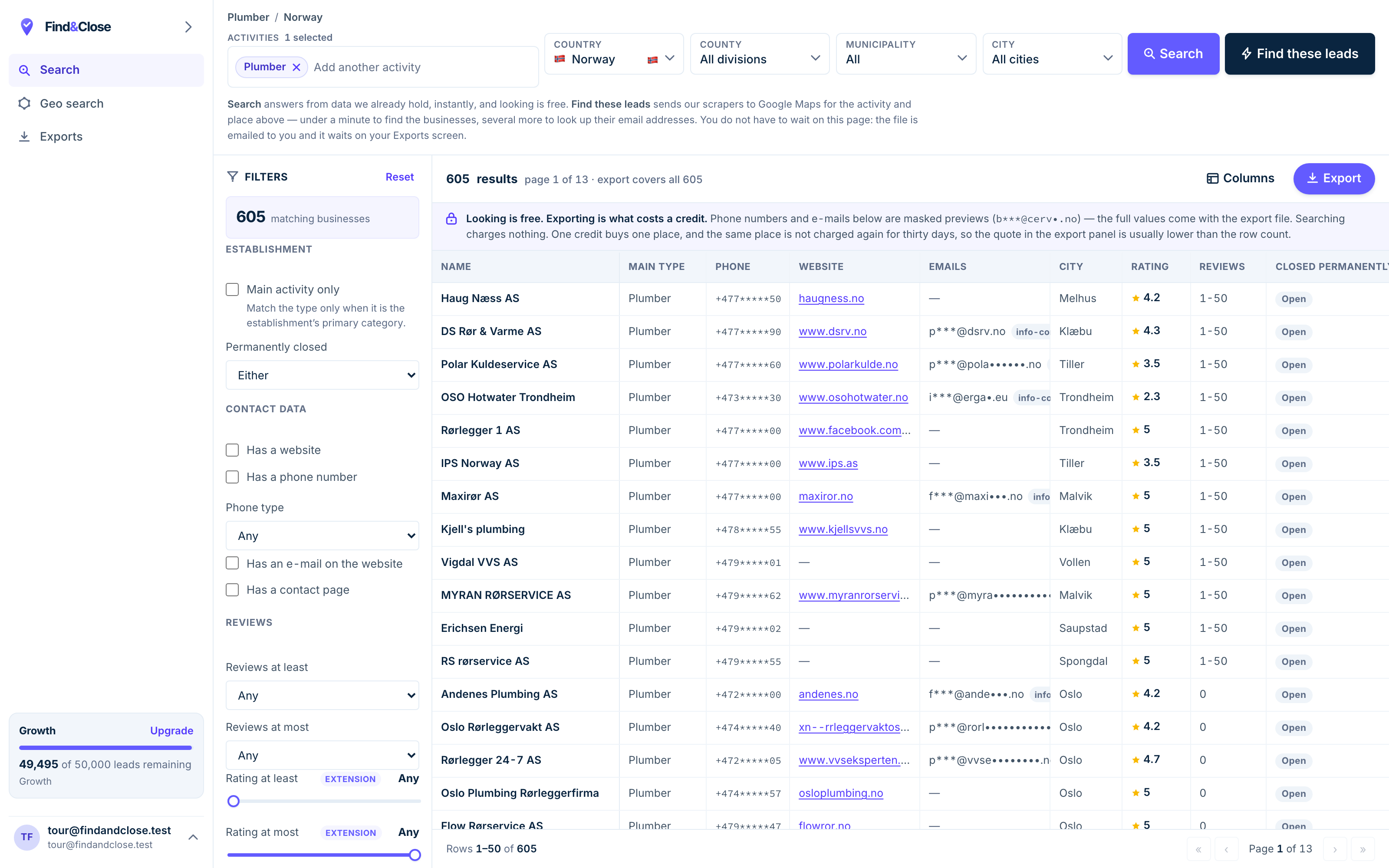
- Pick the trade Type it and take the match. One trade or twenty, on every plan.
- Pick the place Country, county, municipality, city. No plan gates the geography.
- The count moves first The number updates before you spend anything. Looking is free.
- Filter to the ones worth calling Has email, has phone, has a website, has a contact page. Combine them freely.
- Contacts are masked until export You can see a row exists and judge it. The address itself is the product.
- Export what you are looking at The file is exactly this filter set, with nothing dropped in between.
The two-tool workflow, start to finish
You build and cut the list here. You write and send it there. Four steps, and the handover is a CSV.
-
Choose the country, then the trade. Hair salons in Denmark. Plumbers in Norway. Garages in Sweden.
Over 4,000 map categories sit behind that picker, and the live count moves as you narrow it.
Pick one trade per campaign. A message that works on a salon will not work on a roofer, and one file per trade keeps that honest.
-
Cut the file to the group you can write to. Tick No website for the owners with the widest gap.
Sort by review count and keep the busy ones if you sell software. Keep the quiet ones if you sell marketing.
Narrow to a region so the batch fits one week of replies.
Review count is a real segmentation axis for local business. It stands in for size, age and demand all at once.
-
Export the file. Keep name, town, trade, rating, review count, website flag and email.
Those seven columns are the raw material for the personalisation you paid for.
Bring the fields across, not just the address. A variable you did not export is a line you cannot write.
-
Import the CSV and map the seven columns to custom variables.
Now write the line their engine was made for. Name the town. Name the star rating. Name the review count.
Add the LinkedIn or call step if the trade warrants one, and let their warmup carry the send.
Their personalisation is strong. It just needs a variable worth dropping in, and that is what the export carries.
What local fields change about your replies
No reply-rate claim here. We have not run your campaign. What we can do is show why the fields matter more than the copy.
Personalisation fails in a boring way. The variable is true but dull.
A specific fact beats a smooth sentence
Every owner has read a line that names their industry. It reads like a mail merge, because it is one.
A review count reads differently. It is public, it is theirs, and it moves week to week.
The same holds for the town and the star rating. They tell the reader you looked at their listing, not at a database row.
We ship all three on every row, so the fact is in the file before you write a word.
The no-website rows are the shortest path to a yes
A business with no website has no agency and no budget to defend. Whoever answers the phone owns the decision.
Contact databases cannot filter on this, because they start from people. We start from the listing, so the column is either full or empty.
One tick cuts a national file to the owners with the widest gap. That group is worth more than the rest of the file.
Phone gives the campaign a second life
A small trade reads email on site, once a week, on a phone. Silence is common and means very little.
Every row carries the business number where Maps holds one. So a quiet email step is a call list, not a dead end.
Their dialer sits on the multichannel tier. Point it at our phone column and the two halves fit.
Every filter here works on every plan. Geography, categories and all 64 columns come with the $49 tier. Only the credit count moves as you go up.
Questions before you pay for both
Do you send email?
No. We do not send email, and we do not write it either.
There is no sequencer here, no warmup, no LinkedIn steps and no dialer. Keep your sender. We hand you the file it needs.
Then why call this a Lemlist alternative?
We would rather not. It is the phrase people search, so this page answers it head on.
On sending, they win by default. We do not compete there at all.
On the data half, the two are real options, and they sell to different buyers.
Lemlist has its own lead database. Why add ours?
Theirs indexes people at companies, with waterfall enrichment for emails and phone numbers. For selling into offices, that is the right shape.
Local trades sit outside that shape. A one-van electrician has no LinkedIn profile and no seniority band.
Ours indexes the business instead. Different source, different rows, very little overlap.
How do the two costs compare?
Their credits price per enriched field, with an email costing less than a phone number.
Ours are flat. One credit is one row, and the row arrives with all 64 columns filled in as far as the listing allows.
Plans open at $49 a month for 10,000 credits. See the full breakdown.
What arrives in the export?
Name, address, postcode, region and coordinates. Phone, with a flag for mobile. Email, plus the page we found it on.
Website and a flag for the ones with none. Rating, review count and whether the owner has claimed the listing.
Social profiles where the listing carries them, opening hours, price level and the map category tree.
Do we cover more than the Nordics?
Every plan can search every country. Our depth is in Norway, Sweden, Denmark and Finland, and we say so rather than claim the world.
The source is Google Maps today. Apple Maps and Bing Maps are on the roadmap, and we will not list them as shipping until they ship.
Where to go next
The other three senders, the full index, and three lists people pull on day one.
- Instantly and FindAndClose The sending half and the list half
- Smartlead and FindAndClose Unlimited mailboxes, finite list
- PersistIQ and FindAndClose A dialer needs phone numbers
- Every list we publish Trades, countries and guides
- Plumbers in Norway With phone, email and rating
- Electricians in Norway With the no-website flag
- Accountants in Norway The largest Nordic file we hold
Give your personalisation something to work with
Fourteen days, 100 leads, no card. Pull one trade in one region and see which fields your first line has been missing.
- 14-day free trial
- 100 leads included
- No credit card