Compared · LeadSwift
The LeadSwift alternative that counts before you search
LeadSwift bundles local lead capture and cold email into one tool, metered by searches per day. We sell the list alone, out of a Nordic index you can count first.
No daily search capCount before export64 fixed columns
What LeadSwift is good at
This is the most direct competitor on our comparison pages. Same buyer, same promise, different machine.
LeadSwift finds local businesses on demand. You type a keyword and a place, and it goes hunting. Their examples read like ours: restaurants in Toronto, plumbers in Dallas.
It pulls from more than Google Maps. Their site names Yelp and similar sources beside it. That is one more net in the water than we cast.
It reaches past the switchboard too. They advertise decision-maker contacts: names, titles and personal emails. We ship what the firm publishes, and no more.
The enrichment goes deep. Tech stack, social profiles, review scores and SEO signals ride along on the row. You can even filter firms by keywords inside their website code.
Then comes the part we chose not to build. LeadSwift sends the email for you. Sequences, sender rotation, A/B tests, open and reply tracking, and one shared inbox for answers.
Every plan carries unlimited leads, contacts and exports. Only the searches per day change: one, five or twenty. Their 7-day trial is free and needs no card.
One tool that finds and sends is a real pitch, and for a solo founder it may be the right one. We split those jobs on purpose, and this page explains the cost of each choice.
Where they win outright
- Cold email lives inside the product, so one login runs the lot
- Decision-maker names and titles, which we do not offer
- Yelp and other sources beside Google Maps
- Any market you can type, not four countries
- A cheaper entry ticket on annual billing
- Annual plans pause for up to three months
LeadSwift and FindAndClose, row by row
Their prices came off their own pricing page on the date below. Grey rows are the ones they win.
| FindAndClose | LeadSwift | |
|---|---|---|
| What the plan metersModel | Lead credits | Searches per day |
| Searches per dayModel | No cap, credits only | 1, 5 or 20 by plan |
| Leads, contacts and exportsModel | Credits inside your plan | Unlimited on every plan |
| Entry price, monthly billingPricing | $49 a month | $49.99 a month |
| Entry price, annual billingPricing | $39 a month | $19.99 a month |
| Top listed planPricing · monthly billing | $249, 250,000 credits | $199.99, 20 searches a day |
| Pause your planPricing | No | Annual, up to 3 months |
| Free trialPricing · no card either way | 14 days, 100 leads | 7 days |
| Data sourcesCoverage | Google Maps | Maps, Yelp and similar |
| GeographyCoverage | Every country, fetched on demand | Anywhere you can search |
| Decision-maker names and titlesCoverage | No | Advertised on their site |
| How a search runsWorkflow | A query on a held index | A live hunt per search |
| Count before you spendWorkflow | Yes | Run the search and see |
| A whole country in one queryWorkflow | Every plan | A keyword and a place per search |
| Dedup across searchesExport | One row per firm | We could not confirm |
| Fixed 64-column exportExport | Yes | Not published |
| MX check on the email domainExport | Yes | Not published |
| Sends the email for youOutreach · by design on our side | No, and we say so | Sequences, rotation, shared inbox |
| Suppression list per accountOwnership | Yes | We could not confirm |
| Your exports after you cancelOwnership | Yours, we keep nothing back | Not stated on their pricing page |
LeadSwift's pricing and features last checked on 27 July 2026. We re-check every month. Rows shaded grey are ones where they beat us.
Their pricing page ran a 50%-off promotion on the date above and calls its rates early-adopter pricing. Check the page yourself before you compare. We re-check monthly.
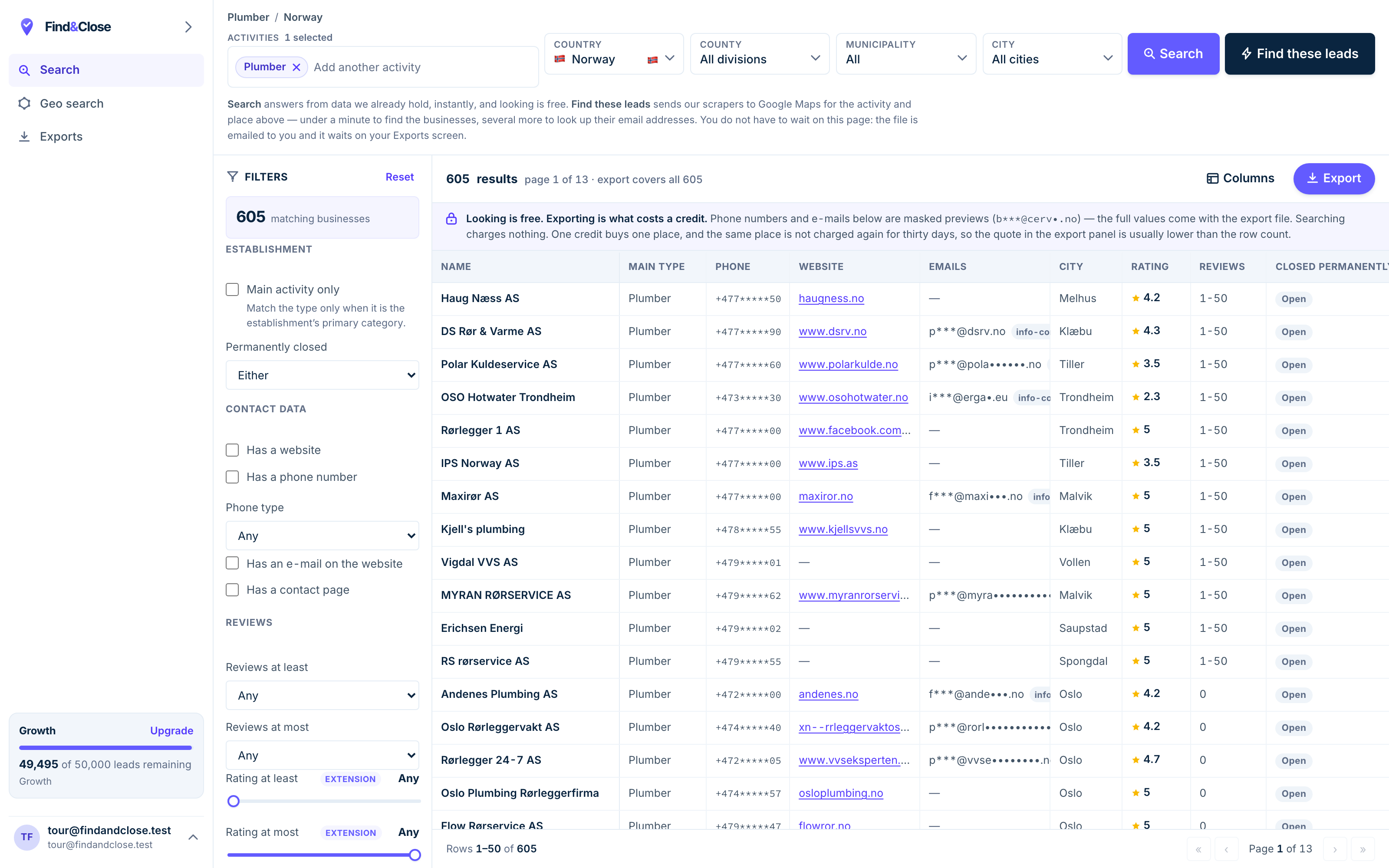
- Pick the trade Type it and take the match. One trade or twenty, on every plan.
- Pick the place Country, county, municipality, city. No plan gates the geography.
- The count moves first The number updates before you spend anything. Looking is free.
- Filter to the ones worth calling Has email, has phone, has a website, has a contact page. Combine them freely.
- Contacts are masked until export You can see a row exists and judge it. The address itself is the product.
- Export what you are looking at The file is exactly this filter set, with nothing dropped in between.
The one difference that decides it
LeadSwift meters the hunt. We already hunted. Everything else on this page follows from that.
A search cap changes how you plan a week
On their Starter plan you get one search a day. One keyword, one place. They say a typical search returns thousands of firms, and every one of them is included.
That is generous per search, and tight per day. Cover a trade across twenty towns and you either wait twenty days or buy a bigger plan.
Our meter is the row, not the question. Ask anything, as often as you like. The count updates as you tick filters, and credits only leave when you export.
Twenty towns is one query here, because the index already holds them. The whole country is, too.
Bundled sending, or your own sender
LeadSwift folds the sender into the plan. That is convenient, and it is also a commitment. Your list, your sequences and your reply history all live in one vendor.
We stop at the file, on purpose. Send from any tool you already trust, and keep the list if you ever change it.
There is a real trade here and we will not flatten it. One tool is simpler. Two tools are yours.
If you go the two-tool route, our cold email guide for local businesses shows a full sequence to run in your own sender.
Who should buy which
- One login that finds and sends, worldwide — buy LeadSwift.
- Owner names and titles on the row — buy LeadSwift.
- Nordic markets, counted before you spend — buy ours.
- A fixed schema your CRM import can trust — buy ours.
- A list that outlives every vendor choice — buy ours.
What a switch involves
Both trials are free and cardless, so the honest answer is: run them side by side.
- Export your LeadSwift lists. Exports are unlimited there, so pull everything you value first.
- Start our trial. 14 days, 100 leads, no card. Nothing converts on its own.
- Query one market you know. A trade and a country. Read the count, then export and open the file.
- Compare the rows, not the pitch. Same firms, two files. Check emails, phones and dead listings in each.
- Decide where sending lives. Keep their sender, or point your own tool at our CSV. Both work.
The overlap between these two tools is real, so the file test settles it faster than this page can.
Judge three things: how many rows are right, how many are dead, and whether the schema will still be the same next month.
Then judge the meter. A cap on searches suits a patient solo seller. A cap on rows suits a team that asks many questions.
Questions people ask before they move
Should I stay with LeadSwift?
Yes, if you want one tool that finds leads and sends the email, anywhere on earth. That bundle is their whole pitch, and for small teams it works.
Move if your market is Nordic and you want a count on screen before any spend. That is our whole pitch.
Is FindAndClose cheaper than LeadSwift?
On annual billing, no. Their $19.99-a-month Starter undercuts our $39 annual rate, and we mark that as their win.
On monthly billing the entry prices sit level. What differs is the meter: searches per day there, lead credits here. See our tiers.
Do you send email like they do?
No, and that is a design choice, not a gap we are racing to close. We hand you the file, and you send from your own tool.
Our pages show sample sequences as advice to run yourself. We never send a message on your behalf.
Do you find owner names and personal emails?
No. We ship what the firm publishes about itself: the switchboard, the site, and role inboxes like contact and sales.
LeadSwift advertises decision-maker contacts, and we mark that as their win. Our GDPR position is simpler for it — the legal picture is here.
What does a search actually cost in each tool?
There, a search is a metered daily unit that returns unlimited leads. Here, a search is free, and the export spends credits per row.
So test five filters here before spending anything. The count on screen moves as you tick them.
How big is your index?
44,684 records across Norway, Sweden, Denmark and Finland, from Google Maps. Every count on our pages comes off the live database.
We do not cover other countries yet, and we say so rather than hedge. Browse every list we publish.
Read the other comparisons
LeadSwift usually gets weighed against these. Each page concedes what it must.
- PhantomBuster compared A list vs an execution timer
- Google Maps email extractor Where the emails come from
- D7 Lead Finder compared The other daily-search model
- Scrap.io compared The closest rival
- Chrome Maps scrapers The cheap end of the market
- Cold email for local firms The sending playbook
- Every list we publish The full index
Test the file against theirs
Fourteen days, 100 leads, no card. Pull one Nordic market, open both exports, and count which rows you would call.
- 14-day free trial
- 100 leads included
- No credit card