Plain guide
Google Maps email extractor: the three routes that actually work
Maps does not hold email addresses, so every extractor gets them somewhere else. This page explains where, what that costs, and which route fits which job.
The email is never on the listingThree routes comparedSources named throughout
Start with the fact most tools skip
There is no email field on a Google Maps listing. None. Every tool selling this search term works around that.
A Maps listing holds a name, an address, a phone, a website, hours and reviews. It does not hold an email address, and it never has.
The official Places API confirms it: email is not a field you can request at any price.
So a Google Maps email extractor is really two machines in one. The first reads the listing. The second follows the website link and hunts the site for an address.
That second machine is where the tools differ. It decides your hit rate, your speed, your cost and whether you can trust the column at all.
Why this matters before you buy
A firm with no website can never yield an email, whatever the tool. No site, no hunt.
A found address can still be wrong, stale or a catch-all. A serious tool tells you where it found each one, so you can check.
And an extractor is only as good as its Maps reading. If the search misses half the firms, the email hunt starts half-blind.
Route one: an extension in your browser
A panel rides on top of a Maps search you run yourself. It reads the results, visits the sites, and builds a CSV.
This is the cheap seat, and for small jobs it is a fine one. Install it, search a city, press the button.
Where it fits
- One town, one trade, a few hundred rows, today
- A quick test of a niche before real money goes in
- A budget near zero
Where it stops
Maps feeds one search a couple of hundred results at most. The extension cannot read rows Maps never drew.
The email hunt runs in your browser, on your IP, one site at a time. A big list means your machine stays open for hours.
Overlapping searches land the same firm in three files. You become the dedup step.
And when Google changes the page layout, the reader breaks until its maker patches it.
We wrote up the extension class in full, with names, in the Chrome scraper comparison.
Route two: a cloud automation
A hosted platform runs the same two steps on its machines. You configure the job; it delivers the file.
PhantomBuster is the best-known name here. Its Maps flow exports a search, then visits each firm website for emails, phones and social links. Your laptop stays shut throughout.
The ceiling moves up, not away. Their own docs note that Maps shows at most 120 results per search. Big areas mean many searches, stitched together.
You pay in platform units. Hours of run time, enrichment credits, automation slots. The bill fits the platform, not the list.
Where it fits
- You already run automations on such a platform for other networks
- Your market sits outside anyone’s ready-made index
- You want scheduled re-runs feeding another system
We compared the biggest platform in this class row by row in the PhantomBuster page.
Route three: an index with the emails already found
The third route does the extraction before you show up. You query a finished store and export rows.
This is what we build. Our crawler reads Maps listings across Norway, Sweden, Denmark and Finland. It follows each website and files what it finds.
By the time you search, the hunting is over. You filter a trade and a country, read the count on screen, and export.
What the shape buys you
- A count before any spend, so you can size a market for free
- One row per firm, no matter how many searches you run
- An email column with the source page beside it
- An MX check on the email domain, so you know mail can land
- Role inboxes where the site lists them: contact, sales, finance
- 64 columns in a fixed order, on every plan
What the shape costs you
Coverage is whatever the index holds. Ours is four Nordic countries and nothing else. If you sell into Texas, routes one and two are your routes.
Freshness is the crawl cycle, not this minute. We stamp dates on our data so you can judge that trade yourself.
The three routes, side by side
The extractor column stands for the browser-extension class as a whole. Read it as a shape, not one brand.
| FindAndClose | Browser extractor | |
|---|---|---|
| Cost to start | From $49 a month | Free to a few euros |
| Works anywhere on earth | Every country, fetched on demand | Wherever you search |
| Where the email hunt runs | Our crawler, before you arrive | Your browser, while you wait |
| Machine on during the job | No | Yes, for the whole run |
| Rows from one searchMaps caps a single query | A whole country | A couple of hundred |
| Count before you spend | Yes | No |
| One row per firm across searches | Yes | No |
| Source page beside each email | Yes | Varies by tool |
| MX check on the email domain | Yes | Varies by tool |
| Survives a Maps redesign | Yes | No |
| Schema that never moves | 64 columns, one order | Varies by tool |
Browser extractor's pricing and features last checked on 27 July 2026. We re-check every month. Rows shaded grey are ones where they beat us.
The cloud-automation route sits between these columns. It is hosted like an index, yet you configure it like an extension. Its own docs put a 120-result cap on each Maps search.
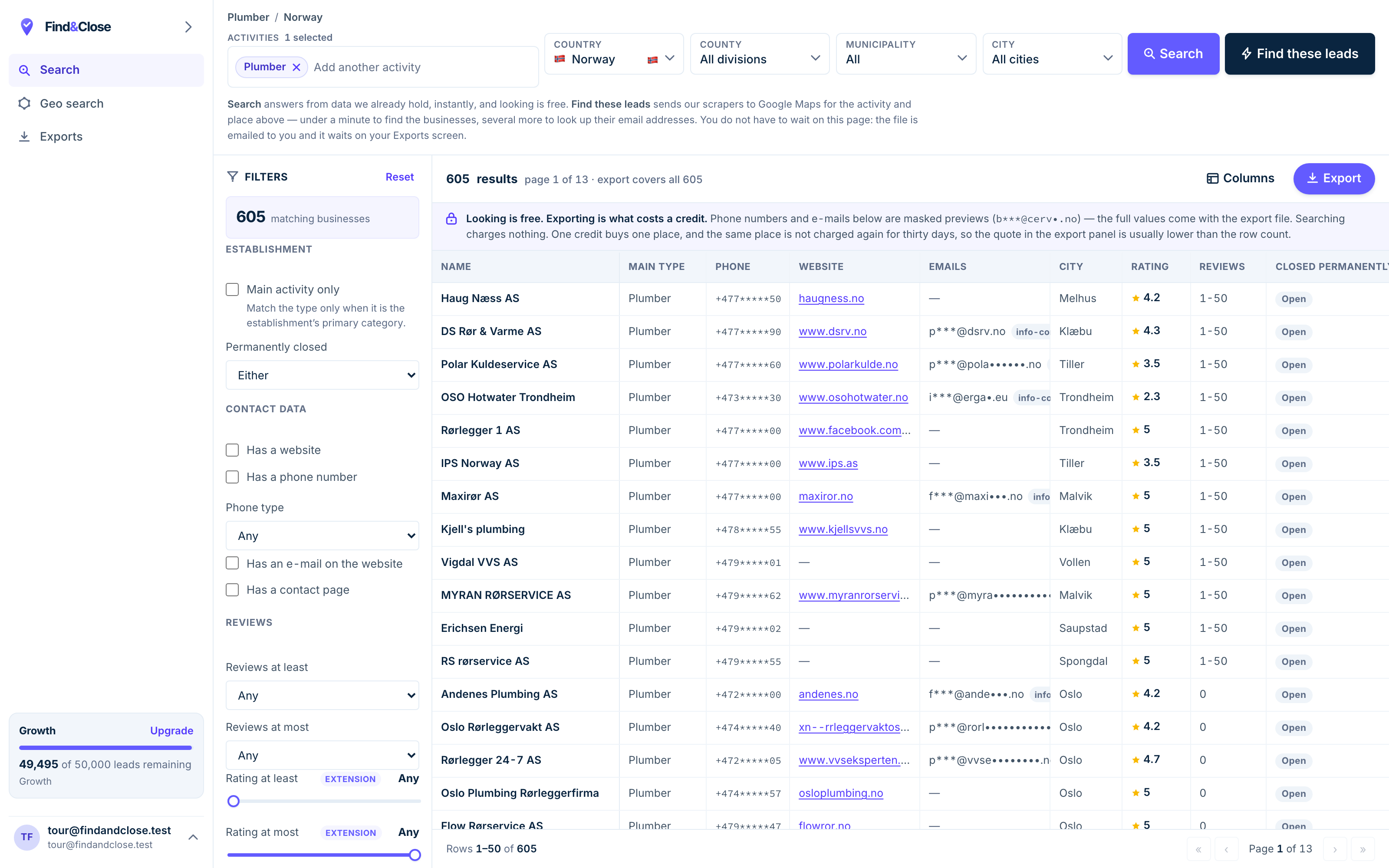
- Pick the trade Type it and take the match. One trade or twenty, on every plan.
- Pick the place Country, county, municipality, city. No plan gates the geography.
- The count moves first The number updates before you spend anything. Looking is free.
- Filter to the ones worth calling Has email, has phone, has a website, has a contact page. Combine them freely.
- Contacts are masked until export You can see a row exists and judge it. The address itself is the product.
- Export what you are looking at The file is exactly this filter set, with nothing dropped in between.
How to judge any email column
Whatever route you pick, test the column the same way. Five checks, ten minutes, before any campaign.
- Ask where the tool found each email. A tool that cannot name the source page is asking you to guess with it.
- Check the domain takes mail. An MX lookup is cheap. A column without one hides its dead weight.
- Count the blanks, and respect them. Firms without websites cannot have emails. A 100% fill rate is a warning, not a feature.
- Look for role inboxes. contact@ and sales@ are what small firms publish. Tools promising more are hunting elsewhere.
- Send ten by hand first. Bounces on a hand-picked ten mean the column is soft. Stop and ask the vendor why.
One more thing belongs in the plan: the law. In the EU, cold B2B email runs on legitimate interest, with real duties attached.
Name yourself, say where the address came from, offer an opt-out, and honour it. The GDPR cold email guide walks the whole position.
And keep a suppression list from day one. A firm that says stop must stay stopped, whichever teammate exports next.
Common questions about extracting emails from Maps
Can any tool extract emails straight from Google Maps?
No. There is no email field on a Maps listing, so there is nothing on the listing to extract.
Every tool that returns an email followed the website link and found it there. Ask any vendor to confirm this, and be wary of one who will not.
Why do so many rows have no email?
Because many firms have no website, and a firm with no site cannot yield an address. Others have a site but publish only a form.
That is the terrain, not a tool failure. In our index the blank is honest: the row still carries the phone the firm published.
Are extracted emails safe to send to?
Safer when three things hold. The tool names the source page. The domain passes an MX check. Your message fits the business you write to.
Then follow the EU rules: identify yourself, cite the source, offer an opt-out. See the legal guide.
How long does extraction take?
In your browser, hours for a big list, because each website is visited live. On a cloud platform, it is a queued run against a metered clock.
Against an index, seconds. The visiting happened during the crawl, before you searched.
What does FindAndClose actually extract?
We crawl Maps listings across four Nordic countries, follow each website, and file emails, role inboxes, socials and more. 64 columns, fixed order, every plan.
Each email carries its source page and an MX flag. Browse every list we publish or the plans.
Can I try it before paying?
Yes. Fourteen days, 100 leads, no card, and nothing converts on its own.
Pick a trade and a country, read the count, and export a real file. Judge the email column against the five checks above.
Read next
The named tools behind each route, and the guides that follow the file.
- PhantomBuster compared A list vs an execution timer
- LeadSwift compared Credits vs searches per day
- Google Maps scraper guide The wider four-route map
- Build a local email list The full method
- Maps data without code Step by step
- GDPR and cold B2B email The legal position
- Every list we publish The full index
Skip the extraction. It already ran.
Fourteen days, 100 leads, no card. Filter a Nordic trade, read the count, and export a file with the email and its source page on every row.
- 14-day free trial
- 100 leads included
- No credit card