Compared · PhantomBuster
The PhantomBuster alternative with no execution timer
PhantomBuster rents you automation hours and lets you build almost anything. We hold a Nordic index and hand you the finished file. Two different products, and a fair table below.
No hours to meterNo Phantom to configureEmail on the row
What PhantomBuster is good at
PhantomBuster is not a Maps scraper with extras. It is an automation platform, and a broad one.
Their site counts 2.5 million users since 2016. That is a long run in this market, and it shows in the product.
The model is simple to state. You pick a ready-made automation, called a Phantom, and feed it input. It runs in their cloud, on their machines, with your browser shut.
The store covers far more than Maps. LinkedIn work is the heart of it. Profile visits, connection requests, Sales Navigator exports and outreach flows all live there.
For Maps they ship a flow called Google Maps Search to Contact Data. It exports a Maps search, then visits each firm website to hunt for emails, phones and social links.
Every plan carries unlimited users. Every plan carries an MCP server, so an AI agent can drive the tool. Both are strong calls, and we match neither.
The free trial costs nothing and needs no card. It holds two hours of run time and caps exports at ten rows.
If your real job is LinkedIn outreach with Maps on the side, PhantomBuster is the better buy. This page is for the other case: you want a local business list, full stop.
Where they win outright
- Hundreds of automations across many networks, not one source
- LinkedIn and Sales Navigator flows, which we will never build
- Unlimited users on every plan, trial included
- An MCP server, so Claude or ChatGPT can run it for you
- Worldwide reach on the day you press launch
PhantomBuster and FindAndClose, row by row
Their figures came off their own pricing page on the date below, on annual billing. Grey rows are the ones they win.
| FindAndClose | PhantomBuster | |
|---|---|---|
| What you buyModel | A finished list | An automation platform |
| Data sourcesCoverage | Google Maps | LinkedIn, Maps and many more |
| GeographyCoverage | Every country, fetched on demand | Worldwide |
| What the plan metersPricing | Lead credits only | Hours, slots and three credit types |
| Entry pricePricing · their annual rate | $49 a month | $56 a month, billed annually |
| Execution time by planPricing | None to manage | 20 to 300 hours a month |
| When the hours run outPricing · their own FAQ | Nothing pauses | Automations pause until reset |
| Email enrichment allowancePricing | On the row, in the plan | 500 to 10,000 credits a month |
| Rows from one Maps searchWorkflow · their own docs say 120 | A whole country | Up to 120 per search |
| Count before you spendWorkflow | Yes | Launch the run and see |
| Setup before the first rowWorkflow | Filter and export | Pick, configure and feed a Phantom |
| Fixed 64-column exportExport | Yes | Varies by Phantom |
| Users per accountSupport | 1 to unlimited by tier | Unlimited on every plan |
| MCP server for AI agentsSupport | No | On every plan |
| LinkedIn automationCoverage | No | Yes |
| Free trialPricing · no card either way | 14 days, 100 leads | Free, exports capped at 10 rows |
| Suppression list per accountOwnership | Yes | We could not confirm |
| Your exports after you cancelOwnership | Yours, we keep nothing back | Not stated on their site |
PhantomBuster's pricing and features last checked on 27 July 2026. We re-check every month. Rows shaded grey are ones where they beat us.
Their prices above are annual-billing rates from their pricing page. Their toggle marks annual as the 20% saving, so monthly billing costs more. We re-check this table every month.
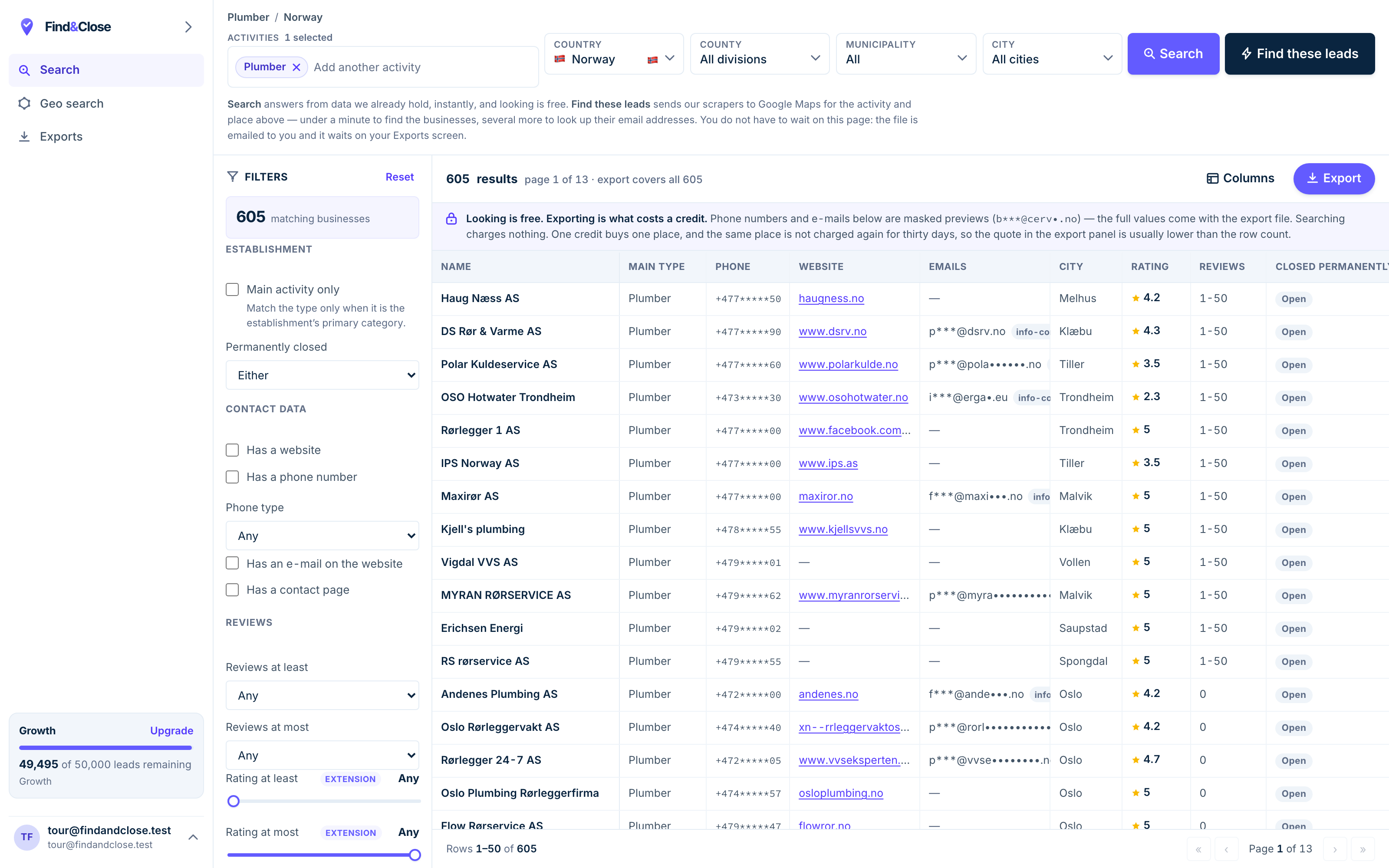
- Pick the trade Type it and take the match. One trade or twenty, on every plan.
- Pick the place Country, county, municipality, city. No plan gates the geography.
- The count moves first The number updates before you spend anything. Looking is free.
- Filter to the ones worth calling Has email, has phone, has a website, has a contact page. Combine them freely.
- Contacts are masked until export You can see a row exists and judge it. The address itself is the product.
- Export what you are looking at The file is exactly this filter set, with nothing dropped in between.
The one difference that decides it
PhantomBuster sells you time on their machines. We sell you rows out of an index we already built.
The meter
Every PhantomBuster plan holds a monthly stock of hours. The clock runs while a Phantom works. Their Start plan holds 20 hours, Grow holds 80, Scale holds 300.
Run dry and the automations pause. Their own FAQ says so, in plain words. They wait for the monthly reset, or for an upgrade.
That model is fair for what they sell. An automation platform has to meter something, and time is the honest unit.
It is a poor fit for a list, though. A list has a size, not a duration. You should pay for rows, not for the minutes a robot spent finding them.
The 120-row ceiling
Their own docs carry a note worth reading twice. Google Maps shows at most 120 results per search, so one run can never return more.
Their fix is honest: split the area up and run many searches. Each search burns time on the meter, and each one can overlap the last.
We solved this on our side of the fence. Our crawler did the splitting, the running and the merging before you arrived.
So one query here covers a whole country. The count sits on screen before you spend a credit, and each firm appears once.
Who should buy which
- Automating LinkedIn touches at any scale — buy PhantomBuster.
- Chaining flows across many networks — buy PhantomBuster.
- Wiring an AI agent into your outreach stack — buy PhantomBuster.
- Pulling Nordic local business lists every week — buy ours.
- Wanting a count on screen before any spend — buy ours.
What a switch involves
For the Maps part of your work, very little. There is no Phantom to rebuild, because there is nothing to run.
- Download your past results. Pull the CSVs from your Phantom runs while you still have the plan.
- Start our trial. 14 days, 100 leads, no card. Nothing converts to a paid plan on its own.
- Run one search here. Pick a trade and a country. Read the count before you export a row.
- Check the header row. Our 64 columns never move. Map your CRM import once and forget it.
- Keep PhantomBuster for LinkedIn. Plenty of teams run both. We do not touch LinkedIn and never will.
The two tools barely overlap once you name the jobs. One automates networks. One hands you a Nordic file.
If Maps lists are a side dish for you, stay put and spend nothing. If they are the meal, the meter is the wrong way to buy them.
Run the trial against one real market and judge the rows. That costs an afternoon and no money.
Questions people ask before they move
Should I stay with PhantomBuster?
Yes, if LinkedIn automation is part of your week. We do not touch LinkedIn, and their flows there are the best-known in the market.
Move only if your real need is local business lists. That is the one job where an index beats an automation.
Is FindAndClose cheaper than PhantomBuster?
Close, at entry. Our $49 plan sits near their $56-a-month annual rate. Monthly billing with them costs more than that.
The models differ more than the prices. They meter hours and credit types. We meter lead credits and nothing else. See what each tier holds.
What is execution time, and why do you not have it?
On their platform, it is the monthly stock of hours your automations may run. When it runs out, the automations pause until reset.
We have no equivalent because nothing runs on your behalf. You query an index we already hold, and the answer is instant.
Do you have an MCP server like theirs?
No. PhantomBuster ships one on every plan, trial included, and that is a real win for them.
We ship a REST API from the $99 tier at 10 requests a second. Higher tiers run at 50 and 200.
Where does your email column come from?
The same place theirs does: the firm website, not the Maps listing. No Maps listing carries an email field.
The difference is when the work happens. Their flow hunts per run, on your hours. Our crawl did it before you searched, and each row names the page the email came from.
Can I keep my exports if I cancel?
Yes. The file you downloaded is yours, and we do not delete customer exports.
You lose the app and new searches. You keep every row you already pulled.
Read the other comparisons
PhantomBuster rarely sits alone on a shortlist. Here is the rest of it, written the same way.
- LeadSwift compared Credits vs searches per day
- Google Maps email extractor Where the emails come from
- Apify compared The other platform play
- Scrap.io compared The closest rival
- The four routes to Maps data The plain guide
- Instantly compared Sending is a separate job
- Every list we publish The full index
Read the count, skip the meter
Fourteen days, 100 leads, no card. Pick a Nordic trade, watch the number on screen, and export a file with the email already on the row.
- 14-day free trial
- 100 leads included
- No credit card