Guide · Buying data
Should you buy an email list?
A bought list can save you weeks, or it can burn a sending domain. This page shows what the money gets you. It also shows how to vet any seller, ours included.
Useful even if you never buy from usNordic data: NO · SE · DK · FIA seller checklist to copy
What you are really buying
Every email list is a photograph. The only question is when the photo was taken.
A list is a file of rows someone collected at some point in the past. The seller ran a crawl, or bought one, and froze what it found.
The world did not freeze with it. Firms close. Owners sell up. Websites lapse and addresses change with them.
None of that shows in the file. A stale row looks exactly like a fresh one until you send to it.
So the value of any list is set by one date: the last time each row was checked. Not the day you paid.
- A row checked last week is a lead.
- A row checked last year is a guess.
- A row with no date at all is a liability, priced as a lead.
Cards on the table: we sell email lists too. Ours cover local businesses in Norway, Sweden, Denmark and Finland, and nowhere else. If you need US or global data, a tool like Outscraper fits better. Either way, hold every seller — us included — to the checklist below.
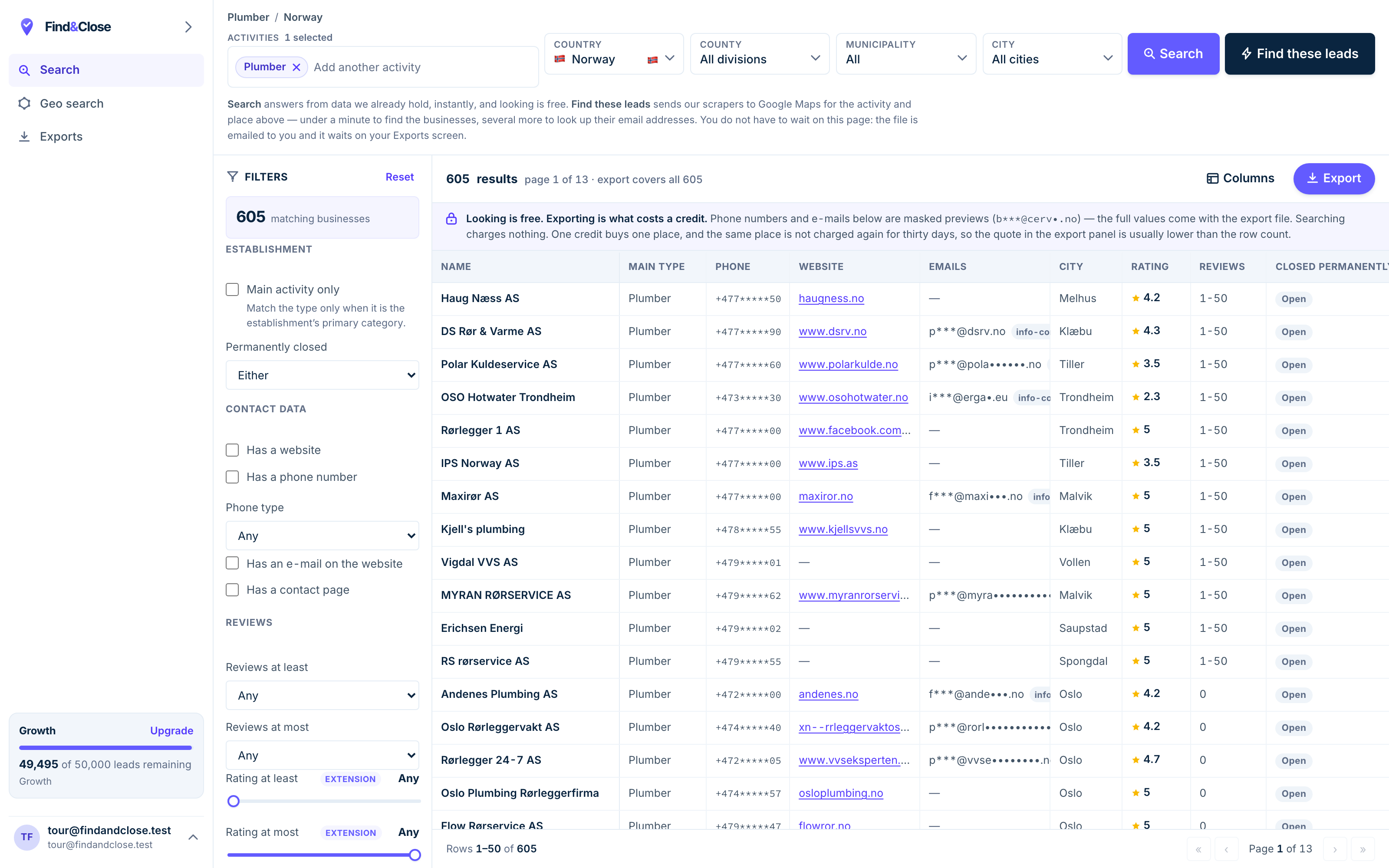
- Pick the trade Type it and take the match. One trade or twenty, on every plan.
- Pick the place Country, county, municipality, city. No plan gates the geography.
- The count moves first The number updates before you spend anything. Looking is free.
- Filter to the ones worth calling Has email, has phone, has a website, has a contact page. Combine them freely.
- Contacts are masked until export You can see a row exists and judge it. The address itself is the product.
- Export what you are looking at The file is exactly this filter set, with nothing dropped in between.
The three risks the pricing page never mentions
Bought lists fail in three ways. Each one is avoidable, and each one is common.
Stale rows
Lists get resold. A file can pass through several hands before it reaches you, and it ages at every step.
The seller rarely lies about this. They just do not bring it up, and most buyers never ask.
Ask when each row was last seen. A serious seller answers with a date on the row. A reseller answers with a discount.
GDPR exposure
The moment you import a list, its legal duties become yours. Not the seller’s. Yours.
In the EU, cold B2B email runs on legitimate interest, and that basis carries duties. You must say who you are. You must say where you got the address. You must offer an opt-out and honour it.
That is workable for business addresses drawn from public sources. It gets much harder for consumer inboxes, where marketing law expects consent.
A personal name in an address is personal data, full stop. The GDPR cold email guide walks the whole position. This page is not legal advice, and neither is that one.
Your sending domain
Mailbox providers watch your bounce rate. Mail that hits dead addresses reads as a bought-list signal, and they treat the sender as such.
The damage lands on the domain, not the campaign. Burn it, and every later email from that domain starts life in a worse place.
This is the cost people miss. A cheap list can be the most expensive thing you buy this year.
One more trap: some sending tools ban bought lists outright in their terms. Read yours before you import a single row.
When a bought list is defensible
Sometimes buying is the right call. The honest cases share a shape.
Buying beats building when the list is fresh, the target is business inboxes, and you plan to work it hard.
- The addresses are B2B: role inboxes on public business data, not private people.
- The seller can name the source and the date for every row.
- You will work the market for months, not blast it once.
- You verify the file before the first send and drop what fails.
- The message fits the trade you write to. Relevance is half the legal case.
And the cases where you should walk away.
- Consumer addresses, at any price.
- Huge counts at tiny prices with no source named.
- Any file the seller will not sample before you pay.
- A plan that starts and ends with one big blast.
Building the list yourself is always an option too. The local email list guide shows what that takes and what coverage to expect.
The seller checklist
Six questions, ten minutes. Any seller worth paying answers all six without flinching.
- Ask where each address was found. A good answer names a source per row, such as the contact page it came from. A vague answer means guessed addresses.
- Ask when each row was last seen. You want a date on the row, not a claim about the file. Data without dates is folklore.
- Get a sample before you pay. Twenty rows from your real segment. Open ten websites by hand and check the addresses match.
- Verify the sample. Run it through any email verifier. A high failure rate on twenty rows tells you about the other ten thousand.
- Count the blanks. Local firms without websites cannot have findable emails. A 100% fill rate is a warning, not a feature.
- Ask what happens after you cancel. Some vendors delete your exports when the plan ends. Get the answer in writing.
Notice what the checklist does not ask: the price. Price per row is the last question, because a dead row is not cheap at any price.
The fresh-index alternative
There is a third route between buying a static file and building a crawler: query an index someone keeps alive.
A maintained index does the collection work on a rolling cycle. You filter, read a live count, and export the current state of the file.
The difference from a classic bought list is the tense. You buy what the data is now, not what it was when a broker froze it.
Ours works that way. We hold 44,684 local business records across Norway, Sweden, Denmark and Finland, counted from the live database on 26 July 2026. Each email carries the page it was found on, so you can check our working.
The honest limits, stated plainly.
- Four countries. If you sell into the US or beyond, buy elsewhere — Outscraper handles global one-offs well.
- Coverage is what an honest crawl finds. Plenty of local firms publish no email at all, and we flag those rows rather than guess.
- Freshness is the crawl cycle, not this minute. Every count carries its date.
Browse the industry hub to see every list we publish, or read the coverage numbers before you spend anything.
Questions people ask before buying a list
Is it legal to buy an email list?
Buying a file is rarely the illegal part. The duties attach to what you send and to whom.
In the EU, B2B outreach on public business data can run on legitimate interest, with duties: name yourself, name the source, offer an opt-out. Consumer marketing is a different regime and usually needs consent. Read the GDPR guide and take real advice for a big programme.
Why do bought lists bounce so much?
Age, mostly. Every month between the crawl and your send, some firms close and some addresses die. The file cannot tell you which.
Verification before sending catches part of it. A dated, source-named row catches more, because you can judge freshness before you pay.
Can I import a bought list into my newsletter tool?
Check the terms first. Some sending tools ban bought lists outright, and an import can cost you the account.
Cold outreach and newsletters are different jobs anyway. A newsletter list should be people who asked. A cold list never is.
What is a fair price for an email list?
Price the usable rows, not the file. A thousand rows with three hundred live, relevant addresses is a three-hundred-row list.
That is why the sample-and-verify step matters more than the rate card. It converts the headline price into the real one.
Bought list or built list — which wins?
Frequency decides it. One town, one trade, once: build it by hand for free. A fresh segment every month: buy access to data someone keeps alive.
The worst option is the middle one people default to: a big static file, bought once, worked for a year as it quietly dies.
Do you sell email lists yourselves?
Yes, for local businesses in four Nordic countries, out of a live index with counts you can check before paying. The trial gives 100 leads over 14 days with no card.
And if your market is not Nordic, we would rather say so here than after you paid. Start with a global tool instead.
Read next
The build-it route, the legal frame, and what we publish.
- Build a local business email list The DIY route, with real coverage rates
- GDPR and B2B cold email The duties that come with any list
- Email lists by industry Every list we publish, by sector
- Google Maps email extractor Where local emails really come from
- Outscraper compared The global option, weighed fairly
- Every list we publish The full index
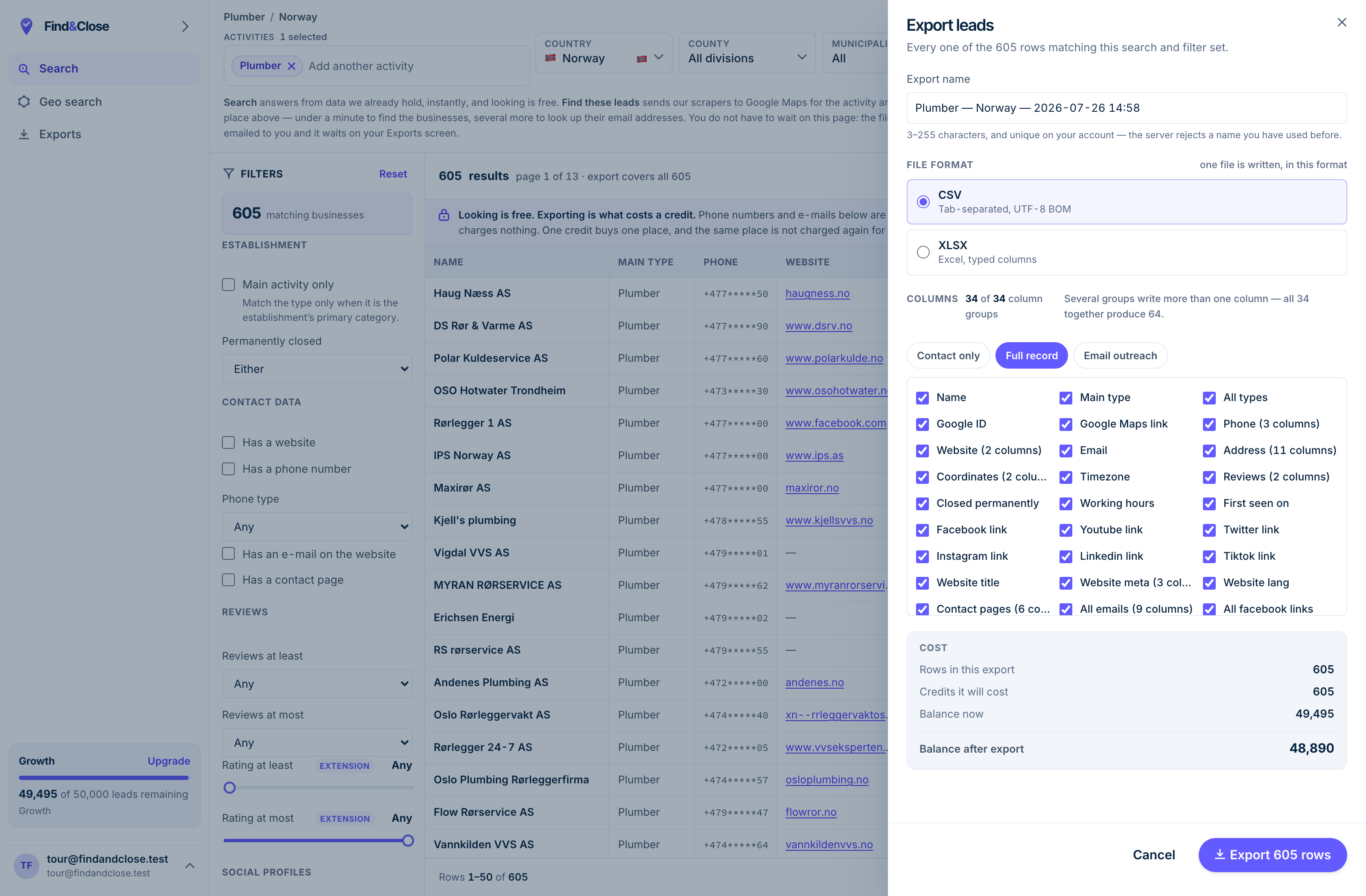
- It exports the whole result Every row the filter matched, not the page you happen to be looking at.
- CSV or XLSX Tab-separated UTF-8, or typed Excel columns. One file per job.
- 34 groups, 64 columns The same 64 on every plan. Nothing is held back for a higher tier.
- Three presets Contact only, full record, or the outreach set. Or tick your own.
- The cost, before you commit One credit per place, once per 30 days. Re-downloading is free.
Vet us with your own checklist
Fourteen days, 100 leads, no card. Pull a sample from a live Nordic list, open ten websites, and check our working before you pay anyone.
- 14-day free trial
- 100 leads included
- No credit card