Guide · Free routes
Free Google Maps email extraction
You can get business emails out of Maps without paying anyone. This page maps every free route, with the caps stated, and the point where free stops making sense.
A manual SOP that costs nothingReal free tiers, with their caps100-lead trial, no card
The fact that shapes every free route
A Google Maps listing holds no email address. It never has.
A listing carries a name, an address, a phone, a website link, hours and reviews. Email is not among the fields, at any price, on any tool.
So every route — free or paid — does the same two jobs. Read the listing. Then follow the website link and hunt the site for an address.
That second job is the real work, and it is where free routes spend your time instead of your money.
It also sets a hard ceiling no tool can move: a firm with no website can never yield an email. In our own Nordic crawl, plenty of local firms have that gap.
This page is the free-tier cut of a bigger question. The Google Maps email extractor guide compares all three routes with money on the table: extension, cloud and index. Our own index covers Norway, Sweden, Denmark and Finland. The free routes below work anywhere.
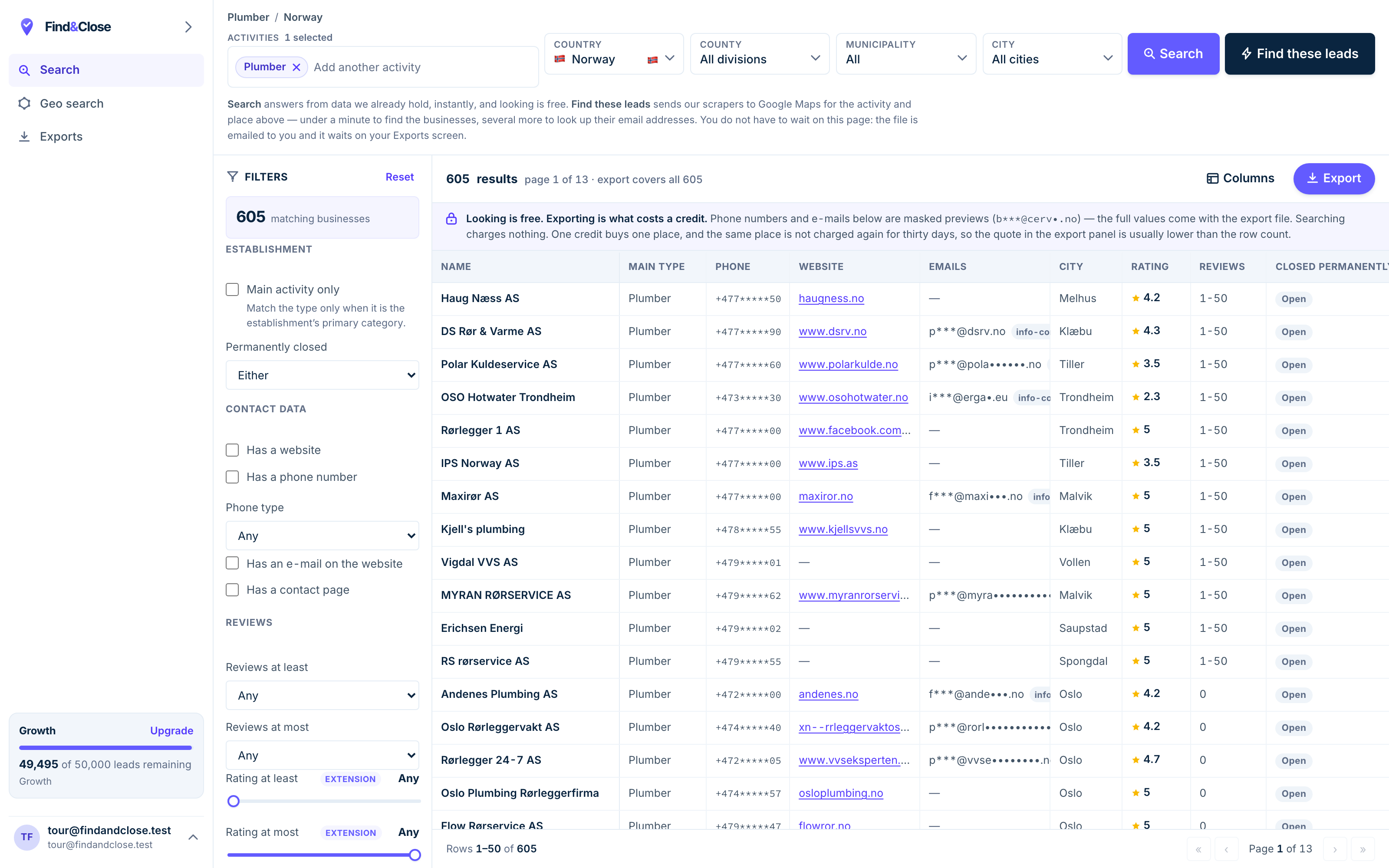
- Pick the trade Type it and take the match. One trade or twenty, on every plan.
- Pick the place Country, county, municipality, city. No plan gates the geography.
- The count moves first The number updates before you spend anything. Looking is free.
- Filter to the ones worth calling Has email, has phone, has a website, has a contact page. Combine them freely.
- Contacts are masked until export You can see a row exists and judge it. The address itself is the product.
- Export what you are looking at The file is exactly this filter set, with nothing dropped in between.
Route one: copy by hand
Zero tools, zero risk, zero money. Just your time.
- Search one trade in one town on Maps. Keep the search narrow. A single query stops feeding results after a couple of hundred rows anyway.
- Open each listing and copy the basics. Name, phone, website into a spreadsheet. Add a column for the date — you will thank yourself in a month.
- Click through to each website. Check the contact page, the footer, and any mailto link. That is where the email lives, when it exists.
- Record misses as misses. No website, or a form instead of an address: mark the row, keep the phone. A flagged gap is information; a guessed address is a bounce.
- Stop at fifty rows and review. Count how many rows produced an email. That rate tells you whether this niche supports an email campaign at all.
Expect a slow first hour and a faster second one. The method scales to perhaps a hundred rows before your patience gives out, and that is fine.
Do not skip this even if you plan to pay later. An hour of hand-copying teaches you what the trade’s websites look like, which no export ever will.
Route two: free tiers of real extractors
Most paid tools give something away. The figures below come from our dated comparison pages, read off each vendor’s own site in late July 2026.
The free tiers worth knowing, with their caps as published.
- G Maps Extractor gives 1,000 credits a month with no card. Covered in the Chrome extension comparison.
- Map Lead Scraper runs in the browser sidebar with a free monthly export allowance. Same comparison page.
- Outscraper makes the first 500 places in a 30-day window free. Weighed in the Outscraper page.
- Apify starts free with $5 of platform credit a month. Weighed in the Apify page.
- D7 Lead Finder allows five free searches a day — but you cannot export the free rows. Details in the D7 page.
- PhantomBuster offers a cardless trial with two hours of run time, and exports capped at ten rows. Details in the PhantomBuster page.
Free tiers move often, so treat each figure as a snapshot and check the vendor’s page before you plan around it.
How to read a free tier
A free tier is a sales funnel, and that is fair — ours is one too. The design tells you where the vendor expects you to hit the wall.
Caps on exports mean you can look but not leave with the data. Caps on searches or credits mean small jobs cost nothing at all.
Watch what the free rows lack, not just how many you get. Dedup across searches, the source page per email, and a check that the domain takes mail are the parts free rows tend to miss.
Route three: our 100-lead trial
Our free layer, described with the same bluntness as everyone else’s.
The trial runs 14 days and includes 100 leads, with no card and nothing that auto-converts. When it ends, it just ends.
Inside those 100 leads, you get the whole product. Every country we hold, every filter, all 64 export columns, and exports switched on.
Two parts cost nothing beyond that. The count on screen is free to read at any size, so you can size a market without spending a lead. And every published list page shows live counts and sample rows with no signup at all.
The cap that matters: our index covers Norway, Sweden, Denmark and Finland. If your market is Texas, the free tiers above serve you better, and we would rather say so than waste your fortnight.
Browse every list we publish or the industry hub before starting — the counts there may answer your question for free.
When free is enough — and when it stops
Free is not a lesser version of paid. It is the right tool for a real set of jobs.
Free is enough when
- You need one town, one trade, once.
- You are testing whether a niche is worth any money at all.
- The whole job fits under a few hundred rows.
- You are learning the craft before spending on it.
Free stops working when
- You need a whole country, not a search radius. Single Maps searches cap out at a couple of hundred rows.
- You pull lists on a schedule, and dedup across pulls becomes your unpaid job.
- You need to trust the email column: source pages and mail-server checks are paid-tier features almost everywhere.
- The price of your own hour makes the maths silly. An afternoon of copying is not free if your time bills.
The pattern across every route is the same. Free buys you the sample; money buys you the scale, the freshness and the checking.
Whatever route you take, the law does not care that the rows were free. EU cold email to businesses carries the same duties either way — the GDPR guide lists them.
Questions about free extraction
Can I get emails from Google Maps free of charge?
Yes, by hand: run the search, open each website, copy what the contact page shows. It costs time and nothing else.
The free tiers above automate part of that, inside their caps. For a small one-off job, the two together are enough.
Why do free tools return so many rows without an email?
Because many firms have no website, and no site means no address to find. Others publish only a contact form, which is not an email.
That is the terrain, not a defect of free tools. Paid tools face the same wall; the good ones flag the gap instead of guessing.
Is free extraction legal?
The price of the tool changes nothing in law. The fields on a listing are public business data, and the duties attach to your outreach, not your software bill.
In the EU that means legitimate interest with its duties: identify yourself, name the source, offer an opt-out. And read the terms of any service you automate against.
What does the FindAndClose trial include?
14 days, 100 leads, no card, and no auto-conversion into a paid plan. Every filter, every country we hold, all 64 columns, exports on.
The live counts and the published list pages stay free after the trial too. Only exporting new rows needs a plan.
What do I get by paying that free never gives?
Scale past the search cap, one row per firm across every pull, the source page beside each email, and a check that the domain takes mail.
In short: free finds you addresses. Paid tells you which ones to trust, at a volume worth building a campaign on.
Read next
The paid side of this question, and what to do with the addresses.
- Google Maps email extractor All three routes, money included
- Scrape Maps without code The wider no-code toolkit
- Chrome extension scrapers The free-tier class, with names
- Build a local email list Coverage rates and verification
- GDPR and B2B cold email The duties, free rows included
- Every list we publish Live counts, no signup
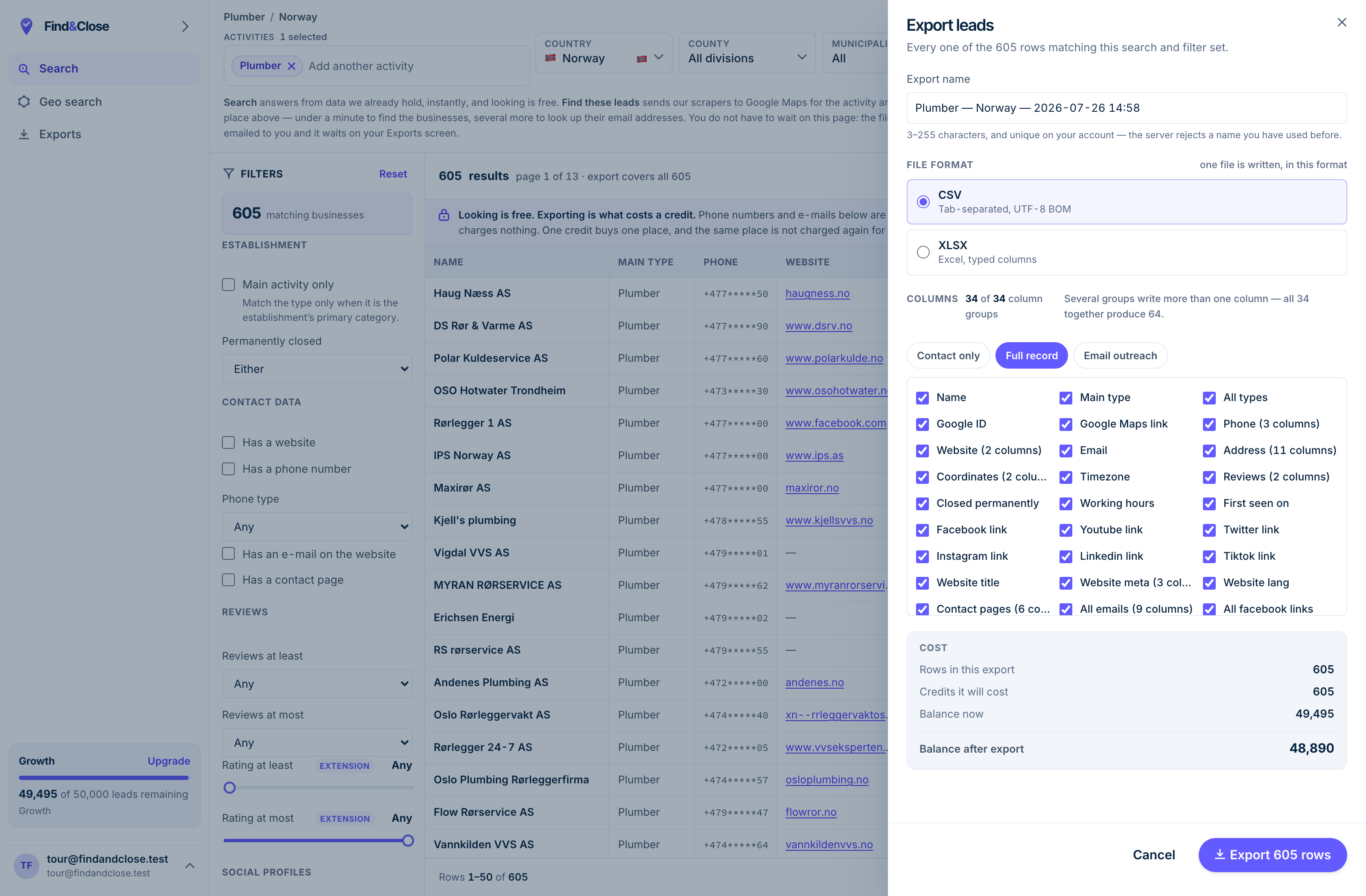
- It exports the whole result Every row the filter matched, not the page you happen to be looking at.
- CSV or XLSX Tab-separated UTF-8, or typed Excel columns. One file per job.
- 34 groups, 64 columns The same 64 on every plan. Nothing is held back for a higher tier.
- Three presets Contact only, full record, or the outreach set. Or tick your own.
- The cost, before you commit One credit per place, once per 30 days. Re-downloading is free.
Spend the free 100 on a real market
Fourteen days, 100 leads, no card. Read the live count, pull the file, and judge the email column before a cent changes hands.
- 14-day free trial
- 100 leads included
- No credit card