Skrapp.io · compared
Skrapp finds the email. We find the business first.
Skrapp turns a LinkedIn profile or a domain into a verified work email, and it does that well. But a finder needs an input. Most local trade firms give it nothing to work from.
$49 a month, month to month64 columns on every planWe do not send email
What Skrapp is genuinely built for
Skrapp is an email finder and verifier. You bring the person or the domain. It brings the address.
The core move is simple. You give Skrapp a name and a company domain, or a LinkedIn profile. It hands back a work email and a verdict on whether it is safe to send to.
The LinkedIn side is where most users live. Their extension reads the profile page you are on and finds the email behind it. Their site also lists CRM sync and AI enrichment on the paid plans.
For a rep working named people at named companies, that is a good tool at a fair price. Nothing on this page argues otherwise.
What a credit buys
Their pricing page is plain, so we can quote it. Read on 27 July 2026, it showed three plans.
- Free — 50 email credits and one seat
- Professional — $39 a month for 2,000 email credits and two seats
- Enterprise — $349 a month for 50,000 credits, 15 seats, API access and SSO
Yearly billing cuts those to $29 and $262 a month.
One credit buys one found email or one verification. Only emails marked valid or catch-all cost a credit. An invalid result costs nothing, which is a fair rule.
Note what the credit is spent on. Every credit assumes you already know who you are looking for. Skrapp does not sell the knowing. It sells the finding.
The input problem
A finder needs something to start from. A name plus a domain. A LinkedIn profile. A list of companies you already hold.
Now think about a plumbing firm in Bergen with two vans. There is no LinkedIn profile to open. There is often no domain to search. The extension has nothing to read.
What that firm does have is a Google Maps listing. A name, an address, a phone number, opening hours, a rating. Often an email the owner published for customers.
Our index grew out from that pin. The listing itself is the row. You do not feed us an input list, because finding the businesses is the product.
Skrapp and FindAndClose, row by row
Grouped the way buyers ask: what each tool starts from, cover of local firms, contact fields, price shape, who owns the export, and sending. Grey rows are the ones Skrapp wins.
| FindAndClose | Skrapp | |
|---|---|---|
| Where a row comes fromthe thing the tool starts from | The Google Maps listing | A name, a domain or a profile |
| Finds businesses you did not know | Yes | No |
| Firm with no website | Yes | No domain to search |
| Firm with no LinkedIn page | Yes | Nothing for the extension to read |
| Nordic local tradesNorway, Sweden, Denmark, Finland | 44,684 rows today | Depends on your input list |
| Search by Maps category4,000+ categories, every plan | Yes | No |
| Filter on star rating and review count | Yes | No |
| Named person at a company | No | Yes |
| Email verifier you can run on any list | No | Yes |
| LinkedIn browser extension | No | Yes |
| Invalid emails cost nothing | A credit buys the whole row | Valid and catch-all only |
| The number the shop answers | Yes | Not the product |
| Opening hours, rating, review count | Yes | No |
| Columns in the export | 64, on every plan | Contact fields |
| Entry paid plan | $49 · 10,000 lead credits | $39 · 2,000 email credits |
| Seats on the entry plan | One | Two |
| Free tier you can keep | No | 50 credits |
| Trial | 14 days, 100 leads, no card | Free plan |
| Files you already exported | Yours for good | Also yours once out |
| Email sending built in | No | No |
Skrapp's pricing and features last checked on 27 July 2026. We re-check every month. Rows shaded grey are ones where they beat us.
Skrapp prices and credit rules were read off skrapp.io/pricing on the date shown. Prices there are US dollars; ours are euros, so treat the two as close, not equal.
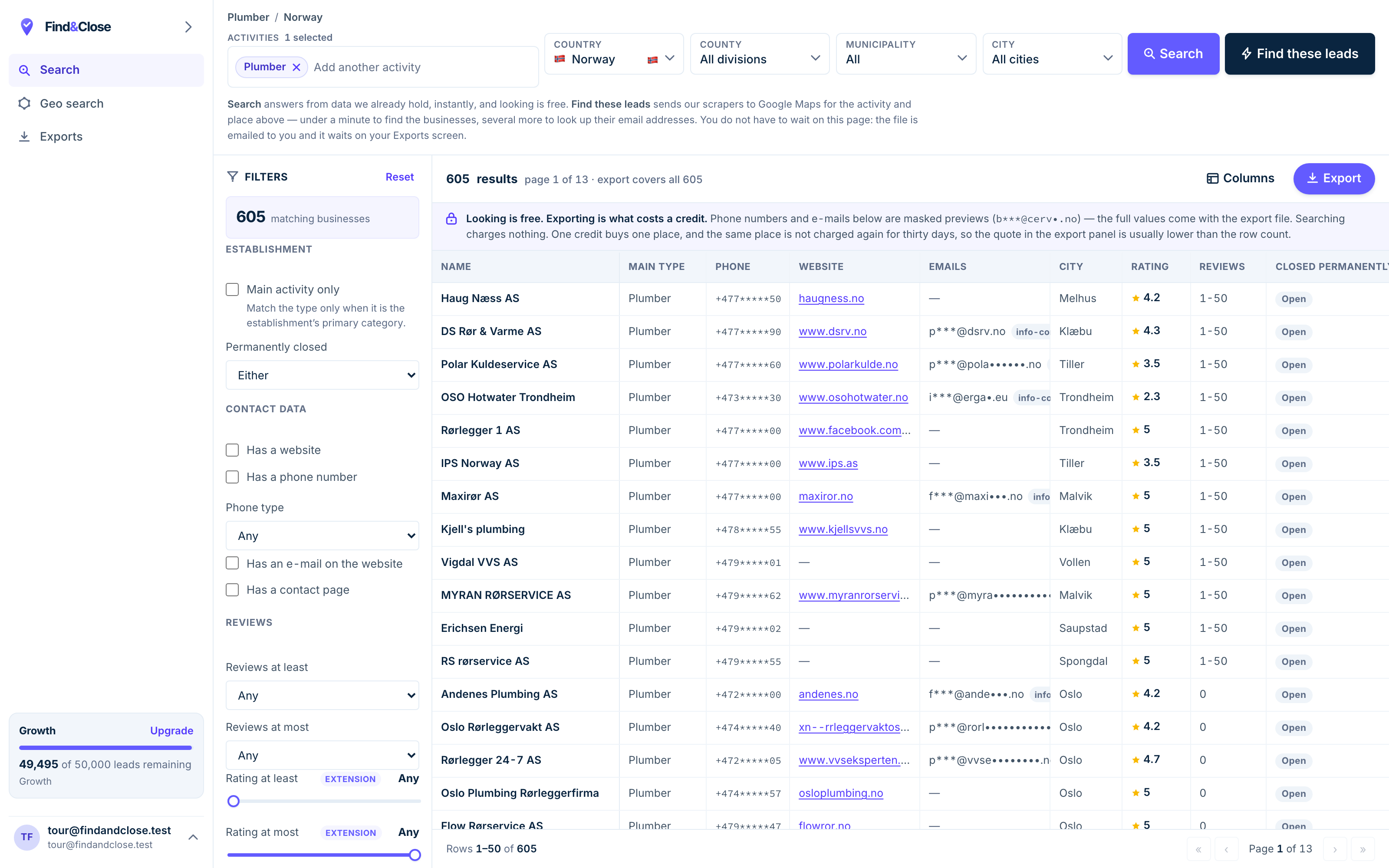
- Pick the trade Type it and take the match. One trade or twenty, on every plan.
- Pick the place Country, county, municipality, city. No plan gates the geography.
- The count moves first The number updates before you spend anything. Looking is free.
- Filter to the ones worth calling Has email, has phone, has a website, has a contact page. Combine them freely.
- Contacts are masked until export You can see a row exists and judge it. The address itself is the product.
- Export what you are looking at The file is exactly this filter set, with nothing dropped in between.
The coverage test — try to build the input list
Skrapp is only as strong as the list you feed it. So test the feed, not the finder.
- Pick one trade and one town you know well. Plumbers in Trondheim. Hair salons in Malmö. Somewhere you can check by eye.
- Try to build that list on LinkedIn. Search the trade and the town. Count the firms that have a company page.
- Check how many of those firms have a domain. Skrapp needs one or the other to find anything.
- Open the same trade on Google Maps. Count the pins. The gap between the counts is this page.
We think you will find a handful of profiles and a few hundred pins. We could be wrong in your town. Run it and see.
Then run the same trade here. The trial lasts 14 days and gives you 100 leads with no card. Export one town and ring five numbers by hand.
A count you made yourself beats any table we could write. That is why we lead with the test.
When to run both
These two tools sit at different steps of the same job. Plenty of teams should hold both.
Keep Skrapp for named people at firms with a web presence. A rep who works accounts one by one gets real value from the extension and the verifier.
Add us when the list itself is the missing piece. Roofers in Aarhus. Dentists in Oslo. Gyms in Uppsala with no website. Those rows live on the map, not behind a profile.
- You know the person, need the email — Skrapp
- You need to find every firm in a trade — us
- Enriching a CRM full of named contacts — Skrapp
- Selling websites to shops that have none — us
- Any list where the owner answers the phone — us
The two even chain together. Our export carries the website column. Feed those domains into Skrapp and it can hunt named staff where staff exist.
One thing neither of us does: send. Skrapp finds and verifies. We find and export. The sending happens in your own tool either way.
What people ask before they switch
Should I cancel Skrapp?
Most of the time, no. If your reps use the extension on named accounts every day, it earns its fee.
The better question is where your input lists come from. If building the list is the slow part, that is the part we sell.
Is FindAndClose an email finder?
Not in the Skrapp sense. You do not give us a name and get an email back.
You give us a trade and a place. We give you every listed business there, with the email the business itself published where one exists.
Do you verify emails like Skrapp does?
No. We have no verifier, and Skrapp wins that row in the table above.
Our email is the one the business published on its own listing or site. Many teams run an exported file through a verifier before a big send. That works fine with ours.
Which is cheaper?
They price different things, so read the shapes. Skrapp Professional showed $39 a month for 2,000 email credits when we checked.
Our Starter is $49 a month for 10,000 lead credits, with the phone, address, rating and 60 more columns in every row. See what each plan holds.
Can I use your file inside Skrapp?
Yes, and it is a good pairing. Our export includes the website column, and Skrapp can work from a domain.
Use us to find the firms. Use Skrapp to chase named staff at the ones big enough to have any.
What do I get for $49 a month?
Starter gives 10,000 lead credits, one seat, and CSV or XLSX exports with all 64 columns on every row.
Every country, every filter and all 4,000+ categories sit on that plan. Nothing about geography is behind an upgrade.
Read the other two, then the guides
The same test runs against each of these finders. The answer moves a little each time.
- Wiza compared Sales Navigator, exported
- RocketReach compared Lookups against 700 million profiles
- Lusha compared Credits burnt per reveal
- Apollo compared The volume tool with sending built in
- Build a local email list The method, start to finish
- Cold email for local firms What to send once you have the file
- Local business leads, Norway The country file, with counts
Skip the input list. Start from the map.
Fourteen days, 100 leads, no card. Pull one trade in one town and count the rows no finder could have found.
- 14-day free trial
- 100 leads included
- No credit card