Guide · Architects
Architect email list: sell to the people who specify
An architect does not buy your window, your cladding or your light fitting. They draw it into a project, and the builder buys it. That changes everything about the pitch.
Covers Norway, Sweden, Denmark and FinlandNo trade count — we do not track architects yetThe one desk-based trade in this batch
Where this list comes from, and what it does not hold
Say the two limits first, so nobody buys the wrong thing.
FindAndClose builds local business lists from Google Maps. We cover four countries: Norway, Sweden, Denmark and Finland.
If you sell into the Nordics, this is live data from our own crawl. Every published count carries the date we ran it.
There is a second limit here, and it is honest. Our page set tracks 27 trades. Architects are not one of them yet. So this page shows no architect count, because we do not have one to stand behind.
You can still pull the trade. The app searches Maps categories beyond our page set, architects included. Pick the category, pick a country, and the count shows before you export a row.
For a US or global architect list, we are the wrong shop. A worldwide scraper fits that job. Our Outscraper review says where they win and where they charge for it.
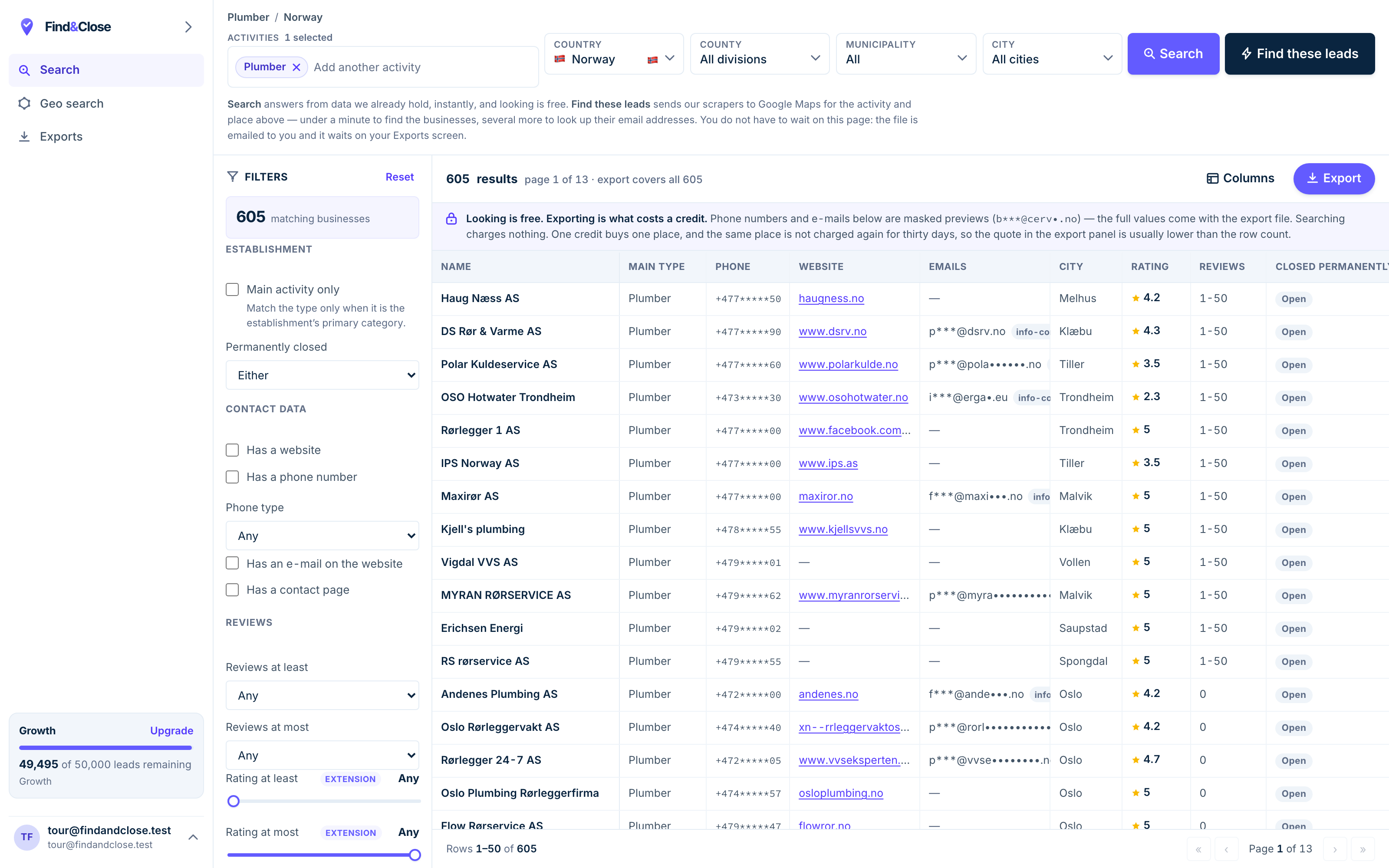
- Pick the trade Type it and take the match. One trade or twenty, on every plan.
- Pick the place Country, county, municipality, city. No plan gates the geography.
- The count moves first The number updates before you spend anything. Looking is free.
- Filter to the ones worth calling Has email, has phone, has a website, has a contact page. Combine them freely.
- Contacts are masked until export You can see a row exists and judge it. The address itself is the product.
- Export what you are looking at The file is exactly this filter set, with nothing dropped in between.
The buyer is a drawing, not a person
This is the one fact that decides your whole campaign. Get it wrong and you sell to the wrong trade.
Most trades on this site buy the thing you sell. A plumber buys fittings. A gym buys software. The person who reads your email holds the budget.
Architects break that rule. An architect draws a building. They name the products that go in it: the windows, the doors, the cladding, the flooring, the lights.
Then someone else buys those products. The client. The main contractor. The developer. The architect never touches the invoice.
- Specify your product into the drawing, and the contractor orders it by name.
- Miss the drawing, and no price will win the job back later.
- One architect can steer many projects a year, each worth far more than a single sale.
- The value is not the architect. It is the pipeline of buildings behind them.
So you are not selling a product to an architect. You are asking to be the default choice in work they have not drawn yet. That is a slower game, and a bigger one.
This is why product makers chase this list hardest. A window brand, a cladding maker, a lighting supplier: each wins a project the moment an architect writes their name on a sheet. The construction company list reaches the firms who then buy what was specified.
The one trade in this batch that reads email
Carpenters, painters and handymen answer the phone in a van. Architects do not. They sit at a desk.
An architect works in an office, at a screen, all day. Email is not the admin pile for them. It is the job.
They send drawings by email. They receive product data by email. They field questions from contractors by email. The inbox is a working tool, open from morning to night.
That flips the channel order you use on every other building trade.
- A short, useful email can land during the working day, not after it.
- Product data, spec sheets and detail drawings are welcome, because they are the work.
- The phone is the interruption here, not the main line.
- A firm has a front desk, and a named person for each discipline.
For the seller, this is rare good news among the trades. You are writing to a reader whose day is built around the inbox you are landing in.
We do not publish an architect email coverage figure, because we do not track the category. But the channel logic holds whatever the count turns out to be. This is a desk trade, so lead with the desk channel.
How to sort the file when there is no count to lean on
Without a tracked page, you plan from the trade, not from our numbers. Here is the honest way to do it.
Start with country rates as your only guide. Across our tracked trades, email coverage runs at 38% in Norway, 19% in Sweden, 17% in Denmark and 16% in Finland. Desk trades tend to sit above their country line, but we will not guess by how much for architects.
So pull the category in the app and read the real coverage before you plan a send. The number in the corner is your true starting point, not a benchmark from someone else.
- Pull the architect category per country. The live count and the email flag tell you what you actually have to work with.
- Split solo studios from multi-partner firms. Sort by name and review count. A one-name studio is a single specifier. A large practice has a discipline lead you need to find.
- Find the named inbox for a firm. A generic info@ rarely reaches the right specifier. The find business emails guide ranks the methods and names their failure rates.
- Verify before any send. Bounces burn your domain. The list building guide covers verification and catch-alls.
One habit pays off here. Architects publish their built work. Read a firm’s recent projects before you write, and your first line can name the exact kind of building your product suits. That is the opposite of a mail merge.
A specification cadence for a product maker
Written for someone whose product gets bought by others once an architect names it. The goal is not a sale. It is a place in the next drawing. Run it in your own tool — we do not send anything.
-
Subject spec data for [firm]’s next [building type]
Hi [name] — I saw your [named recent project]. We make [product] for exactly that kind of build.
I am not asking you to buy. I am asking to be easy to specify. The spec sheet and the detail drawings are below.
If this is not useful, reply stop and I will not write again.
An architect wants to draw fast and draw right. Handing over spec data and details is doing part of their job for them, which is the one welcome cold email in this trade.
-
Subject the detail that trips people up
One follow-up, then I will leave you be. The join that causes most site questions with [product] is [detail].
The drawing below solves it. Drop it straight into your set if it helps.
A yes or a stop, either is a clear answer for me.
Giving away the tricky detail proves you know how the product is built, not just sold. It reads as a colleague, not a vendor.
-
Call mid-morning, once the studio has settled into the day.
One question: is there a live project where [product] could fit, and who leads that discipline?
If yes, offer to send a sample or a lunch demo for the team. If no, ask to check back next quarter.
The phone is the interruption channel for a desk trade, so it earns one well-timed call — after the email has already made you a known name.
-
Subject filed under [product], for when you need it
I will stop writing now and leave the file with you.
When a project calls for [product], the spec pack is above and my number is below. Good luck with the current set.
Specification is a waiting game. The win comes when a matching project starts, which is on their calendar, not yours. The breakup leaves the pack where they will search for it that day.
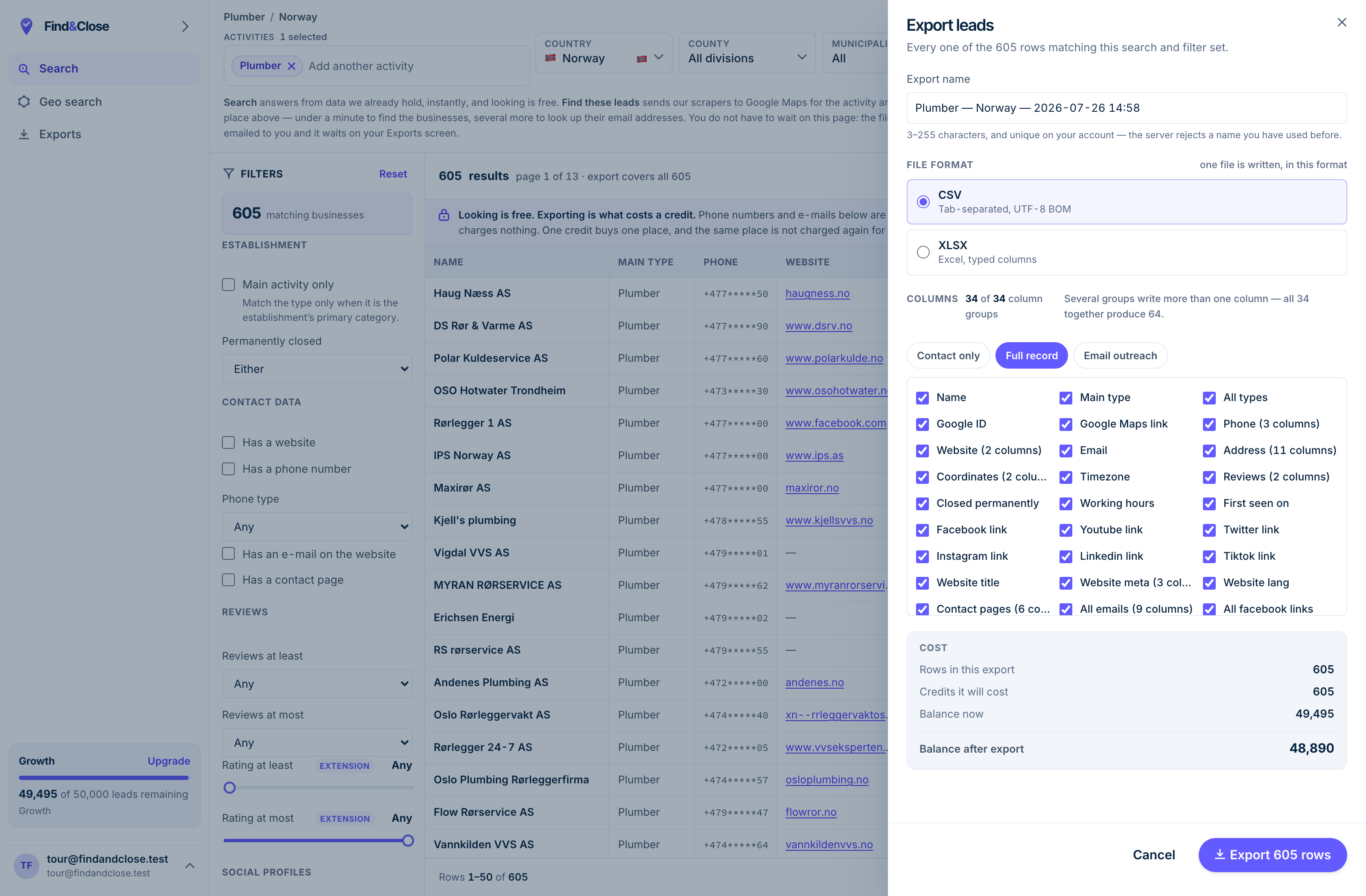
- It exports the whole result Every row the filter matched, not the page you happen to be looking at.
- CSV or XLSX Tab-separated UTF-8, or typed Excel columns. One file per job.
- 34 groups, 64 columns The same 64 on every plan. Nothing is held back for a higher tier.
- Three presets Contact only, full record, or the outreach set. Or tick your own.
- The cost, before you commit One credit per place, once per 30 days. Re-downloading is free.
Straight answers about architect lists
Why is there no live architect count on this page?
Because our tracked page set covers 27 trades, and architects are not one of them yet. Every count we publish comes from that file, dated.
We will not pad a page with a guess. You can still pull the architect category in the app, where the real count shows before you export.
If architects do not buy my product, why build the list?
Because they decide what gets bought. An architect writes your product into a drawing, and the contractor orders it by name.
One specification can carry more value than a direct sale, because it rides on a whole project. You are buying influence over the pipeline, not a single order.
Should I email or call an architect?
Email, in almost every case. Architects work at a desk, and the inbox is a working tool, not an after-hours chore.
Send useful things: spec data, detail drawings, sample offers. Save the phone for one well-timed call after your name is already known.
How do I reach the right person in a large practice?
A generic info@ address rarely lands with the specifier you need. Large firms split work by discipline, so the right reader is a named person.
Find the name first. Our find business emails guide ranks the methods and is honest about how often each one fails.
Do you cover architects outside the Nordics?
No. We cover Norway, Sweden, Denmark and Finland, and nothing else. Saying so early saves you money and us a refund.
For US or global coverage, use a worldwide scraper. Our Outscraper review is an honest look at the strongest one.
Is cold email to an architecture firm legal in the Nordics?
B2B outreach in the EU and EEA usually rests on legitimate interest under the GDPR. Say who you are, where you found the data, and offer an opt-out in the first message.
The national e-marketing rules differ by country. Our GDPR guide walks through it. It is not legal advice.
Go deeper
No architect country page exists yet, so start with the four country hubs and the firms who buy what gets specified.
- Construction company list The firms who buy the spec
- Local business leads in Norway The full Norwegian file
- Local business leads in Sweden The full Swedish file
- Local business leads in Denmark The full Danish file
- Local business leads in Finland The full Finnish file
- Find business email addresses Reach the named specifier
Pull the architect category and read the real count
Fourteen days, 100 leads, no card. Pick architects, pick a country, and see the true coverage before you plan a single send.
- 14-day free trial
- 100 leads included
- No credit card