Guide · Contact data
How to extract emails from Google Maps
Maps has no email field. The address you want sits on the firm’s website, one click away. Here is the workflow that gets it out, at hand scale and at index scale.
No email field on MapsThree routes, ranked by effortNordic index behind ours
Where the email really lives
The map never shows one. Knowing where it does live is the whole trick.
Open any Google Maps listing and read the fields. Name, address, phone, website, hours, photos, reviews. There is no email slot, and there never has been.
Even Google’s own Places API returns no email field, at any price.
So the phrase “extract emails from Google Maps” is shorthand. The real job has two halves. First, read the listing. Second, follow its website link and hunt the site for an address.
Most published addresses sit on the contact page. The rest hide in footers, privacy pages and booking pages.
The chain runs listing → website → contact page → address. A firm with no website breaks the chain at link two. No tool on earth can extract what nobody wrote down.
One honest note before the methods. Our own index covers Norway, Sweden, Denmark and Finland. If you need US or global lists, a run-anywhere tool such as Outscraper fits better. The workflow below works the same either way.
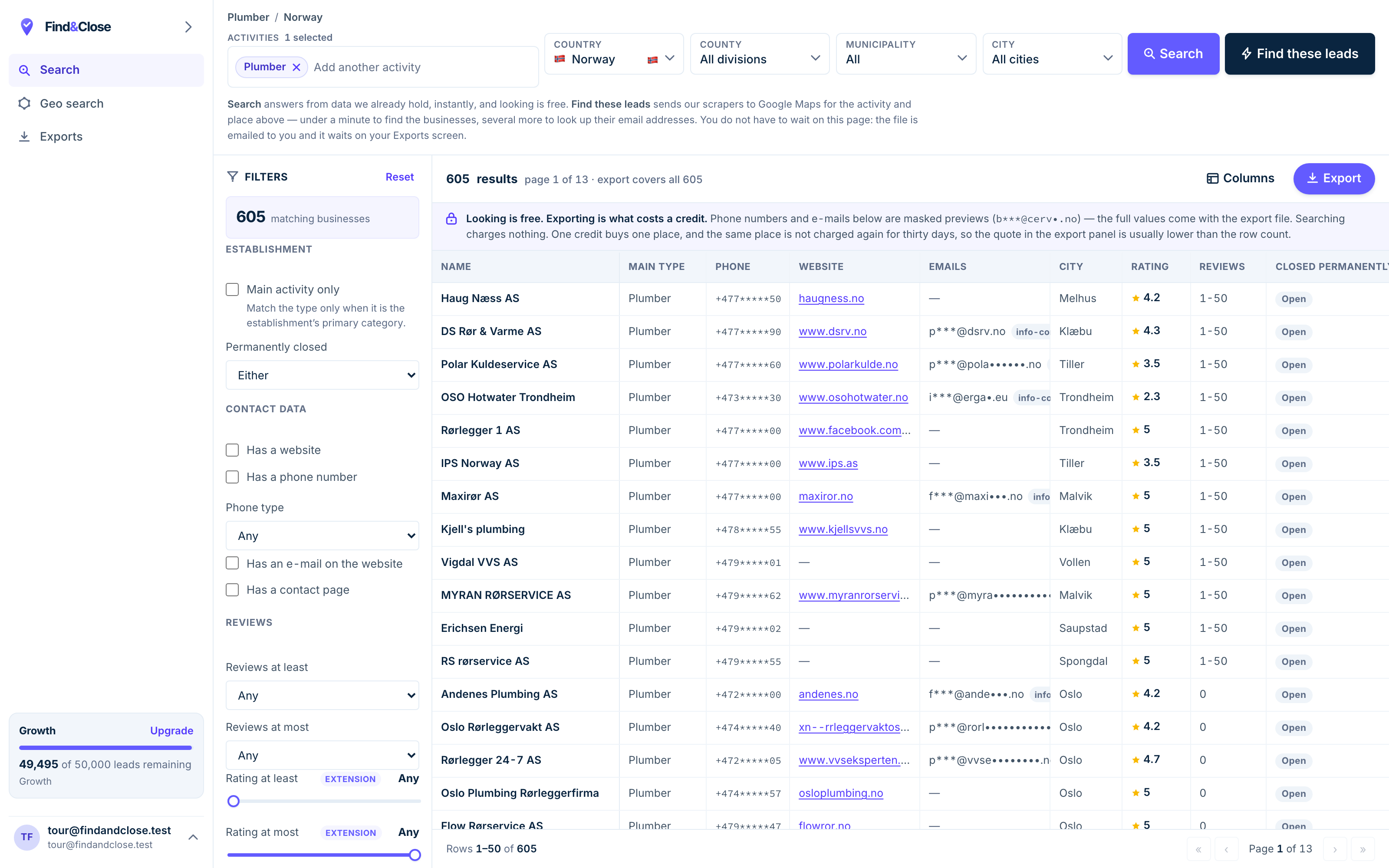
- Pick the trade Type it and take the match. One trade or twenty, on every plan.
- Pick the place Country, county, municipality, city. No plan gates the geography.
- The count moves first The number updates before you spend anything. Looking is free.
- Filter to the ones worth calling Has email, has phone, has a website, has a contact page. Combine them freely.
- Contacts are masked until export You can see a row exists and judge it. The address itself is the product.
- Export what you are looking at The file is exactly this filter set, with nothing dropped in between.
Route one: extract by hand
The zero-cost route. Slow per firm, and the best way to learn what a good row holds.
- Run one tight Maps search. One trade in one town. A tight search keeps the list small enough to finish.
- Open a listing and click the website link. No link means no email hunt. Flag the row for a phone call and move on.
- Read the contact page first. Then the footer and the privacy page. Data law pushes firms to name an address on that last one.
- Search the page source for
mailto. Some contact forms hide a plain address behind the button. The source view gives it up. - Record four things per row. The address, the page you found it on, the date, and the listing’s phone number.
- Flag the misses. No site, or a site with no address: mark the row for phone. Never guess an address to fill the gap.
Budget a few minutes per firm. For twenty prospects, that is one evening. For four hundred, it is a lost week — which is why the next two routes exist.
The source-page habit is the one to keep. An address with its source takes seconds to re-check. An address without one is a rumour.
Route two: let an extension walk the chain
A browser extension runs the same loop on top of a search you run yourself.
Install one, run a Maps search, press the button. The panel reads the results, visits each website, and writes a CSV with an email column.
For one town and one trade, today, this is a fine route. It costs little or nothing.
Where the route stops
- A single Maps search feeds a couple of hundred rows at most. The panel cannot read rows Maps never drew.
- The site visits run in your browser, on your IP. A big list keeps your machine open for hours.
- Run overlapping searches and the same firm lands in three files. Deduping them is your job.
Which tool, and what each class costs? That is a shopping question with its own page. The Google Maps email extractor guide compares the routes tool by tool.
Route three: query an index that already walked it
The third route moves the extraction to before you arrive. You search a finished store.
This is our product, so weigh this section as the vendor’s view.
Our crawler reads Maps listings across the four Nordic countries. It follows every website link and files what it finds, page by page.
By the time you search, the hunting has already happened. Pick a trade, pick a country, watch the count, export.
- An email where one exists, with the exact page we found it on.
- A flag on every row with no email, so the phone lane is explicit.
- 64 columns in a fixed order, on every plan.
- A live count on screen before you spend a credit.
The trade-off is coverage. Four countries, no more. The index held 44,684 records on 26 July 2026, and every count on our pages carries that date.
The trial runs 14 days with 100 leads and no card. Nothing converts on its own.
Set your hit rate before you start
Extraction has a ceiling, and it sits lower than the tool ads suggest.
An email only exists for you when a firm wrote one on its site. Many never did.
Our own database puts numbers on that, counted on 26 July 2026. In Norway, 38% of rows carry an email. Sweden holds 19%, Denmark 17% and Finland 16%.
Read those as odds, not as a scorecard. In three of the four countries, most hunts come back empty.
So plan the phone lane on day one. The no-email rows are half your market, and the half your rivals skip.
And never pad the file with guessed addresses. Guessed rows bounce, and mailbox providers remember.
Extraction from the map is one method of several. The business email guide ranks seven, from the contact page to the phone, and covers the registry routes this page skips.
Questions about extracting emails from Maps
Can I pull an email straight off a Google Maps listing?
No. The listing format has no email field, and the Places API has none either.
Every working method follows the website link instead. That is the whole game on this page.
Is extracting emails from Google Maps legal?
Three rulebooks touch it: Google’s terms, data protection law, and the marketing rules on what you send. Our legality guide walks all three in plain words.
The short version: public data still carries duties, and none of this is legal advice.
How many emails will a thousand listings yield?
Fewer than any ad promises. In our Nordic index, Norway leads at 38% of rows with an email, and the other three countries sit under one in five.
Whatever your market, plan for the misses. Rows with no email go to the phone lane, not the bin.
What is the fastest route for a one-off list?
For one town and one trade, an extension wins. Run the search, press the button, clean the file by hand.
For a repeat need, or a whole country, an index wins. The count sits on screen before any spend.
Do extracted emails go stale?
Yes. Firms close, domains lapse, inboxes change hands. A dated row tells you how far to trust it.
That is why our export carries first-seen and last-seen dates on every row.
Does FindAndClose extract emails outside the Nordics?
No. Norway, Sweden, Denmark and Finland — and we would rather say so than waste your trial.
For US or global one-off pulls, Outscraper is the honest pointer. Our comparison page shows both sides.
Read next
The shopping question, the wider methods, and the rules.
- Google Maps email extractor The tool classes, compared
- Find business email addresses Seven methods, ranked
- Is scraping Google Maps legal? Terms, GDPR, plain words
- Google Maps scraper Four routes to the rows
- Scrape Maps without code The no-code walkthrough
- GDPR and B2B cold email Before you press send
- Every list we publish The full index
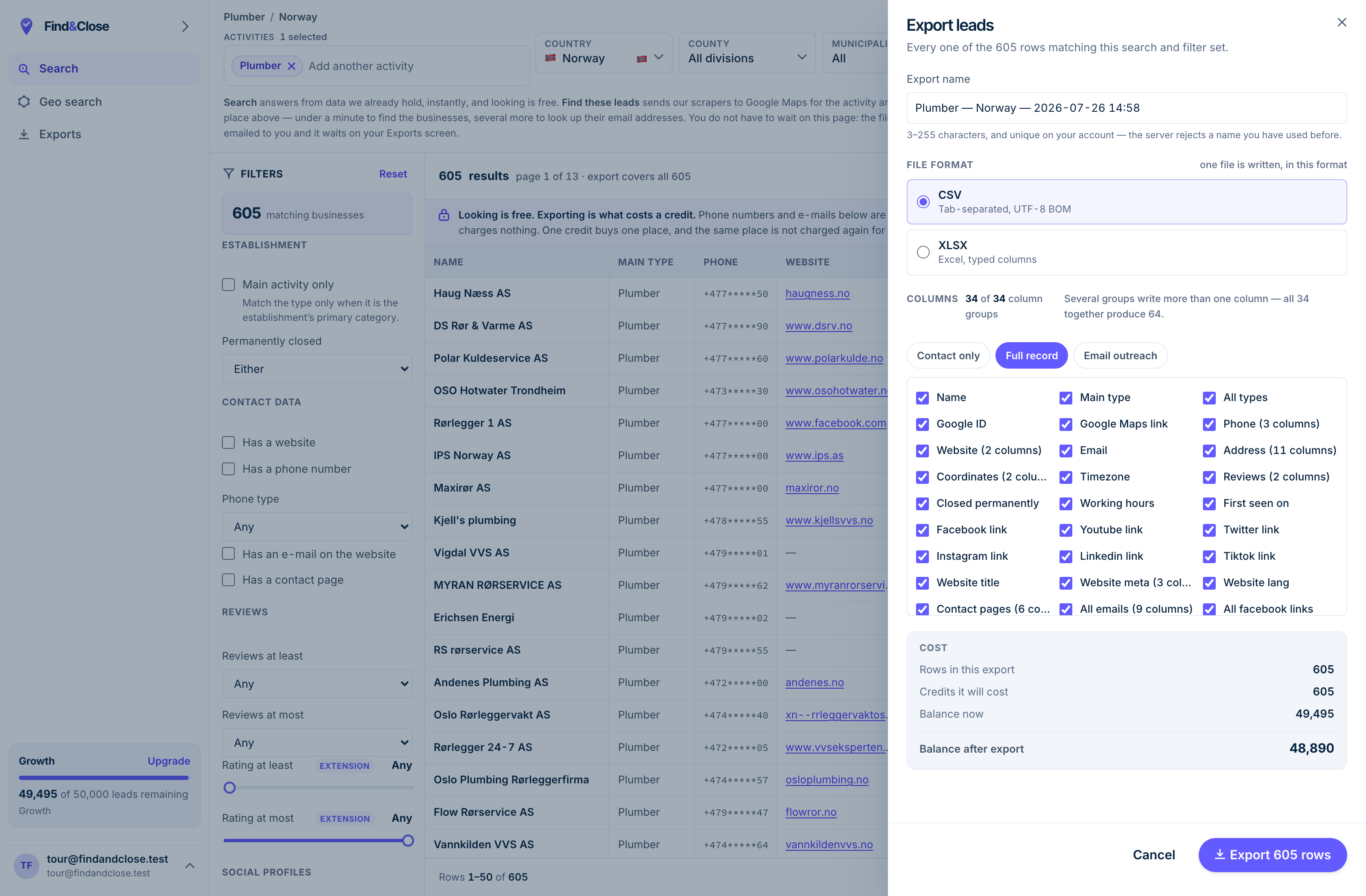
- It exports the whole result Every row the filter matched, not the page you happen to be looking at.
- CSV or XLSX Tab-separated UTF-8, or typed Excel columns. One file per job.
- 34 groups, 64 columns The same 64 on every plan. Nothing is held back for a higher tier.
- Three presets Contact only, full record, or the outreach set. Or tick your own.
- The cost, before you commit One credit per place, once per 30 days. Re-downloading is free.
Skip the hunt and read the column
Fourteen days, 100 leads, no card. Every email names its source page, so you can open the page and check us.
- 14-day free trial
- 100 leads included
- No credit card