GetProspect · compared
GetProspect charges per valid email. We charge per row of the map.
Their pricing is honest: no valid email found, no credit spent. But the finder still needs a person or a domain to start from. A salon with no website and no LinkedIn gives it nothing. We start at the pin instead.
The whole row, not just the email$49 a month, on a cardWe do not send email
What GetProspect is genuinely built for
GetProspect is an email finder that leans on LinkedIn, priced in a way we respect: you pay for hits, not tries.
The core loop runs through their browser extension. You browse LinkedIn or Sales Navigator. The extension pulls verified emails for the profiles you view. A bulk finder and CSV enrichment cover the list-based work.
The pricing model is the honest part. Their page says you pay only for verified valid emails. A search that finds nothing costs nothing. A duplicate costs nothing either.
We read their plans off a saved copy of their pricing page, dated 16 July 2026. Free gives 50 valid emails and 100 verifications a month. Starter at $49 gives 1,000 valid emails, 2,000 verifications and 5 phone numbers. Growth tiers at $99, $199 and $399 give 5,000, 20,000 and 50,000 valid emails. Yearly billing takes 30% off.
Two more details worth crediting. Unused credits roll over into the next month, on every plan. And verification add-on packs never expire, from $29 for 10,000 checks.
A cold email tool, even on Free
GetProspect bundles a cold email tool, and their FAQ says even the free plan can run a sequence.
Their own advice caps it at about 100 emails a day per domain, to protect deliverability. That is sane advice and we repeat it.
We ship no sender at all. Our file runs in your sending tool, whoever makes it.
Where the model runs out
Follow the loop back one step. The extension reads LinkedIn profiles. The bulk finder reads names with domains. Both need the company to exist on the corporate web first.
A two-van plumber in Bergen fails that test twice. No LinkedIn profile to browse. Often no domain to look up. The finder is not broken; the input is missing.
The plumber does have a Maps listing, with a phone number the owner answers. Our index grew out from that pin. The listing is the row.
Per-valid-email pricing is fair, but it prices the one field. Our row carries 64 fields: email, phone, website, rating, review count, opening hours and the rest. For local outreach, the phone often matters more than the email.
GetProspect and FindAndClose, row by row
Grouped by what goes in, cover of local firms, contact fields, how the money works, who owns the export, and sending. Grey rows are the ones GetProspect wins.
| FindAndClose | GetProspect | |
|---|---|---|
| What you type in to startthe input each tool needs | A trade and a place | A profile, or a name with a domain |
| Firm with no website | Yes | Hard to look up |
| Firm with no LinkedIn presence | Yes | Outside the extension's reach |
| Nordic local tradesNorway, Sweden, Denmark, Finland | 44,684 rows today | Follows the corporate web |
| Search by Maps category4,000+ categories, every plan | Yes | No |
| Filter on star rating and review count | Yes | No |
| Verified valid emails only | No | Yes |
| Charged when nothing is found | A credit buys the row, hit or miss | No — misses are free |
| Verify a list you upload | No | Packs from $29, never expire |
| LinkedIn extension | No | Yes |
| Enrich a CSV you already hold | No | Yes |
| Phone numbers | A column on every row | 5 a month on paid plans |
| Opening hours, rating, review count | Yes | No |
| Columns in the export | 64, on every plan | Contact and company fields |
| What the entry plan gives | $49 · 10,000 lead credits | $49 · 1,000 valid emails |
| Credit rollover | From $99, one month | Every plan, one month |
| Yearly discount | 20% off | 30% off |
| Free tier you can keep | No | 50 valid emails a month |
| Trial | 14 days, 100 leads, no card | Free plan instead |
| Files you already exported | Yours for good | Also yours once out |
| Cold email tool built in | No | Yes, even on Free |
GetProspect's pricing and features last checked on 16 July 2026. We re-check every month. Rows shaded grey are ones where they beat us.
GetProspect's site blocks automated readers. Every figure above comes from a saved copy of getprospect.com/pricing, dated 16 July 2026. Their prices are in US dollars; ours are in euros. We re-check each month.
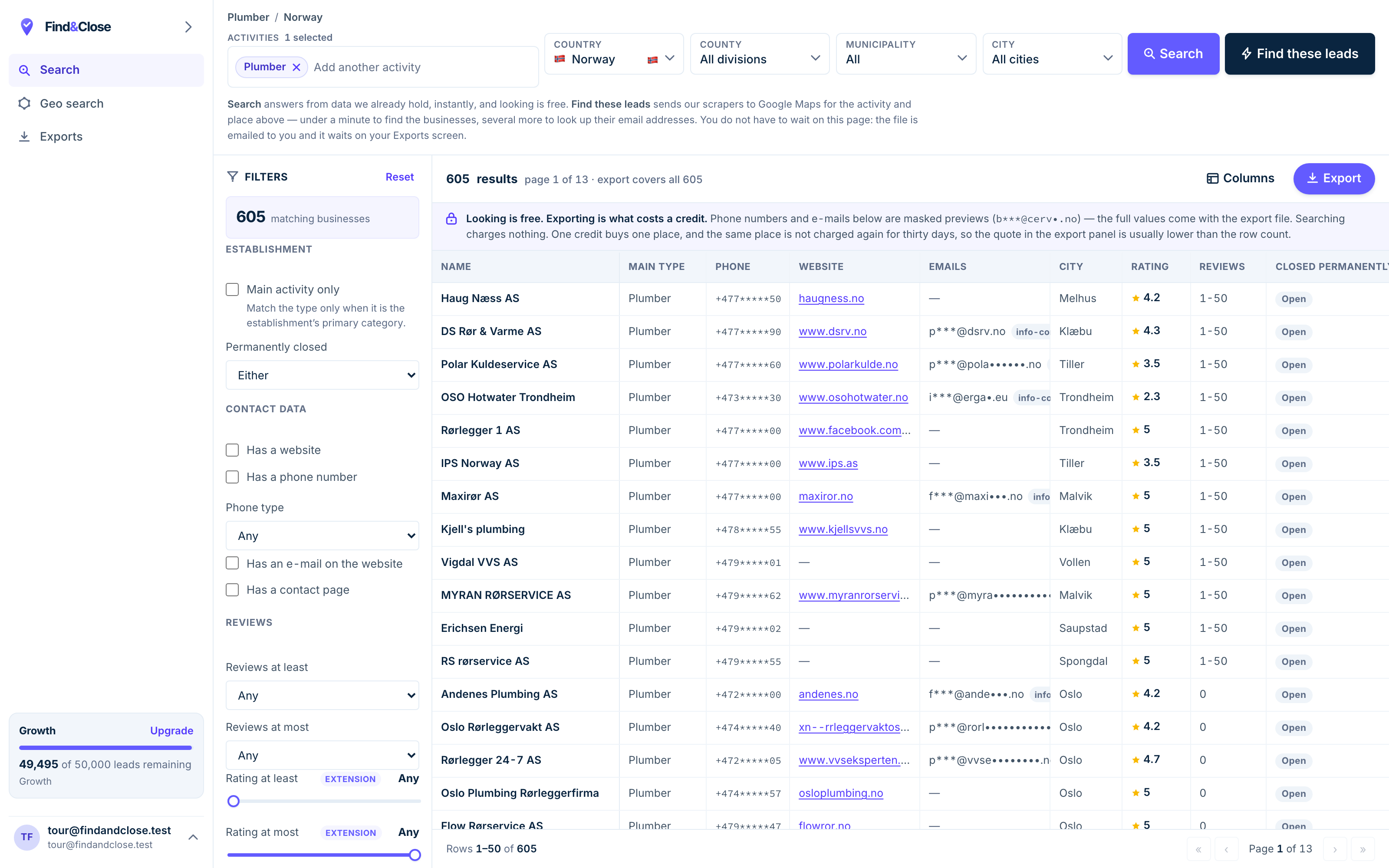
- Pick the trade Type it and take the match. One trade or twenty, on every plan.
- Pick the place Country, county, municipality, city. No plan gates the geography.
- The count moves first The number updates before you spend anything. Looking is free.
- Filter to the ones worth calling Has email, has phone, has a website, has a contact page. Combine them freely.
- Contacts are masked until export You can see a row exists and judge it. The address itself is the product.
- Export what you are looking at The file is exactly this filter set, with nothing dropped in between.
The coverage test — 50 free emails will show you
Their free plan is real and monthly. Use it to answer one question before you pay anyone.
- Pick one trade and one Nordic town. Opticians in Uppsala. Cafés in Aarhus. One you can check by eye.
- Try to build that list in GetProspect. Use their search with location and industry filters, then count.
- Count the rows that are the shop itself. Not a head office two countries away. The shop with the door.
- Open the same trade on Google Maps. Count the pins in the same minute, on your own screen.
- Compare the two counts. The gap is not their bug. It is the edge of what a LinkedIn-first index can hold.
For sales roles at software firms, their count will look strong. That is the ground the tool was drawn for.
For roofers and salons, we think the map wins by a wide margin. We could be wrong in your town. Run it and see.
When to run both
One finds people behind companies. One finds the companies on the map. The overlap is smaller than it looks.
Keep GetProspect if your reps live in Sales Navigator. The extension fits that habit, and per-valid-email pricing keeps the bill honest.
Use us when the list is a trade in a region. The owner is the buyer, the shop line is the channel, and no profile browsing will surface those firms.
- Emails for profiles you browse on LinkedIn — GetProspect
- Every hair salon in Denmark, with phones — us
- Enriching a CSV of names and domains — GetProspect
- Building the CSV of local firms in the first place — us
- Verifying an old list before a send — GetProspect
They chain well too. Our export carries names and websites. Their CSV enrichment reads a file like that and adds person-level emails where a domain exists.
Neither move makes us a sender. Whatever you buy, the mail goes out from your own tools. See how to run the send.
What people ask before they switch
Should I cancel GetProspect?
If your team works LinkedIn every day, no. The extension fits that motion and we have nothing like it.
Look at what share of your outbound goes to local firms instead. Move that share here and keep the rest where it is.
Their pricing only charges for valid emails. Yours does not. Why?
Because we sell a different unit. They sell one field: the verified email. We sell the whole row, and the row is useful even when the email cell is empty.
A firm with a phone, an address, a rating and no email is still a lead. You can ring it. Their model has nothing to charge for there; ours does, because it hands you the row.
Are your emails verified like theirs?
No. Our email column holds what the business published itself, and we do not run a verifier over it. They win that row.
If bounces worry you, run our email column through any verifier before a big send. Their own $29 pack would do it.
How do your phone numbers compare?
Their Starter plan includes 5 phone numbers a month. Ours puts the phone in every row, at no extra credit.
That is not a trick on either side. Person-level mobiles are hard to source, so they meter them. We carry the number the shop itself published.
What does it cost to test both?
Nothing. Their free plan gives 50 valid emails a month. Our trial gives 100 leads over 14 days with no card.
Run the same trade and town through both in one afternoon. Then read what each plan holds before you pay anyone.
Is a Maps-based list legal to email in Europe?
Every field we sell is public business data, published by the firm on its own listing. Under GDPR that supports B2B contact with an opt-out.
You carry duties as the sender: offer the opt-out and honour it. Our per-account suppression list blocks a domain from every future export. Read the legal ground.
Read the other two, then the guides
The same test runs against each of these tools. The answer shifts a little each time.
- Hunter.io compared Domain in, email out
- Snov.io compared The outreach toolbox
- Build a local email list The full method
- Firms with no website The no-domain search
- Cold email local businesses What to send them
- GDPR and B2B cold email The legal ground
- Lusha compared Credits burnt per reveal
- Apollo compared The contact graph, tested
Get the rows no profile search can reach
Fourteen days, 100 leads, no card. Export one trade in one town and count the phones that came free.
- 14-day free trial
- 100 leads included
- No credit card