Hunter.io · compared
Hunter needs a domain to search. We find firms with no domain.
Feed Hunter a website and it finds the addresses behind it. It does that job well. But a two-van plumber often has no website at all. We start one step earlier, at the Maps pin.
We find the business first$49 a month, month to monthWe do not send email
What Hunter is genuinely built for
Hunter is the best-known email finder on the web. Its whole model runs on one input: a domain.
Hunter's core tools all start from a website. Domain Search lists the addresses behind a site. Email Finder takes a name plus a company and returns the address. Email Verifier checks any address you already hold.
The credit rule on their pricing page is plain. One credit buys one email found. A verification costs half a credit. A bulk domain search spends one credit for up to ten addresses found.
The plans, read on 27 July 2026: a free tier with 50 credits a month. Starter at $49 a month for 2,000 credits. Growth at $149 for 10,000. Scale at $299 for 25,000. Yearly billing takes 30% off.
One generous detail: every paid plan allows unlimited team members. The whole team shares one credit pool. We charge for seats past our first tier, so mark that as their win.
The sending half of Hunter
Hunter is not only a finder. Paid plans bundle Campaigns, a cold email tool.
Starter connects three email accounts and sends to 2,500 people per campaign. Growth connects ten accounts. Scale connects twenty.
We do not do that half at all. FindAndClose has no sender and no connected inboxes. You export a file and run it in the tool you already use.
If Hunter sends your email today, this page is not telling you to cancel it. We compare the finding half only. The sending half stays theirs.
Where the model runs out
A domain search needs a domain. That sounds like a small thing. For local trades, it is the whole thing.
Think of a plumber in Bergen with two vans. There may be no website, so there is no domain. There is nothing to type into Hunter's search box.
What that firm does have is a Google Maps listing. A name, an address, a phone number, opening hours, a rating. Our index grew out from that pin, so the listing itself is the row.
Hunter answers "who works behind this site?". We answer "which firms are in this trade, in this town?". Those are different questions, asked at different steps.
Hunter and FindAndClose, row by row
Grouped the way buyers ask: what goes in, cover of local firms, contact fields, price, who owns the export, and sending. Grey rows are the ones Hunter wins.
| FindAndClose | Hunter | |
|---|---|---|
| What you type in to startthe input each tool needs | A trade and a place | A domain, or a name at a company |
| Firm with no website | Yes | No domain to search |
| Nordic local tradesNorway, Sweden, Denmark, Finland | 44,684 rows today | Follows the domain, not the town |
| Search by Maps category4,000+ categories, every plan | Yes | No |
| Filter on star rating and review count | Yes | No |
| Filter for firms with no website | Yes | No |
| Emails for staff behind a company site | No | Yes |
| Verify an email list you upload | No | 0.5 credit per check |
| The number the shop answers | Yes | No |
| Opening hours, rating, review count | Yes | No |
| Columns in the export | 64, on every plan | Contact fields |
| Date stamps on the rowfirst seen and last seen | Yes | No |
| What the entry plan gives | $49 · 10,000 lead credits | $49 · 2,000 credits |
| Seats on paid plans | 1 on Starter, 5 from $99 | Unlimited, one shared pool |
| Yearly discount | 20% off | 30% off |
| Free tier you can keep | No | 50 credits a month |
| Trial | 14 days, 100 leads, no card | Free plan instead |
| Files you already exported | Yours for good | Also yours once out |
| Cold email campaigns built in | No | On every paid plan |
Hunter's pricing and features last checked on 27 July 2026. We re-check every month. Rows shaded grey are ones where they beat us.
Every Hunter figure above was read off hunter.io/pricing on the date shown. Their page priced in euros when we read it, so the two columns compare straight across.
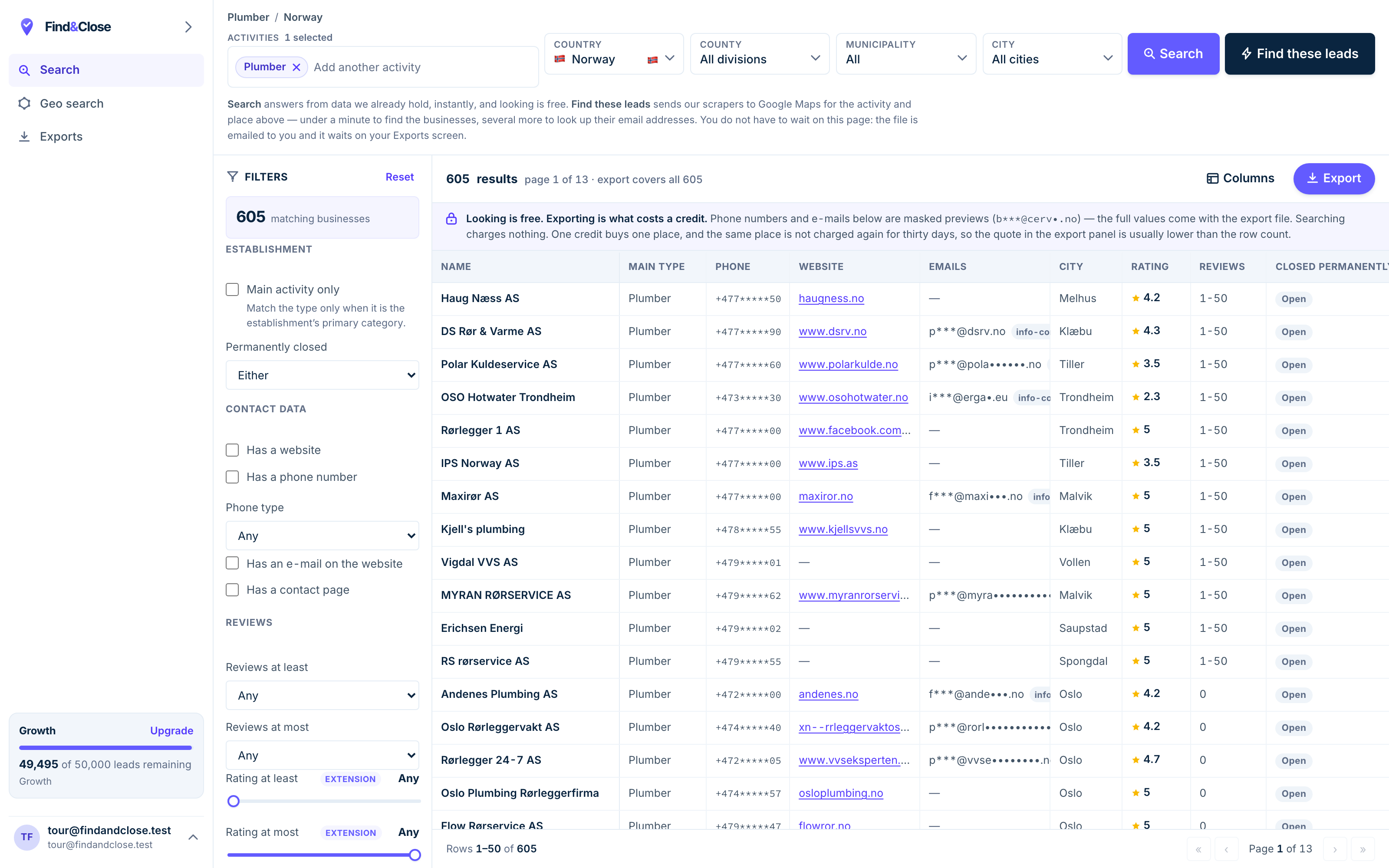
- Pick the trade Type it and take the match. One trade or twenty, on every plan.
- Pick the place Country, county, municipality, city. No plan gates the geography.
- The count moves first The number updates before you spend anything. Looking is free.
- Filter to the ones worth calling Has email, has phone, has a website, has a contact page. Combine them freely.
- Contacts are masked until export You can see a row exists and judge it. The address itself is the product.
- Export what you are looking at The file is exactly this filter set, with nothing dropped in between.
The coverage test — run this before you read on
You do not have to take our word or theirs. Fifteen minutes and a free Hunter account will settle it.
- Pick one trade and one town you know well. Plumbers in Trondheim. Salons in Odense. Somewhere you can check by eye.
- Open Google Maps and list ten firms in that trade. Write down each name and whether the listing shows a website.
- Count how many have no website at all. For those firms, Hunter has nothing to search. No domain, no result.
- Run the firms with websites through Hunter. The free tier gives 50 credits a month. That covers this test.
We think you will find that a fair share of the pins carry no website. In some trades it is most of them. We could be wrong in your town. Count it and see.
Then run the same trade here. The trial lasts 14 days and gives 100 leads with no card. Export the town and look at the email column yourself.
This is why we lead with the test and not with a claim. A count you made beats any table we could write.
When to run both
These two tools sit at different steps of the same job. Plenty of teams should hold both.
Keep Hunter if your targets have websites and staff. It finds the person behind the domain, and the Verifier is a real product. Nothing here changes that.
Add us when the target list is a trade in a town. Roofers in Malmö. Dentists in Oslo. Those rows live on the map, and many carry no domain for Hunter to read.
- Finding the marketing lead at a 50-person firm — Hunter
- Finding every gym in Denmark with no website — us
- Checking a stale list before a send — Hunter's Verifier
- Building the list in the first place — us
- Any list where the owner answers the phone — us
The two even chain together. Our export carries a website column. Feed those domains into Hunter's bulk search, at one credit per ten addresses found, and you get person-level emails for the bigger firms on the file.
One warning, said here rather than in small print. We do not send anything. No mail leaves our servers on your behalf. If Campaigns is why you pay Hunter, keep paying Hunter.
What people ask before they switch
Should I cancel Hunter?
Most of the time, no. If Hunter sends your campaigns or verifies your lists, cancelling breaks that, not the data.
The honest advice: keep Hunter for domain work and sending. Add us for the trades. The two bills together are still small.
Is FindAndClose a Hunter replacement?
No. We work one step before Hunter, not on the same step.
We find the businesses: name, address, phone, email, website, rating and 58 more columns. Hunter finds people behind a domain you already know. Different questions.
Do you verify email addresses like Hunter does?
No, and we will not pretend to. Hunter's Verifier is a real product and it wins that row in our table.
Our email column holds what the business itself published. Many teams pull our file, then run the emails through a verifier before a big send.
Can I feed your export into Hunter?
Yes, and it is a good pairing. Our file carries a website column. Hunter's bulk domain search reads a list of domains.
Their pricing page says one credit covers up to ten addresses found in a bulk search. That stretches a Hunter plan a long way.
What does $49 buy in each tool?
At Hunter, $49 a month buys 2,000 credits, three connected inboxes and their Campaigns tool.
Here, $49 buys 10,000 lead credits and one seat. Every country, every filter and all 64 columns sit on that plan. See what each plan holds.
Where do your emails come from?
From what the business published about itself: its listing and its own public pages. We hold business data, not private contact files.
Under GDPR, that public business data supports B2B outreach with an opt-out. Read the full position on data and the law.
Read the other two, then the guides
The same test runs against each of these tools. The answer shifts a little each time.
- Snov.io compared The outreach toolbox
- GetProspect compared Pay per valid email
- Build a local email list The full method
- Firms with no website The no-domain search
- Cold email local businesses What to send them
- GDPR and B2B cold email The legal ground
- Lusha compared Credits burnt per reveal
- Apollo compared The contact graph, tested
Pull one town of trades, domains or not
Fourteen days, 100 leads, no card. Long enough to export one town and count the firms Hunter could never see.
- 14-day free trial
- 100 leads included
- No credit card