Guide · Definitions
Google Maps leads
Every local firm sits on the map. That does not make every listing a lead. Here is the line between the two, drawn with the fields on the listing itself.
A definition you can filter byFive qualifying signalsNordic index, dated counts
A working definition
A Maps lead is not a name in a file. It is a listing that shows two things at once.
Start with what a listing is: a public scorecard for one local firm, which Google and its customers keep current.
A Google Maps lead is a listing that shows evidence of money and evidence of a need you can serve. Both at once. One without the other is just a row.
Evidence of money lives in the review count. Reviews come from customers, and customers bring budget.
Evidence of need is a visible gap. A missing website. A weak rating. An unclaimed profile.
The index behind this page covers Norway, Sweden, Denmark and Finland — 44,684 records on 26 July 2026. Selling into the US or beyond? A worldwide tool such as Outscraper serves that better. The definition here still holds.
The definition is the filter. If you cannot state the money signal and the gap for a row, it is not a lead yet. It is homework.
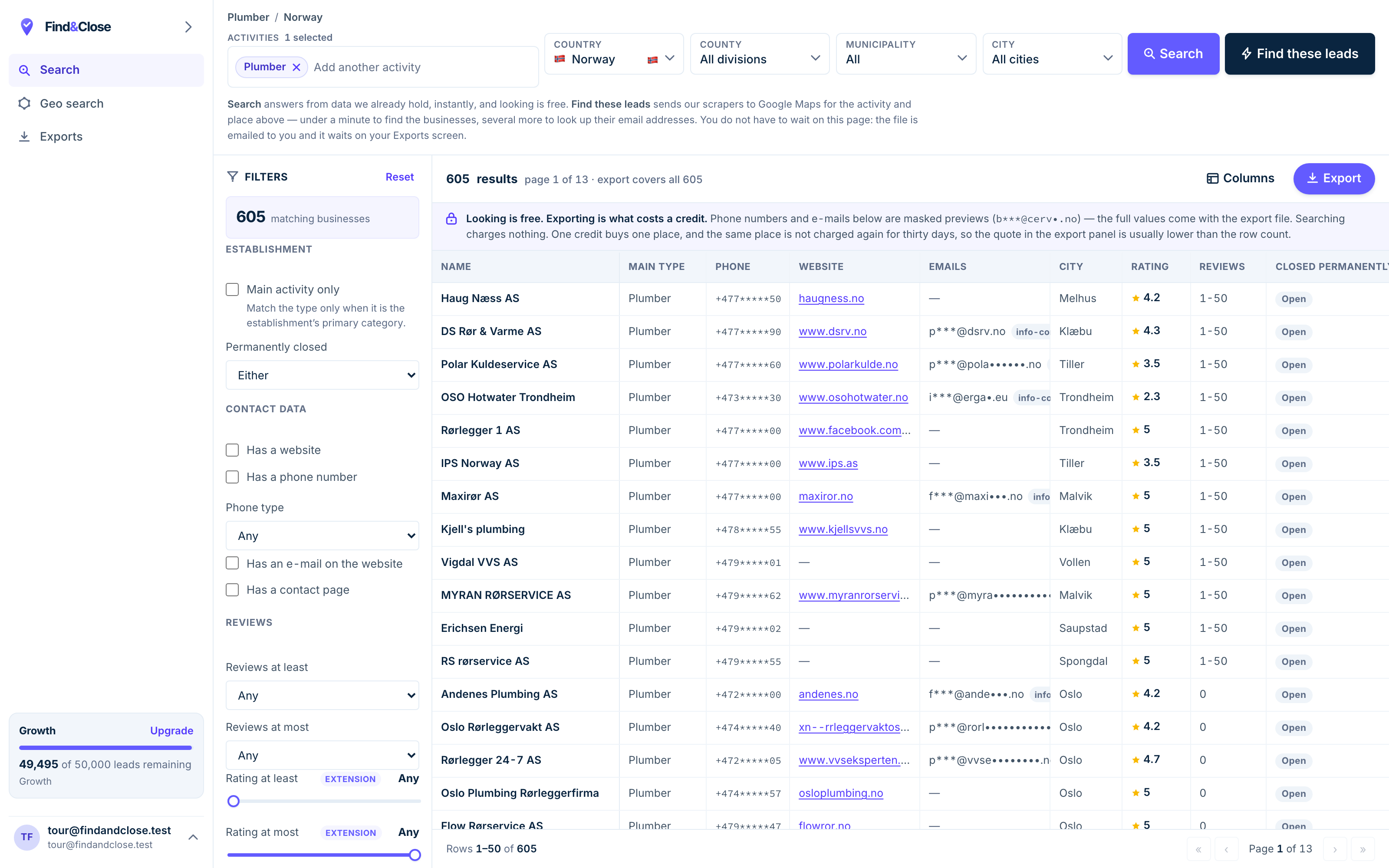
- Pick the trade Type it and take the match. One trade or twenty, on every plan.
- Pick the place Country, county, municipality, city. No plan gates the geography.
- The count moves first The number updates before you spend anything. Looking is free.
- Filter to the ones worth calling Has email, has phone, has a website, has a contact page. Combine them freely.
- Contacts are masked until export You can see a row exists and judge it. The address itself is the product.
- Export what you are looking at The file is exactly this filter set, with nothing dropped in between.
Five signals, and what each one says
Everything you need to qualify a row already sits on the listing.
The website link
Present, it tells you the firm spends on being found. Absent, it names the gap for you. Either reading is useful.
The rating
Under four stars, customers steer their friends elsewhere. Over it, the firm holds proof it can point at.
A weak rating next to a strong review count is the loudest combination on the map.
The review count
This is the money column. Ten reviews is a trickle. A hundred is a queue of past customers, with a budget behind the door.
The claimed flag
Unclaimed means the owner has never touched the page. Whatever you sell that firm, the pitch starts with showing them the page exists.
The photos and hours
Stale photos and wrong hours mean the listing decays while the firm works. Small signal, honest signal.
Qualification is subtraction
You do not find leads. You remove non-leads until leads are what remains.
- Cut the dead. A closed marker, or a listing no customer ever touched. Out before you start.
- Cut the rows without your gap. Sell websites? Rows with a good site leave the file. One gap per campaign.
- Cut what you cannot reach. A row with no phone and no email has no door to knock on. Park it.
- Rank the rest by review count. Money first. Work down from the busiest scorecard.
What remains is short, and that is the point. Fifty qualified rows beat five thousand raw ones, because you will finish the fifty.
This page stops at the qualified list on purpose. The offer, the message, the cadence and the tracking sit in the full lead generation playbook, and that page owns them.
Where the rows come from
Three sources feed a Maps lead list. They differ in time and ceiling, not in truth.
- By hand, off the map: free, slow, fine for the first twenty rows.
- An extension over your own searches: faster, capped at what one search draws.
- An index like ours: filtered on screen, counted before you spend, exported with 64 columns per row.
Whatever the source, insist on dates and on an honest email column. A lead with a guessed address is a bounce wearing a suit.
In our index, 23,846 of the records sit in the 81 trade categories we track. One trade, one country and one gap filter tends to come back at a size you can finish.
If the missing website is your gap, the no-website guide sizes that hole country by country.
Questions about Google Maps leads
What makes a Maps listing a lead rather than a row?
Two signals at once: evidence of money and a gap you can fix. The review count carries the first. The website flag, rating and claimed status carry the second.
A row with one signal and not the other goes back in the pile.
Are Google Maps leads better than bought lead lists?
They carry something bought lists lack: the market’s own opinion of each firm, in public, with dates on it.
A bought record proves a firm exists. A listing shows how the firm performs, scored by its own customers.
How many leads does one segment hold?
Fewer than the raw count suggests, and that is healthy. Qualification is subtraction.
Our Nordic index held 44,684 records on 26 July 2026. One trade, one country and one gap filter cuts that to dozens or a few hundred rows.
Do Google Maps leads come with email addresses?
Only where the firm put one on its own website. The listing itself has no email field.
Our export marks found and missing per row. The extraction guide shows where the addresses really sit.
Can I get Google Maps leads for the US from FindAndClose?
No. We cover Norway, Sweden, Denmark and Finland, and we say so up front.
For US or worldwide pulls, look at Outscraper. For Nordic trades, our counts are live and dated.
Read next
The playbook, the extraction, and the gap that sells itself.
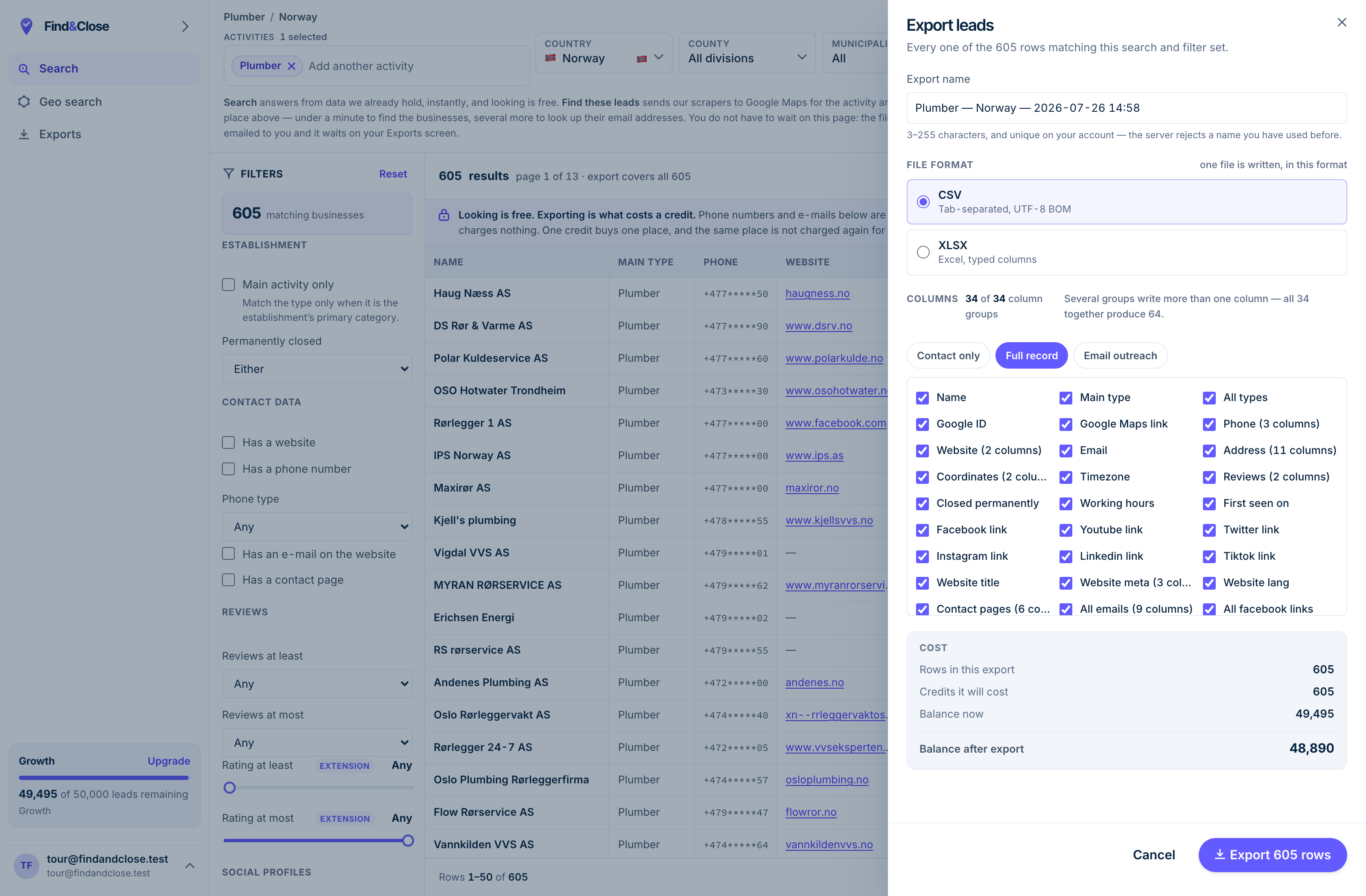
- It exports the whole result Every row the filter matched, not the page you happen to be looking at.
- CSV or XLSX Tab-separated UTF-8, or typed Excel columns. One file per job.
- 34 groups, 64 columns The same 64 on every plan. Nothing is held back for a higher tier.
- Three presets Contact only, full record, or the outreach set. Or tick your own.
- The cost, before you commit One credit per place, once per 30 days. Re-downloading is free.
Count your qualified rows tonight
Fourteen days, 100 leads, no card. One trade, one country, one gap filter — the count sits on screen before you spend anything.
- 14-day free trial
- 100 leads included
- No credit card