Plain guide
Lead scraper: the four types, and how to pick yours
A lead scraper turns public pages into a contact list. There are four kinds, and they suit four different hunts. We build one of them, for four Nordic countries, and we say so up front.
Four types, named plainlyWe cover Norway, Sweden, Denmark, FinlandThe law included
What a lead scraper actually does
The word covers a lot of machinery. The job underneath is always the same.
A lead scraper reads pages that already exist in public. Business listings, profiles, directories, websites. It writes what it reads into rows: name, contact route, and whatever else the page held.
That is the whole trick. The differences between tools are where they read, when the reading happens, and what lands on the row.
One honest line before the tour. We build FindAndClose, a Google Maps lead scraper for Norway, Sweden, Denmark and Finland. If your leads live elsewhere, the right tool for you is on this page, and it is not ours.
What no lead scraper can do
It cannot read what was never published. A firm that lists no email cannot yield one.
It cannot verify intent. A scraped row is a business, not a buyer.
And it cannot send. Scraping fills the top of the funnel; outreach is a second tool and a second discipline.
Type one: Google Maps scrapers
The workhorse for local business leads. If your buyer has a shopfront, a van or a waiting room, start here.
Google Maps holds a listing for most trading firms on earth: name, address, phone, website, rating, hours. A Maps scraper turns those into a list, and some tools follow the website to add an email.
The class splits four ways: browser extensions, cloud crawlers, the official API and maintained indexes. We wrote that split up in full in the Google Maps scraper guide, and ranked the named tools in the best-of list.
Ours is the index kind. 44,684 Nordic records, deduplicated, with a count on screen before you export and 64 fixed columns after. The lead generation playbook shows what to do with the file.
Fits you when
- You sell to local businesses: trades, clinics, shops, agencies
- The switchboard and the firm inbox are enough to start a deal
- You want volume by area and category, not named individuals
Type two: LinkedIn scrapers
For leads that are people with job titles, not places with opening hours.
LinkedIn scrapers export profiles, searches and Sales Navigator lists. The best-known name is PhantomBuster, an automation platform whose LinkedIn flows are the heart of the product.
The row is different here. You get a person, a title and a company, and the tools often chain into connection requests and visits.
Two cautions. Automating a logged-in account runs against LinkedIn’s terms, and the account at risk is yours. And a person’s profile is personal data, which raises the GDPR bar above plain business listings.
We do not scrape LinkedIn, and we never will. Our full read on the biggest tool in this class is the PhantomBuster comparison.
Fits you when
- Your buyer is a role inside a company, not the company itself
- Deals start with a named person and a warm touch
Type three: directory scrapers
Yelp, trade registers, niche listing sites. Useful where Maps is thin, noisy where it is not.
Directory scrapers read listing sites beyond Maps. LeadSwift pulls from Maps, Yelp and similar sources in one hunt. D7 Lead Finder sweeps directories worldwide and hands back up to 1,200 leads per search.
The strength is reach into sources Maps misses. The weakness is overlap and age: the same firm appears in five directories, and nobody edits the stale four.
So dedup is the whole game here. Ask any directory tool how it merges the same firm across sources, and what happens when the sources disagree.
We compared both named tools: LeadSwift and D7 Lead Finder.
Fits you when
- Your niche lives on a directory Maps ignores
- You want wide, cheap coverage and will clean the file yourself
Type four: email finders
Not scrapers of listings, but of mailboxes. They start where the other three stop.
An email finder takes a domain or a name and returns addresses. Hunter and Snov.io are the known names; Apollo and ZoomInfo sit next door as full contact databases.
These tools shine on named-person outreach at companies you already chose. They are weak for local business hunting, because the input is a domain, and small local firms are exactly the ones without one.
Our lane splits from theirs cleanly. We find the firms and the published inbox. They find the person behind a domain you hand them.
We compared the neighbours: Hunter, Apollo and ZoomInfo. The manual craft is in how to find business email addresses.
Fits you when
- You already know which companies you want
- You need a named inbox, not a switchboard
A held index against an on-demand lead scraper
Whatever the type, every tool is one of two shapes. This table is about the shape, not a brand.
| FindAndClose | On-demand scraper | |
|---|---|---|
| When the reading happensModel | Before you arrive | When you press go |
| Works anywhere on earthCoverage | Every country, fetched on demand | Wherever it can read |
| Sources beyond Google MapsCoverage | No | Depends on the tool |
| Cost to startPricing | From $49 a month | Free tiers are common |
| Count before you spendWorkflow | Yes | Run first, count after |
| Rows from one Maps searchWorkflow · the Maps ceiling | A whole country | A couple of hundred |
| Dedup across every searchExport | One row per firm, on Google ID | Merge the files yourself |
| Schema that never movesExport | 64 columns, one order | Varies by tool and run |
| Email source page on the rowExport | Yes | Varies by tool |
| MX check on the email domainExport | Yes | Varies by tool |
| Freshness on demandCoverage · a crawl cycle is not a live read | No | Yes |
| Suppression list across exportsOwnership | Yes | Rarely offered |
| Your file after you cancelOwnership | Yours, we keep nothing back | Read the vendor’s terms |
On-demand scraper's pricing and features last checked on 27 July 2026. We re-check every month. Rows shaded grey are ones where they beat us.
The right column describes the on-demand class as a shape. Named tools differ, and our per-tool pages carry their verified figures. Checked 26 and 27 July 2026.
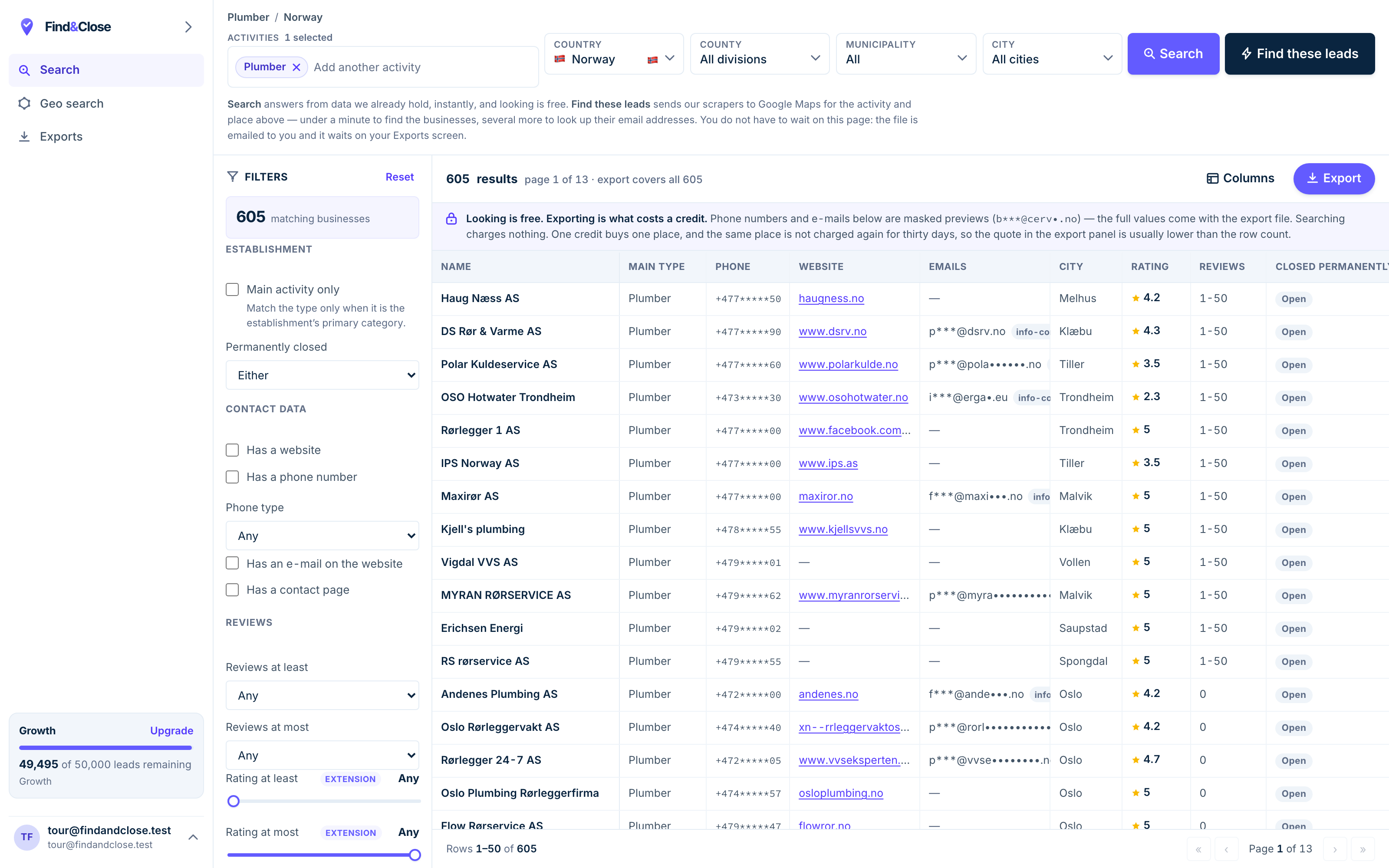
- Pick the trade Type it and take the match. One trade or twenty, on every plan.
- Pick the place Country, county, municipality, city. No plan gates the geography.
- The count moves first The number updates before you spend anything. Looking is free.
- Filter to the ones worth calling Has email, has phone, has a website, has a contact page. Combine them freely.
- Contacts are masked until export You can see a row exists and judge it. The address itself is the product.
- Export what you are looking at The file is exactly this filter set, with nothing dropped in between.
The honest fit guide
Start from the lead, not the tool. Who is the lead, and where does it already stand in public?
- My lead is a local business. A Maps scraper. In the Nordics, ours; elsewhere, see the ranked list.
- My lead is a job title at a company. A LinkedIn scraper or a contact database. Mind the terms and the GDPR bar.
- My lead lives on a niche directory. A directory scraper. Budget real time for dedup.
- I know the company, I need the inbox. An email finder. Feed it the domain and verify what comes back.
- I need two of the above. Buy two tools. One tool that does both usually does one of them badly.
And wherever you land, the same three checks
Ask where each contact field came from. A tool that cannot name the source page is guessing, and so are you.
Check the domain takes mail before you send. An MX lookup is cheap; a burned sender domain is not.
Keep a suppression list from day one. A firm that says stop must stay stopped, whichever tool runs next quarter.
The law rides along whatever you pick. In the EU, cold B2B email runs on legitimate interest, with duties: name yourself, cite the source, offer an opt-out. The GDPR guide walks the whole position.
Common questions about lead scrapers
Is a lead scraper legal to use?
Reading public business data is not the risky part. What you send, to whom, and how you handle opt-outs is where the duties sit.
Business listings are the easy case. Personal profiles raise the bar, and each platform’s terms are a separate question from the law.
What is the difference between a lead scraper and a lead database?
A scraper reads pages when asked. A database was assembled earlier and is sold as a finished product.
Our index sits between the two: scraped by us on a rolling crawl, sold as a queryable store with a date on every row.
Which lead scraper is best for local businesses?
A Google Maps one, because Maps is where local firms publish themselves. The four ways to run one are in the Maps scraper guide.
For Norway, Sweden, Denmark and Finland, that is the market we built for. Outside it, the ranked list names better picks.
Do you scrape LinkedIn or personal profiles?
No. We crawl Google Maps listings and the firm websites behind them, and nothing else.
We ship what the firm publishes about itself: switchboard, site, and role inboxes like contact and sales. No personal profiles, no private data.
What does one of your rows hold?
Sixty-four columns. Name, split address, phone with line type, and the website. The email with its source page and an MX flag. Rating, reviews, socials, hours and more.
Every geo page shows 50 real rows free. Try dentists in Norway and read a real file.
Can I try it before paying?
Yes. Fourteen days, 100 leads, no card, and nothing converts on its own.
Pick a trade and a country, read the count on screen, and export. See the plans for what comes after.
Read next
The named tools behind each type, and the guides that follow the file.
If the lead is a Nordic local business, the scrape already ran
Fourteen days, 100 leads, no card. Filter a trade and a country, read the count, and export a file built for calling and mailing.
- 14-day free trial
- 100 leads included
- No credit card